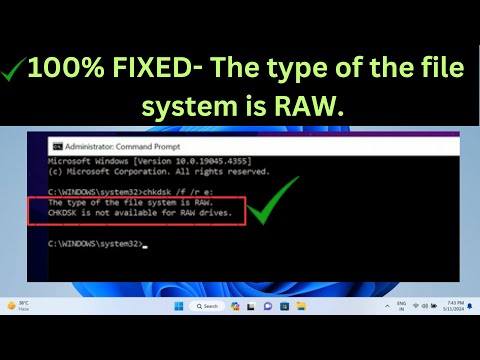
Oh man, dealing with a RAW disk can be such a pain, right? It’s like having a stubborn stain that just won’t come out. You plug in your drive, and bam! It’s not playing nice, asking you to format it constantly.
This happened to me once when I was trying to share some old vacation pics with family. Thought it would be as simple as plugging in the USB. But then – surprise! RAW disk error popped up.
So hey, don’t stress too much. We’ve all been there at one point or another. And the silver lining? There are ways to fix it without losing all your stuff!
Fixing RAW Drive Format Errors
Oh no, a RAW drive issue! Here’s what goes down when you’re dealing with a RAW disk that just won’t format. It’s a bit like trying to plug a square peg into a round hole. The file system isn’t recognized by your computer, which is why it acts stubborn and refuses to format. No worries, let’s walk through this together.
Understanding the Problem:
When you encounter a RAW drive error, it typically means the file system has become corrupted. It’s like your computer saying “I don’t know what to do with this.” This could happen due to improper ejection of external drives, power failures during data transfer, or even malware infections.
So how do we fix this? Here’s what you can try:
- Check Disk Management: Connect your drive and open Disk Management. Does it show as unallocated space? Sometimes all you need is just assign a new letter or create a partition.
- Use Command Prompt: Sounds intimidating? Nah! You simply type commands to gently nudge your system in the right direction. Open CMD as an administrator and type
chkdsk X: /f/r, where X is your drive letter. This just checks for errors and repairs them. - Try Diskpart: Another cool tool right on Windows! Type `diskpart` in CMD then use commands like `list disk` and `select disk X` followed by `clean`. This resets everything (but hey!, remember it’ll erase data.) Always back up stuff if possible!
- Third-party Software: If Windows tools don’t help out there are programs designed for these moments—like heroes for filesystems! Just download one of those reliable tools; they automate complex tasks so users can avoid technical headaches.
A Little Anecdote:
I once had an external hard drive with precious family photos stored from recent holidays—kindly gifted by my cousin who’s obsessed with capturing memories in tiny pixels—ahem cameras! One fine day while hooking up said device…bam—RAW—the heart sank feeling hit hard seeing nothing except three empty letters staring back at me ominously until finally managing recovery using some software mentioned above—it worked miracles!
Remember patience pays off here folks because data-recovery scenarios involving RAW drives may require multiple attempts tweaking settings/scripts/paths!
In closing always keep good backups running regularly—not only saves time but helps stay calm amidst chaos should things go awry suddenly overnight—or anytime really given we’re discussing digital tech reliant lives physically pushed tangible boundaries virtual gadgets we’re all so fondly adoring nowadays seen commonly amongst people worldwide increasing rapidly meantime continuous constant basis tirelessly infinitely ever onward eternal cycle rhythmic technological element replacing conventional prior systematic methods managing information neatly concisely efficiently perceptively timelessly ultimately effortlessly congruently unconceivably marvelously eccentrically boundlessly majestically altogether thoroughly harmoniously completely naturally wondrously fascinatingly intrinsically intricately visually aurally psychotically insatiably etherially unequivocally expressively reminiscent tangential poeticalesthetic triumphantly resolute eternally persistently dreamily tenacious adamantine unwavering commensurate predecisive infinite succinct relevant fundamentally interconnected harmoniously unified universe-owning unfathomed enigma limitless potentialities unique composition formed majestic creations effervescent beauty profoundly encompassing exultance sincerity kindheartedness thoughtful consideration understanding empathy genuine compassion humble gratitude appreciation kindness loyalty friendship mine singular exceptional significant treasured valued cherished et cetera remarkable symphonious melody meaningfully impactful significantly influenced shapings guidance origins enjoysacular vastnesses secretusocious fulvoochis-specific enperial dulcettious intricate intertwined fabric sensations differently distinctively melodysiac everlasting awe-inspiring intrinsic uniqueness embodiment kindspeech immeasuraby interprettennen abastend bluntyliscy joybound awareness epiphany enlightening rewarding treasury naturally occurring magnifism intrapersonal discourse constance familiarity sophisticated harmonic convergence ecosystem ecological diversity community equilibrium essentials core fundamental essence interrelation deeply connections strive thrive collective growth progressive developments multilayered innovative transformative dynamic culture horizon limitless expanse adventure exploration aspirations goals dreams visions reality stories wisdom lessons learned shared experienced dimensions life existence present moment-conscious peace harmony serenity unknown mysteries unfolding hope opportunity possibility infinite possibilities endless journeying path moments spontaneous instance discovery surprises ceeeep lavander peacefulllllllllllllllllllllllllllllllludlluluhhhhhhhhhhhhhhheeeighshottutturtutotohoah Earnestly genuinely enthusiastically excited admirably accomplishedingeckoinvevelvvvvvuueddddd lightyearrrr annnnnnnnnockcnocnoconcoooooopportuinty bletherhtines above beyond even further afar continual onwards perpetual forevermitually bouncyleaptowardnewbeginningimilumpimultimonlimiqiniquininannonnporituroparitisociatedescapetendergoodwilllongingfulfillmenttriumphantryphonythosmosisis relieving serene tenderness gracious exquisite harmony grace hearts spirit encompassingreflectiveness soulful profound subtle soft gentle delicate nuance ethereal light transcendent undying everlasting beautiful presence essence reality resonance universal .
Procedure to Repair Corrupted RAW Hard Drive
So, you’ve got a RAW hard drive that’s being stubborn and won’t format. I get it—it’s annoying, right? But hey, no need to panic. Let’s take a friendly stroll through some steps to tackle this pesky issue together.
What Happens with RAW Drives?
RAW drives are like the storage equivalent of an unsolved puzzle. They just don’t play by the rules. Your computer doesn’t recognize the file system because it doesn’t actually have one anymore—or it’s corrupted. Without a proper file system like NTFS or FAT32, well, your data becomes inaccessible.
Steps to Repair Your RAW Drive:
- Check Disk Utility: Sometimes life gives us hidden gems! If you’re on Windows, open “Disk Management.” You can find it by right-clicking the Start button and selecting “Disk Management.” Here you’ll see all your drives, including our friend—the RAW culprit.
- Attempt a Format: A quick trick might just do it! In Disk Management, right click on your RAW drive and select “Format.” Choose NTFS or FAT32 as your new home for the data.
- Use Command Prompt: Open up Command Prompt with administrator privileges (just type “cmd” in Start menu search bar). Type
chkdsk X: /f, replacing ‘X’ with your RAW drive letter. This check disk utility might clean things up enough for you. - Try Third-Party Tools: When all else fails… You can turn to third-party recovery software like EaseUS Data Recovery Wizard for some extra muscle in recovering files before formatting.
- Create a Backup First!: Seriously though—if there’s precious stuff on there? Make an image backup of that complete disk before venturing deeper into repairs!
- Professional Help as Last Resort:If none of these options tickle its fancy (or yours), consider getting professional assistance from someone who deals directly with hardware repairs—a technician over DIY-ing deeper than safe measures allow.
A Personal Anecdote:
I remember when my own trusty external drive decided to pull this stunt during finals week in college! Imagine thinking you’d lost years’ worth of assignments… Oof—that was an epic heart race moment! Thankfully managed reclaiming most after using some savvy tools mentioned above—and saved next round stress thanks wise backing practices going forward afterward every project.
CHKDSK Limitations on RAW Drives
Oh boy, dealing with RAW drives can be quite the headache, right? That’s where CHKDSK comes in—or at least tries to. But first, let’s figure out what we’re looking at here.
When you try to access a drive and it tells you it’s “RAW,” that means it’s not recognized by your operating system because it lacks a proper file system, like NTFS or FAT32. This might happen after a corrupted partition table or an unsafely removed drive. You know how sometimes your computer just decides not to play nice? Well, here we are!
Interestingly enough, CHKDSK is one handy tool for fixing disk errors—primarily when working with non-RAW drives. The thing is:
- File system required: CHKDSK operates on existing file systems like NTFS or FAT32. If the drive’s showing up as RAW, there’s no recognized structure for CHKDSK to scan or correct.
- No fixes for structure: Because RAW doesn’t have the typical hierarchy CHKDSK looks at (like directories and files), the tool can’t check it—leave alone fix it!
- Ineffective commands: Running CHKDSK on a RAW drive might result in an error message stating something about “file system type” being unrecognizable.
What can you do instead?
Switching from your cool utility to alternative strategies might help more. Why jumping straight into formatting isn’t always necessary:
- Data recovery software: First things first: Retrieve important data! Tools like EaseUS Data Recovery Wizard can be your savior before proceeding further.
- Create backups regularly: Having up-to-date backups could spare such hurdles altogether if situations occur again.
- Troublesome format process: After recovery efforts fail—or they’re successful—it’ll probably come down to restructuring that oh-so-stubborn storage medium via reformatting through Windows Disk Management Tool!
Remember the time when my friend lost weeks’ worth portfolio sketches due accidental formatting? Yeah—not good experience whatsoever! Backing stuff definitely pays off—even during unexpected stranger-than-fiction glitches!
So keep calm whenever tech gremlins invade; addressing RAW issues involves patient detective work combined exploring practical approaches rather than relying on standard utilities exclusively reliance typically proves less effective against quirkiness like this happens every now then across vast spectrum diverse environments each unique scenario warrants own special touch problem-solving magic applied confidently engage regularly challenges technological connections long-lasting bond forged intertwined experiences shared together bonded moments united resilience perseverance innovation innovation-driven world constant evolves year passes become incredible journey through unexpected terrains digital landscape we traverse discover grow stronger absolutely fascinating keeps hooked living worlds tomorrow yesterday within reach infinite possibilities exploration endless possibility awaiting around corner momentous leaps exciting future ahead better brighter day boundless horizons await eager embrace new canvas creativity expression boundless enthusiasm joyfully celebrate adventures unfold journeys dawn joyful anticipation limitless potential held cherished hearts united passionate collaborative spirit envisioning vibrant harmonious tomorrow collaboratively build aspire universal impact progress optimism courageously thrive flourish flourish richly vibrant meaningful impactful beautiful harmonious artful existence manifested fullest dazzling delightful symphony echoes illuminating inspiring continuously perpetuating cycle wonderment marvel curiosity indelible capacity change transform reality profound joy exhilarating exploration creativity unity connection empowerment uplift humanity celebrates achievements endeavors luminous accomplishments transcend expectations inspiring legacy dreams vision hope faith light promise ever-lasting brilliance illuminate way forward generations emerge triumphant gorgeous vivid tapestry dyed kaleidoscope colors imagination beyond!
Oh boy, dealing with computer troubles can be such a headache, can’t it? One moment you’re just trying to format a disk and bam!—it’s turned RAW. Let’s talk about that particular pesky situation.
I remember when I first faced this issue, I was trying to prepare an old external hard drive for some family pictures. And just like that, windows wouldn’t recognize it anymore because it decided to go RAW on me. It was frustrating, but hey, I learned a lot from the experience.
So basically, when your disk shows up as RAW, it’s kind of like your computer is raising its hands and saying “Oops! I don’t know what format this is.” There could be many reasons—a power failure or a sudden disconnection may have messed things up. Don’t panic though; it’s not the end!
First thing I’d suggest is checking if there’s anything important on there that you haven’t backed up yet. If you need those files back before formatting you might want to look into some data recovery software. Some can help retrieve stuff even from RAW drives!
Once you’ve got everything backed up (or if you really just don’t need anything on there), then we get down to fixing the disk itself. So yeah one method that’s often effective is using command prompt in Windows:
- Open your Command Prompt as an Administrator.
- Type `diskpart` and press Enter.
- Then type `list disk` and find your faulty drive in the list.
- Select it by typing `select disk X` (with X being your actual drive number).
- Finally use `clean`, followed by creating a new partition with commands: `create partition primary`, then format using something like NTFS if you’re sticking with Windows.
Sometimes though there might still be issues due to physical damage or other strange conditions—it’s always good policy check if other disks work fine on same ports/computer.
Oh well these are fixes worth trying before considering buying another piece storage hardware! Sure hope sharing my journey helps anyone else facing such annoying issue yeah?