Hey, you ever tried to organize a bunch of dates in PHP and suddenly felt like you’re staring at an alien code? Yeah, it can get tricky! I remember one time, back when I was just starting out, I had a project deadline looming over me. And there I was, wrestling with date formats that just wouldn’t play nice.
Thing is, getting that correct date format in your PHP scripts isn’t just about making things look pretty. It’s crucial for functionality too. You miss that tiny detail and whoops—your data’s doing the cha-cha instead of lining up neatly.
But don’t worry! There are some nifty ways to handle this without pulling your hair out. Once you wrap your head around it, you’ll be amazed at how smooth everything runs. Got your coffee ready? Jump in—you might even end up loving the little nuances of date formatting.
Validating Date Format in PHP
When you’re dealing with dates in PHP, things can get a little, well, tricky. I mean, dates are everywhere in programming—think about logging events or scheduling posts. So having them in the right format is crucial.
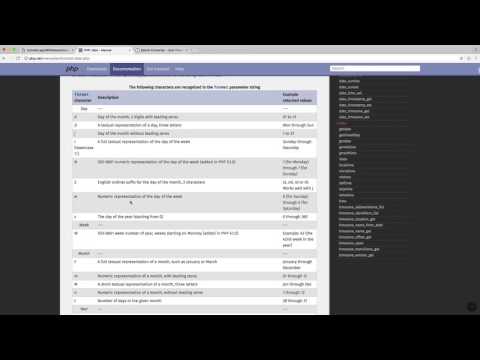
- Understanding Date Formats: In PHP, dates can take many forms like “Y-m-d,” “d/m/Y,” etc. Here’s a bit of wisdom: “Y” is for a four-digit year, “m” for month, and “d” for day.
- Why Validate? Imagine users entering dates in all sorts of formats—that’s chaos! Validating ensures consistency and helps avoid errors down the line.
The Key Function – DateTime::createFromFormat()
This nifty function can help you validate and convert date strings into date objects based on the format you specify.
“`php
$date = “2023-10-15”;
$d = DateTime::createFromFormat(“Y-m-d”, $date);
if ($d && $d->format(“Y-m-d”) === $date) {
echo “Date is valid!”;
} else {
echo “Oops! Invalid date.”;
}
“`
- Why This Works: It creates a new DateTime object if the string matches your specified format. If not, it returns false!
A Little Anecdote:
I once had a friend who missed an important meeting because his app logged every date as January 1st! Turns out he didn’t check the incoming date format. Lesson learned: double-check your formats!
So there you go! Format validation isn’t just technical mumbo jumbo—it saves time and avoids headaches. Feel free to experiment with different formats to fit your project’s needs!
PHP Date Format Conversion from YYYY-MM-DD to DD-MM-YYYY
Oh, those quirky little date formats! I remember when I got tangled up in them during my first PHP project. Dates were all over the place, and I had to figure out how to fix it. You’re not alone if you’ve ever stared at a date and thought, “why won’t you just behave?”
Now let’s see how to change a date format from YYYY-MM-DD to DD-MM-YYYY. Keep it simple, right?
You’ll mostly bump into string manipulation or using PHP’s date functions for this conversion.
- Using DateTime:
This method is like having a tiny helper who knows exactly what you need:
First, create a new `DateTime` object with your original date string.
“`php
$date = new DateTime(‘2023-10-12’);
“`
Next step: format that object the way you want.
“`php
$formattedDate = $date->format(‘d-m-Y’);
echo $formattedDate; // outputs: 12-10-2023
“`
Pretty neat, huh? Just telling PHP, “Hey! Show this as DD-MM-YYYY,” does the trick.
- Using explode and implode:
Think of `explode` as taking apart a toy brick by brick. And then using `implode` to put them back together in the right order.
Suppose you’ve got `$originalDate = ‘2023-10-12’;`. Here’s your plan:
1. Split it using the dash (-) as your marker.
“`php
$dateArray = explode(‘-‘, $originalDate);
“`
2. Rearrange those parts.
“`php
$reorderedDate = implode(‘-‘, array_reverse($dateArray));
echo $reorderedDate; // outputs: 12-10-2023
“`
But remember! This one will fall apart if your input isn’t consistent (say, missing parts). You’ve been warned!
Both methods have their charm—pick whichever suits you best for your task.
And hey, never underestimate how much simpler things get when dates are properly sorted out like that mess in your sock drawer!
So go ahead—sort those dates effortlessly!
Philippines Default Date Format
You know, sometimes setting the correct date format in your PHP scripts feels a bit like trying to untangle Christmas lights. But don’t worry, together we’ll get through it with ease! Now, if you’re dealing with the Philippines’ date format, it’s handy to remember it usually follows the day-month-year structure. It’s kinda unique and charming.
Here’s what you need to keep in mind:
- The common default date format in the Philippines is: DD/MM/YYYY.
- This means if you’re seeing a date like 15/08/2023, it refers to August 15th, 2023.
Switching this up in PHP is super easy once you get the hang of it! You might think of PHP as a good friend who knows how to handle these things—given some guidance of course. By using PHP’s built-in functions like date(), you can transform how dates show up almost effortlessly.
An example for crafting this format:
<?php
echo date("d/m/Y"); // Outputs: 15/08/2023 on August 15th
?>
The magic letters here are:
- d: Day of the month (with leading zeros).
- m: Numeric representation of a month (also with zeros).
- Y: Four-digit year—no need to worry about showing just two digits!
I recall back when I first started using PHP for my projects. I felt pretty triumphant after finally getting my dates right because beforehand, they were all over the place! It goes to show small changes can make everything look neat and professional.
If you’re storing these dates or interacting with databases—like MySQL—you should store them as YYYY-MM-DD by default for consistency’s sake across different regions. But whenever displaying them specifically for an audience in the Philippines or documents adhering strictly to their local style, transform them back into DD/MM/YYYY using our trusty snippets above.
I hope this unravels any knots around handling dates specificially aimed at Filipino users or conventions. Happy coding!
You ever find yourself staring at a computer screen, trying to figure out why your dates don’t make sense? It feels like they have a mind of their own! I once worked on a project where every report showed dates in this wacky format that nobody could decipher. Clients would call, confused, and honestly, I couldn’t blame ’em!
So here’s the scoop. When you’re writing PHP scripts and dealing with dates, it’s all about getting the format just right. PHP’s `date()` function is like your trusty sidekick for this task. You sprinkle some format specifiers like `Y` for a four-digit year or `m` for months—just wrap those in quotes with slashes or dashes wherever you fancy, and voilà! You’re building your date format bit by bit.
My favorite part is how customizable it is; you can make it as simple as ‘Y-m-d’ (that’s year-month-day) or throw extra bits in there if feeling adventurous. But don’t underestimate how crucial it is to stick to something everyone understands—like seriously, having dates formatted differently across systems will drive people bananas!
And you know that universal struggle when handing over scripts to someone else? Well, having clear and consistent date formats eases that process too. No more decoding mysteries from other developers—it’s all about team harmony.
At the end of the day (pun totally intended!), getting those date formats right isn’t just technical perfectionism; it makes life easier for everyone involved. And trust me—less confusion means more time enjoying coffee breaks instead of debugging date-related mishaps!