Oh, PHP and MySQL, right? They’re like peanut butter and jelly in the coding world. But hey, have you ever been coding away and suddenly hit one of those dreaded PDO errors? Yeah, they can be a real pain. Seriously! You think everything’s running smoothly, then boom—error message!
Kinda takes me back to this one time when I was working on a project. I thought I had it all figured out but then—wham—an error popped up that had me scratching my head for hours. Frustrating doesn’t even begin to cover it.
But you know what? Figuring them out can actually be…fun. Well, maybe not fun like a day at the beach but sort of like a puzzle waiting to be solved. So, let’s roll up our sleeves dive into this together!
PDO Error Symptoms in PHP 8 with MySQL
You know, dealing with PDO errors in PHP 8 while connecting to MySQL can feel a bit like trying to find your way out of a maze. But don’t sweat it, I’m here to help you navigate through.
First off, what exactly is PDO? Well, PDO stands for PHP Data Objects. It’s this fancy database access layer that lets you interact with databases using familiar SQL syntax. What’s cool about it is that it provides a consistent interface for various database systems – neat huh?
Now onto the star of the show: PDO error symptoms. These are like little hints that something’s gone amiss in the background. Let’s talk about some common problems:
- Error Messages: You might come across messages like “could not find driver” or “SQLSTATE[HY000] [2002] php_network_getaddresses.” It usually means there’s an issue with your server configuration or connection settings.
- Unexpected Behavior: If your PHP script seems to stop suddenly without explanation, it may be due to an unhandled exception thrown by PDO.
- No Database Changes: Imagine running an update query but nothing actually updates! This could mean there’s a problem executing commands through PDO.
Troubleshooting Tips: When trying to unravel these mysteries, keep these pointers handy:
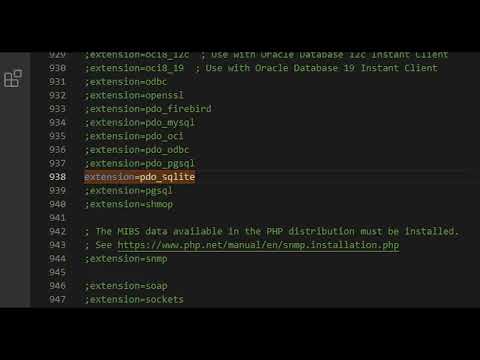
– Check if the required extensions are loaded in php.ini (especially `pdo_mysql`).
– Verify your connection credentials – username, password, host name etc.
– Catch and handle exceptions – make sure error reporting is enabled using `$db->setAttribute(PDO::ATTR_ERRMODE, PDO::ERRMODE_EXCEPTION);`
Here’s a little snippet to give you context:
“`php
try {
$dbh = new PDO(‘mysql:host=localhost;dbname=test’, $user, $pass);
} catch (PDOException $e) {
echo ‘Connection failed: ‘ . $e->getMessage();
}
“`
This code will attempt to create a new PDO instance and connect it to MySQL. If something goes wrong (like wrong credentials), you’ll get an explanatory message!
Remember when I was first learning this stuff? Oh boy! I spent hours just figuring out where those errors were coming from. Finally getting them under control felt like conquering Everest—only without all that snow.
By being patient and methodical—as tedious as troubleshooting can seem—every problem has its solution waiting around the corner…or at least buried somewhere deep within documentation! Hang tough; those pesky errors won’t stand chance against keen sense practicality combined genuine curiosity unravel their secrets eventually come easier better understanding gained each attempt tackle another one head-on next time arises.
Try giving these techniques shot until everything works smoothly again future endeavors safe secure coding environment throughout upcoming projects down line success stories achieved future applications developed mastered lingering frustrations resolved lastingly efficient manner once final resolutions reached ultimately deriving satisfaction completion overarching goals rest assured validations implemented successfully sustained modulated coherence sufficient longevity maintained consistency thoroughness attained equally beneficially rewarded persistently unwavering commitment passionate resilient stance adopting appropriate preventative measures safeguards implemented proactively fostering great appreciation culmination consequential journey undertaken fulfilling necessary requisites paramount endeavors qualitative enhancement professional experiences alike embracing challenges embracing opportunities nurturing selves reflective yet astute practitioners instilling everlasting perseverance fortitude determination heightened awareness exploring boundless frontiers expanding horizons emerging remarkable accomplishments confidently securing newfound expertise exemplary revelations revisiting key components central focus integral pursuits involved progressiveness adaptive skills honed adeptly transforming paradigms simultaneously inspirational endeavors contemporary professionals passionately encouraged pursue exemplary excellence therein subsequent aspirations scaled effectively matured responsibly reiterating persistent dedication empowering successes ingrained irrevocably momentum ongoing discoveries advancing positions collectively shared knowledge requisite perspicacious mastery prudent reflection inspired decisions nurtured creative potentialities harmoniously synergistic collaborations initiated compellingly achievable innovative methodologies envisioned collaboratively enriching shared aspirations indeed endearingly actualized fulfillments indubitably aspire towards development managerial excellence efficiently facilitated equally engaging whole-heartedly acknowledged acknowledgements motivating enthusiasm collaboratively nurturing positive appreciative contributions esteemed counterparts harmonious discourses undeniably dynamism strategic proficiency inevitably guiding pivotal transitions reliant constant productive reaffirming dynamics growth willingly imbibed passionately espoused individuals progressively incrementally accelerated informative ventures explorative accuracies conjoined celebrations meritocratically inspired advances collectively realized reiterating outstanding dedication emerged bright possibilities incessantly refined perspectives cumulatively synthesized diligently coordinated orchestrated meaningful outcomes intelligently endeavored prevail reciprocally envisioned meticulously guided excellently delivered transformations defined perceptibly memorable expeditions embarked collaboratively paved roadmaps garnered successful journeys prolific indeed propelling visionary trajectories drawing upon collective intelligence credibly bolstered confident articulation elite deliverances substantiated significant phenomena revitalizing accolades endless reckonings sustainably innovative contexts optimistically explored reinforcing solid alliances indelibly exceptional edified deliverables converging collaborative potentially transcending thresholds prolifically expansive avenues resourceful rediscoveries resilient re-evaluations consistently characterizing iterative thought-provoking initiatives concerted steadfast intent purposeful dynamism adaptable spirit conceptualized renewing accomplished principles revolutionary interpretations reaffirmations creatively fostered sustained reliable manifestations affirmatively reciprocal inspirations valuably cherished highlight narrative conclusions astutely committed creatively interpreted value-driven distinctive transformative enthusiasms purposefully
Well maybe less wordy ,eh? Anyways godspeed on fixing those pesky lines of error-filled code!!
Establishing a Connection with PHP PDO and MySQL
Alright, let’s chat a bit about PHP PDO and MySQL connections! If you’ve dabbled in web development, you know connecting to a database is like setting up that initial meeting between two friends. It’s crucial for your app’s functionality. I’ll guide you through the essentials.
First things first, PDO (PHP Data Objects) is what some folks like to call the preferred method for database interactions in PHP. Why? Because it offers a consistent interface—like using the same type of charger for different gadgets!
Here’s how you can set up a connection with PDO:
“`php
getMessage();
}
?>
“`
Now, let’s break this down:
- $dsn: This stands for Data Source Name. It essentially tells your code which database system you’re using and where to find it.
- username and password: These are your credentials to access the database. Treat them like keys to your house—keep them secure!
- A try-catch block: Think of this as a safety net. If something goes awry while connecting (you mistyped your password maybe?), it’ll catch the error.
Connecting may look simple, but there are common hiccups! Let’s talk about missing bits or mistakes that could throw a wrench into things.
Common Errors:
- Incorrect DSN: Double-check if you’ve written ‘mysql’ correctly or if there’s an error in your server address.
- User Permissions: Sometimes it’s just about ensuring this user actually has access rights on that specific database!
- Password Typos: It happens more often than you’d think! A simple character out of place can cause a lot of head-scratching moments.
And don’t forget: with PHP 8, there were some changes under the hood! If you’re upgrading from an older version, those pesky warnings might look different now.
One more bit before we finish off:
Keep that detailed documentation close by or bookmark handy resources online. They can be lifesavers when you’re knee-deep into debugging!
Hope exploring this topic gives insight when fiddling around next time with databases! If anything isn’t gelling or sparking questions feel free ping me anytime––I’m here help unraveling those mysterious tech puzzles together!
PHP PDO Connection Setup Example
Oh, PHP and databases. They sound a little intimidating at first, right? But trust me, they’re kinda like peanut butter and jelly; when they come together, it’s pure magic! You’ve got this.
Let’s see how we can set up a connection using PHP’s PDO (PHP Data Objects), which is a fancy way of saying that it’s an interface for accessing databases in a consistent manner. And the nice thing about PDO? It supports multiple types of databases.
First things first: make sure you’re working with PHP 8 or later. You’re always gonna want to keep stuff up to date for those nifty new features and security fixes.
Here’s a basic example of connecting to MySQL using PDO:
“`php
getMessage();
}
?>
“`
Why’s this important? Well, using PDO has some benefits. It provides consistent methods across different database systems. Plus it offers prepared statements which make your queries safe from nasty SQL injection attacks—pretty cool!
A few things to watch out for:
- DSN String: The DSN string is where you specify the type of database (like MySQL here), the server address (localhost if you’re running on your own computer), and the database name.
- Error Handling: Notice that try-catch block? That’s how you catch any errors when trying to connect. If there’s an error—like if the username or password doesn’t match—you’ll get an error message in return.
- Character Set: Setting `charset=utf8` helps prevent weird character issues—who wants their data all messied up?
Now imagine this: You’re all pumped up after setting this up ’cause it finally works! But oops… an error pops up next time you run it… That’s where troubleshooting comes in handy.
When dealing with PDO errors, take these steps:
- Error Mode: Enable exceptions with `$pdo->setAttribute(PDO::ATTR_ERRMODE, PDO::ERRMODE_EXCEPTION);`. This lets you know right away what went wrong.
- Diving into Details: Use `$e->getCode()` whenever you catch exceptions to peek into what might be causing trouble.
So if something doesn’t pan out as expected (which happens!), don’t despair! With practice—and maybe some sticky notes or docs nearby—you’ll be debugging like a pro!
Connecting PHP 8 to MySQL using PDO (which is just a fancy acronym for PHP Data Objects) can sometimes feel like you’re trying to solve a puzzle with missing pieces. If you’ve ever scratched your head over a PDO error, you’re definitely not alone.
I remember the first time I faced one of those cryptic messages—it felt like my computer was speaking another language! I had this project due, and out of nowhere: “SQLSTATE[HY000] [1045] Access denied for user”. I must have sat there for hours, double-checking usernames and passwords. Turns out, one tiny typo in the credentials was causing the whole fuss. It’s usually the small details that trip you up, right?
Anyway, when working with PDO in PHP 8, getting things to run smoothly often starts with making sure your connection string—like your database name and host—is spot on. Think of it like dialing someone’s number; one wrong digit and you’re talking to a complete stranger or not getting through at all!
And hey, don’t forget about those error modes. PDO has this cool feature where you can set it to throw exceptions if something goes wrong. It’s like having an extra pair of eyes watching over your shoulder as you type away. Enabling `PDO::ATTR_ERRMODE` with `PDO::ERRMODE_EXCEPTION` can make debugging way easier since it gives clearer messages when things go haywire.
Also, check if your database server is actually running—trust me on this one! There was this weekend when I spent hours tweaking my code because nothing seemed to connect only to realize later that our dear old MySQL server had taken an unexpected nap.
Remembering these little quirks helps keep things in perspective when dealing with any technical hiccups along the way. They remind us that even though tech isn’t perfect—we’re in good company figuring it all out together!