Okay, picture this: you’re chilling at home, ready to stream your favorite show, and suddenly, bam! Your WiFi decides to take a nap. Frustrating, right? I’ve been there too. Just when things were getting interesting.
But don’t worry! There’s a cool little gadget that might just become your new best friend—5G WiFi antennas for PCs. It’s kind of like giving your computer the superhero cape it didn’t know it needed.
Imagine boosting your network connection without moving an inch. Sounds dreamy? These antennas are all about enhancing your signal power and speed, straight from the comfort of your desk.
We’ll get into what makes ‘em tick and why they could be the key to smoother streaming, gaming or you know…whatever floats your digital boat. Whether you’re tech-savvy or not-so-much—we’ll figure this out together!
5G WiFi Benefits for PC Connectivity
Hey, let’s chat a bit about how 5G WiFi can totally transform your PC connectivity, you know? It’s like shifting from driving a regular car to a super-fast sports car. You’re in for smoother rides and quicker turns!
First things first, when folks talk about 5G WiFi, it’s not some futuristic thing. It’s all about the 5GHz frequency band that offers faster internet speeds compared to the older 2.4GHz band. Think of it like using the fast lane on a highway, you get there much quicker!
Anyway, here are some cool benefits you might notice with a 5G WiFi network connection:
- Speed: This is probably the biggest reason you’ll love it! A higher frequency means faster data transfer rates—perfect if you’re into streaming high-def videos or gaming online.
- Less Interference: Isn’t it annoying when your connection drops because of interference from other devices? 5GHz faces less of this issue since fewer devices use this frequency.
- Smooth Streaming: Whether you’re watching movies on Netflix or gaming with friends miles away, say goodbye to buffering and lagging—everything flows better!
- Crowded Areas: If everyone in your neighborhood’s hunting for bandwidth in rush hours; switching to 5GHz helps because it’s like finding an open place while others are jostling around one spot.
But hey! Here’s something important—the range isn’t as broad as with lower frequencies like 2.4GHz. Picture this: short waves pick up speed quickly but don’t travel far—that’s exactly what happens here.
Now before wrapping up let me give ya an anecdote: My friend Sarah lives downtown (think tall buildings everywhere). She used around five different networks all super slow until she switched over to a nifty new antenna designed specifically FOR PC’s optimized for connecting through both these bands—and voila…she experienced seamless browsing right away WITHOUT ANY HICCUPS AT ALL!
So yeah consider upgrading especially if reliability matters tons since we depend heavily nowadays staying connected more than ever pretty incredible actually how tech revolutionizes ordinary acts just browsing chatting skyping family overseas without hiccup whatsoever huh?!
5G WiFi Antenna Compatibility for PC
When you’re thinking about bumping up your PC’s internet game, a 5G WiFi antenna is one way to go. Let’s chat a bit about how these antennas work and what you should know before diving in.
You know, when dealing with PC upgrades, there’s always that little voice saying, “Will this even fit?” I get it! So first off, compatibility is essential. A 5G WiFi antenna works by connecting to your WiFi card or adapter. Most modern PCs come equipped with WiFi cards that support 5GHz bands. This means they’re generally ready to handle the speed boosts from a 5G antenna.
- Check Compatibility: Look at your PC’s specifications or the documentation for your current WiFi card to see if it supports dual-band (which includes 2.4GHz and 5GHz).
- Antenna Type Matter: Some antennas are omnidirectional, while others are directional. Omnidirectional gives wider coverage but less focused signal strength compared to directional ones.
Let’s say you’ve found out that your PC’s current setup can handle a new antenna. What’s next? Fitting an external antenna typically involves simply screwing it into the applicable port on the back of your PC’s case or onto an external adapter if that’s what you’re using.
- No Internal Card? Not all PCs have internal cards—some might require an external USB network adapter with an attachable port for antennas.
Here’s where things get real: signal quality can make or break your connection experience. My friend Dave bought an indoor omnidirectional model last year; he went from buffering half the time on his video calls, to everything being smooth as butter! Great story right? However remember, walls and obstacles can still mess with those signals even with an upgrade.
Using examples like Dave’s reminds us there’re always benefits balanced against challenges – mostly involving some trial error based around unique environments devices live within our homes offices etcetera…you follow me?
Finally do keep firmware up-to-date along wired connections nearby devices minimized potential interferences distance access points monitored daily usage habits adjusted accordingly improve long-term experiences achieving desired supercharged internet speeds overall stability many crave without realizing potential investments already present nearby!
Best 5G WiFi Antenna for PC Compatibility
Oh, the joy of getting faster internet speeds with a 5G WiFi antenna for your PC! It’s like going from riding a bike to driving a sports car. It’s essential if you’re jazzing up a less-than-stellar network connection or just maximizing your online activities.
- Understanding 5G WiFi: First things first, let’s chat about what 5G WiFi means. You see, the term “5G” here isn’t about mobile broadband but rather the 5 GHz frequency band that offers much faster speeds than the old-school 2.4 GHz band. It’s great for streaming HD videos or gaming without buffering hiccups.
- Choosing Compatibility: You gotta make sure that the antenna you pick works with your PC’s specs. Some antennas require specific drivers or certain operating systems like Windows or macOS. So, double-check before buying!
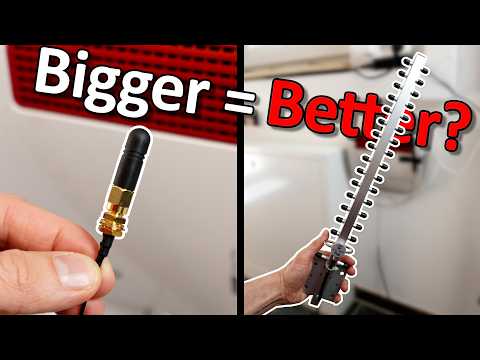
- Antenna Types: There’s variety here—omnidirectional and directional are common options. Omnidirectional antennas are like those friends who get along with everyone; they send signals in all directions. Directional antennas, on the other hand, send signals focused in one direction—a bit like shining a flashlight beam.
- The Connection Way: Most PC antennas connect via USB ports (super easy), while some need internal slots like PCIe—a bit trickier but manageable if you’ve opened your computer case before.
- An Example: Let’s say you want an antenna that’s plug-and-play without needing much setup hustle, you’d gravitate toward USB types—plug it in and boom! You’re set. But if you’re feeling adventurous and want more robust performance, maybe explore PCIe cards.
Imagine this: you’re video conferencing with loved ones overseas or competing fiercely in an online game—and there’s no lagging because of that snappy new 5GHz signal! Isn’t that powerful?
Remember to always check compatibility; nothing’s worse than eagerly opening a package only to find out it won’t work with what you’ve got. Keep these points handy while shopping around so you can enjoy seamless connectivity improvements right off the bat!
You know, I remember the first time I tried to stream a movie on my PC using WiFi. It was like watching a slide show—my internet connection just couldn’t keep up. That’s when I first heard about these 5G WiFi antennas for PCs, supposedly able to enhance your network connection like magic.
Picture this: you’re sitting at home, trying to get some gaming in or maybe even working on an important project (we’ve all been there). And then bam! The dreaded buffering icon appears. Now that can test anyone’s patience. Enter the 5G WiFi antenna, which feels like a knight in shining armor—swooping in to save your day.
Now, what are these antennas really? It’s pretty much an external gadget you attach to your computer to boost its ability to catch those speedy signals flying through the air. Imagine it as giving your PC a pair of binoculars, so it can see those signals from way further away and with much more clarity.
Some folks might wonder if it’s worth it adding yet another gadget to the mix. Thing is, if you’re stuck dealing with slow connections regularly or if live streaming is a big thing at your house, this antenna could be something of a game-changer.
Remembering my own struggles and finally making that upgrade was kind of like night and day; there were fewer interruptions, faster downloads—it just felt smoother overall. Of course every house is different—you might have thick walls or other tech competing for airspace—but having that little bit of extra help can make all the difference sometimes.
Anyway if you’ve experienced similar frustration with sluggish internet speeds and have thought about beefing up your setup then maybe think about grabbing one of these antennas too. After all who doesn’t appreciate less buffering and more uninterrupted Netflix time?