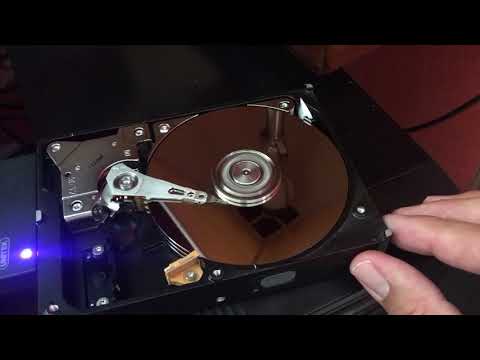
Oh man, the dreaded clicking sound from your Samsung HD103SJ hard drive. That’s like nails on a chalkboard, right? If you’ve ever heard that unsettling noise coming from your computer, you know the feeling. Your heart sinks a little, and panic might set in.
I remember the first time I heard it. My trusty computer suddenly sounded like it was trying to communicate with Morse code! It was like my hard drive had decided to become a DJ scratching a record. Not cool at all.
But don’t worry too much yet! That clicking could mean your drive’s just having a bad day or maybe something’s loose inside. You’re not alone in this! Let’s chat about what could be happening and what steps you can take next. Together, we might just save the day—or at least your data!
Hard Drive Clicking Noise Causes
Oh boy, a clicking noise from your hard drive can be unnerving, right? It’s like hearing a small critter trapped inside your computer. Let’s dig into what might be causing that unsettling sound.
- Physical Damage: One common reason for a hard drive clicking noise is physical damage. Imagine, like, if the read/write heads are bumping against the platters. You wouldn’t want that in your house! This can happen if the drive has been dropped or knocked around.
- Power Issues: Sometimes, the power supply to the hard drive isn’t just consistent or adequate. If it’s not getting enough juice to spin at full speed, it might just act up by making those clicking sounds as it tries again and again to start properly.
- Data Corruption: Another usual suspect in these cases is data corruption. The hard drive could be struggling to read data that’s just not where it’s supposed to be anymore. It tries over and over—click-click—to find the lost bits.
- Firmware Problems: Like how sometimes software on your phone gets buggy, firmware issues on a hard drive can also make things go haywire. A glitchy firmware could lead to commands being misinterpreted, causing some odd behavior like repeated clicks.
- Aging Components: Well, nothing lasts forever! Aging components inside your Samsung HD103SJ might be reaching their twilight years. Just think of it as creaky floorboards in an old house—they still work but complain more when doing so!
Now picture this: you’ve come back home after buying all new furniture only to find out one piece doesn’t fit; you keep trying though! These drives do kinda have their own personalities sometimes.
Loud clicks?, that’s usually bad news indicating something’s off internally—could even mean impending failure (scary!). If you have valuable information on there—I would highly recommend backing up soon before trying anything fix-it-yourself style.
And hey—a personal anecdote here: I once dealt with exactly THIS issue myself! Years ago while finishing up my college thesis—it started going click-clack-click every few seconds…heart-stopping stuff really…until managed getting most backed-up but learned harsh lesson about keeping copies!
Anyway hope helps somewhat; seriously consider checking warranty support options ASAP especially given potential severity involved here rather than ignoring till maybe too late unexpectedly one day down track—keeping fingers crossed all turns out fine though regardless outcome overall remember backups key lifeline when dealing crucial tech elements daily lives increasingly dependent upon technology evermore inherently fragile state modern world presents us amidst rapid advancements unfolding presently everywhere look today seemingly knew did previously perception wise etcetera inherently fragile state modern world presents us amidst rapid advancements unfolding presently everywhere look today seemingly knew did previously perception wise etcetera…
Causes of Hard Drive Clicking Sounds
Oh, the dreadful sound of a hard drive clicking! If you’ve ever heard it, you know it’s a noise that can give your heart a little jump. A clicking sound coming from your Samsung HD103SJ hard drive often signals that something isn’t quite right. Let’s explore what could be happening.
First off, think about the physical components inside your hard drive. There’s a little arm with read/write heads that moves back and forth to access data stored on spinning disks. When something messes with this movement, you might hear that notorious click.
Here are some common causes:
- Insufficient Power Supply: If the power supply to your drive isn’t steady or strong enough, it might cause the arm to malfunction.
- Faulty Read/Write Heads: Over time or due to damage, these heads can get stuck or fail altogether.
- Disk Controller Issues: Sometimes the problem could originate from the disk controller not sending proper signals.
- Wear and Tear: Like any mechanical device, hard drives can wear out over time—especially if they’ve been spinning around for years!
- Bios Settings:An incorrect BIOS setting may lead to improper communication between your hardware components.
Imagine hearing that sound one evening while trying to access some old family photos. Panic would set in, right? That’s why knowing these causes is handy.
Now if you’re curious what steps you could take next—refrain from using it immediately! Disconnecting is usually wise until you figure things out further (to avoid more trouble), but find someone professional who knows their way around those little internal parts so they can assess thoroughly without causing additional issues by accident.
A quick suggestion: Keep regular backups of your important files because prevention is key when safeguarding against unexpected disasters like clicks suddenly echoing through silent rooms late at night!
Stay calm; understanding what’s going on with those clicks will ground even tech novices dealing directly with such issues firsthand… albeit cautiously alongside professionals whenever necessary.
Hard Drive Clicking Sounds
Have you ever heard your hard drive making a weird clicking noise? That’s definitely not a sound you want coming from your computer. When a Samsung HD103SJ starts clicking, it’s usually trying to tell you something important. Let’s break it down and see what could be going on.
Understanding the Clicking Sound
Look, when hard drives are working smoothly, they should be quiet little workers—just the faint hum of activity. That clicking? It’s often called the “click of death.” Yikes! Sounds dramatic, huh? Essentially, it can mean that the drive is having mechanical difficulties or failing.
Why is This Happening?
There are a few reasons why your drive might start doing its own little noisy dance.
- Mechanical Issues: Over time, components inside can wear out. Think of them like tiny old gears struggling to mesh properly.
- Power Problems: If there’s an unstable power supply to the drive, it might start misbehaving—even though it’s not really its fault.
- Bad Sectors: Sometimes data sections get corrupted and confused, leading the hard drive on a wild goose chase.
Trouble Shooting Options
It can be tempting to ignore noises until they go away (or get louder), but don’t wait too long here!
- Backup Data Quickly: If at all possible—grab an external storage device and save anything important pronto. Better safe than sorry!
- Check Connections: Just give those cables connecting your hard disk some love—and make sure they’re snugly in place before moving on.
- User Power Supply Tester: Swapping in another known-good power source may show whether insufficient juice was causing trouble all along.
A Personal Tale
I remember when my cousin once told me how his laptop made weird sounds during finals week—it nearly drove him nuts thinking he could lose vital documents stored inside. In hindsight he’d admit having healthy paranoia led him straight into backup mode immediately… Something any IT friend would applaud naturally!
The Forgiving Level (DIY or Not)
Now depending upon comfort levels around gadgets themselves options vary between self-repair attempts versus professional help-seeking behavior; considering warranty implications wouldn’t hurt either since voided coverages add costs potentially…
And hey listen: sometimes even experts wish every broken thing could fix itself magically without human intervention being requisite anywhere along said process line…
Ah, the dreaded “click of death.” If you’ve been hearing a clicking sound from your Samsung HD103SJ hard drive, I totally get the worry. It’s like that unsettling noise an old car makes right before it gives up on you. Your heart skips a beat, thinking about all those precious memories and important files that might be at risk.
I remember when my friend Sara faced something similar with her own device. She was in the middle of finals week—perfect timing, right? The panic was real! That persistent click-click-click felt like an ominous countdown. But after a deep breath and some research, she found it wasn’t necessarily the end of her data’s journey.
You see, when a hard drive starts clicking, it often hints at mechanical issues inside—like problems with the drive’s read/write head. Just imagine trying to read a book while someone is flipping its pages randomly. Sometimes it’s something simple: maybe it’s trying to tell you it needs more power than it’s getting.
One trick that worked for Sara was checking the cables and connections first. Make sure everything’s snug and secure in there! And if things were still dicey, she knew it was time to back up as much as possible onto another drive or cloud storage—because you never know when it’ll decide to fully retire.
But hey, don’t be too quick to poke around inside if you’re not confident about what you’re doing. It might be worth seeking professional help before things get worse—you know how delicate these gadgets can be!
Sara eventually got her data safe with some quick thinking and external storage solutions until she could replace her failing hard drive. It taught her—and me by extension—that being proactive can save a lot of headaches (and lost files). Hopefully your story turns out just as well!