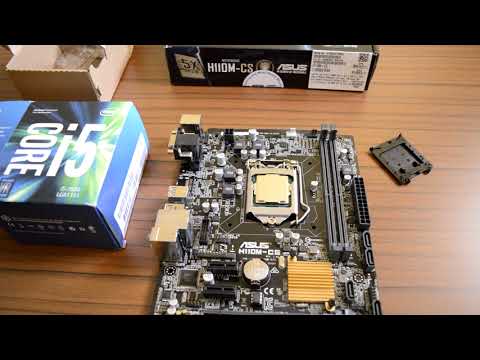
Oh man, dealing with tech issues can be such a headache, right? Especially when it’s something as specific as Intel H110 Express Chipset systems. Who would’ve thought these tiny chips could cause big dramas?
So, picture this. You’re all set for a gaming night, snacks ready, drink in hand. Then BAM, your system starts acting up! It’s like it knows you’re trying to have fun and decides, nah, not today.
These chipsets are like the brain of your computer. When they get a little temperamental—you know—it’s up to us to figure it out and get everything back on track.
Here, we’re gonna unpack some common issues folks run into with these chipsets. Think of it as troubleshooting without the fancy technical manual language that makes your head spin.
Stick around! We’ll learn together how to handle those quirks and keep things running smooth. Hang tight!
Intel H110 Express Chipset Compatibility Issues
Oh, the Intel H110 Express Chipset! It might not be the flashiest piece of tech out there, but it’s still a reliable workhorse in many systems. The thing is, you might run into some compatibility hiccups using it. I mean, hasn’t everyone run into their fair share of computer quirks?
Compatibility with Newer Processors:
Now, one thing to keep in mind is that this chipset was primarily designed for the 6th and 7th Gen Intel Core processors. If you’re thinking about dropping in a new 8th or 9th Gen processor hoping for an easy upgrade, you could be barking up the wrong tree. Those newer chips won’t play nice with this older platform.
Memory Constraints:
Another area where folks often get tripped up is memory compatibility. The H110 has its limits—only supporting DDR4-2133 MHz memory speeds at max. So if you’re got some snazzy faster RAM sticks lying around from another build, well they’ll run at slower speeds here.
Lack of Expansion Options:
The H110 isn’t exactly packed with expansion features either. It usually comes with just a couple PCIe lanes available for peripherals like graphics cards or other add-ins card . Now if gaming or heavy video editing’s your thing, this isn’t ideal since those tasks can demand more bandwidth and slots than what an H110 board typically provides.
- PCIe Slots: Limited number and bandwidth.
- SATA Ports: Typically fewer compared to higher-end chipsets.
No Overclocking Support:
It’s also worth mentioning there’s no overclocking capability on these boards! Some people love pushing their hardware past its limits—here though you’ve gotta leave it running safely within stock specifications.
Bios Updates Concerns:
Updating BIOS versions may seem scary but sometimes necessary when facing persistent issues; however don’t expect miracle advancements from newer firmware revisions bringing radical enhancements because manufacturers stop supporting them after awhile as focus shifts onto later product generations instead!
I remember upgrading my cousin’s PC – we spent ages trying different components before realizing her motherboard wasn’t quite cut out for the task she’d planned… learning curve achieved though eventually sorted by swapping models promptly afterwards anyway!
Look hopefully dotted through all this info are nuggets that’ll help guide better decisions moving forward dealing confronting what awaits given technical landscapes continue evolving addressed thoughtfully amidst varying circumstances encountered alongside ever-changing needs presented along way!
BIOS Compatibility for Intel H110 Express Chipset
Hey, you ever had one of those moments when you’re trying to get your computer running smoothly, but something just isn’t clicking? Been there. Let’s chat about the BIOS compatibility with the Intel H110 Express Chipset.
What’s in a BIOS, anyway? You know that trusty system firmware that kicks in first when you boot up your PC? That’s the BIOS (Basic Input/Output System) we’re talking about. It wakes up all the other components and hands things over to your operating system.
Here’s where things can get tricky: compatibility. Especially with chipsets like the Intel H110 Express, not having a compatible BIOS could lead to headaches—booting issues, hardware not being recognized, or even performance hiccups.
- BIOS Version: Make sure you’ve got the right version that supports all your hardware goodies. Check what’s current by visiting your motherboard manufacturer’s website.
- Memory Modules: Believe it or not, the RAM sticks need a nod from certain BIOS versions to run at full capacity. If yours are being temperamental, check for updates.
- CPU Compatibility: If you’re eyeing an upgrade or replacement for your processor, verify its support with existing or new BIOS versions. Sometimes sticking with an older processor is just better if no update is available.
A buddy of mine once upgraded his CPU without checking this compatibility business—yeah, his PC refused to start at all! Had him scratching his head until he’d figured out it was just a missing BIOS update.
You might wonder about updating?The process usually involves downloading from official sources and following instructions carefully… like seriously carefully—you don’t want anything crashing mid-update! Most boards nowadays offer utilities within Windows itself for convenience—you know?
If you’re struggling with oddities, say some devices aren’t showing up post-installation of new hardware—like graphics cards—it could be related to outdated firmware that’s gone rouge on you.
Got questions in mind? Like maybe why do we even have these issues? Tech is ever-changing and sometimes manufacturers throw curveballs into older systems; not intentionally mean-spirited…just how progress rolls! So many platforms evolve faster than tech folks can drink coffee!
When dealing persistently annoying SOS’ thrown by PCs tied intimately via such chipsets + corresponding bioses keep calm while navigating through solid research-official documentation often saves time frustration cost twofold times over again alright!?
And hey! Have fun tinkering!!
MSI Intel H110 Chipset Compatibility Issues
Sure thing! Let’s chat about the MSI Intel H110 chipset and some of the compatibility quirks you might run into. I’ve always been fascinated by how these little hiccups can be a real head-scratcher, but with a bit of patience, they can often be ironed out.
Understanding the Basics
When it comes down to working with an MSI motherboard featuring the Intel H110 Express chipset, there’s a mix of pros and cons. While it’s designed to support various processors from Intel’s lineup, such as Skylake and Kaby Lake CPUs, issues may still pop up.
Common Compatibility Issues:
- BIOS Updates: You might find yourself needing to update your BIOS for newer processors. It’s funny how something as small as outdated software can trip you up! Always grab the latest version from MSI’s official website.
- Memory Support: The H110 chipset supports DDR4 memory, but not all RAM modules are equally friendly with every board. If your system doesn’t boot smoothly, it could be picky RAM sticks causing trouble.
- Connectivity Woes: This is one of those things that hit home for me once—realizing I couldn’t run multiple high-speed peripherals because my port options were limited. The H110 might not come packed with USB 3.1 or M.2 slots aplenty.
Navigating Compatibility Challenges
So let’s say you’re facing one of these headaches; don’t worry too much! Here are some practical tips:
- *Processor Woes*: If you’re considering upgrading your CPU, double-check its compatibility with your current BIOS version first.
- *Memory Mischief*: Mixing different RAM brands or types? Not always a good idea! Stick to what’s tested compatible by MSI or the memory manufacturer.
- *Peripheral Pickiness*: More ports needed? Expansion cards can sometimes provide those additional USB slots or faster storage connections like SATA ports if needed.
Remember when I was just starting out tinkering with systems—I accidentally mixed two incompatible RAM speeds and was baffled by constant restarts until it dawned on me!
In short though—when chasing down problems linked to this particular chipset—it boils down mostly around ensuring everything in your build sings in harmony together through updates or component tweaks where necessary.
Ah, the Intel H110 Express Chipset! If you’ve fiddled with building PCs or just tweaking them a bit, you’ve probably come across this name. It’s like that reliable friend who maybe has a few quirks but generally gets the job done. Those quirks, though, can sometimes make you scratch your head.
Imagine this: You’re setting up your PC, everything seems cool. The fans are spinning, lights are blinking. But then… boom! No sound from your speakers. That’s right, audio issues can be one of those sneaky little problems with the H110 chipset systems. Honestly? It’s like expecting a symphony and getting silence instead.
Another hiccup people often encounter is with network connectivity. You’re all set to dive into some online gaming or perhaps just stream your favorite show, and suddenly: no internet connection! Ugh, talk about frustrating. Sometimes it feels like trying to connect two tin cans with string across oceans.
And oh boy, don’t even start me on USB ports acting funny. Ever had that moment where you plug in a drive and nothing happens? You start wondering if you’ve entered an alternate dimension where USB drives simply don’t exist.
But hey, once you get past these bumps—and trust me many folks have—you appreciate how sturdy and trusty these chipsets can be for basic computing needs.
These nuisances aren’t always deal-breakers since solutions are out there if you know what to look for or whom to ask (a friendly technician perhaps). But acknowledging them is part of understanding what makes tech both fascinating and occasionally maddening!
If you’re tinkering around with an Intel H110 Express Chipset system right now or planning on getting into one soon – keep calm through any glitches because remember there’s always someone else who’s been exactly where you stand today!