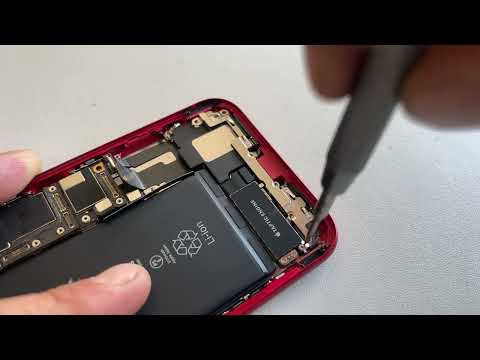
You know that feeling when your phone’s acting like a diva and refuses to charge? Yeah, totally annoying, right? We’ve all been there. It’s like one moment it works perfectly, and the next, it’s on strike!
So, you’re stuck trying all sorts of things: different cables, cleaning out lint with your pinky nail—you name it. Sometimes it feels like you’re on a treasure hunt for answers.
But hey, before you start panicking about buying a new phone or diving into expensive repairs, let’s chat about some simple fixes you can try at home. Spoiler alert: it’s not rocket science!
DIY Charging Port Repair Guide
Oh, the charging port issues! It can be so frustrating when your phone just won’t charge, right? Sometimes the answer’s not a new charger but something’s off with the port. If you’re feeling brave and ready to take things into your own hands, here’s some friendly guidance on how you might sort it out yourself.
Step 1: Inspect the Charging Port
First, grab a flashlight and take a good look inside. Dust or lint could be having a party in there! If you see anything funky, gently use something plastic like a toothpick to clear it out. No metal tools here; we don’t wanna damage anything.
Step 2: Check for Physical Damage
Make sure there are no bent pins or other visible damage inside the port. A magnifying glass might help if it’s hard to see. If this is looking more like an adventure than expected, maybe professional help is due!
Step 3: Test with Different Cables and Chargers
Charge your device using another charger and cable that you know work well. This step will tell if it’s really your port that’s misbehaving or just your trusty old charger taking its leave.
- Your friend’s charger could save the day.
- If it charges fine elsewhere—looks like you’ve got yourself a faulty cable!
Step 4: Soft Reset Your Device
Sometimes your phone just needs a little nudge to recognize that it’s charging again. Turning off and restarting can do wonders! You know those times our brains reboot after sleep? Phones need breaks too.
Step 5: DIY Repair Kits (Optional)
If you’re up for it—and only then—consider getting one of those DIY repair kits available online or at electronics stores:
- Screwdrivers: Tiny ones fit for tiny screws.
- Prying tools: Help lift delicate parts safely.
- A replacement part: Just in case things get real serious!
Just be cautious; warranty issues arise from tampering sometimes!
Anyway remember this kind of task involves risks—even pros get caught out occasionally! So take steps carefully think twice especially around sensitive tech stuffs—it honestly doesn’t hurt weighing options further sometimes reaching experts may prove better peace mindwise along preventing potential costly blunders go down south waywardly… You follow me?
Hope everything goes smoothly soon enough getting fully juiced up quickly proper!
Samsung Phone Charging Port Repair Guide
Oh, charging ports! They’re like the unsung heroes of our digital life. Your Samsung phone’s charging port is just sitting there, quietly doing its job until one day… it doesn’t. So what do you do when your phone decides not to charge? It’s time to roll up your sleeves and see if there’s a fix before a trip to the repair shop.
Signs Your Charging Port Needs Attention
You’ll kind of notice some telltale signs that your charging port might be on strike. Is your phone refusing to charge unless you hold the cable at a weird angle? Or maybe it’s not charging at all with that smug little “not charging” icon mocking you from the screen?
First off, don’t panic. Sometimes it’s just a minor hiccup.
- Check the Cable: Before blaming the port, try using another cable and adapter. Believe me, sometimes it’s the cable that’s being moody.
- Inspect for Dust or Lint: Take a good look inside the port. You’d be surprised how much pocket lint can accumulate in there. A small flashlight can help if you’re struggling to see.
- Use Canned Air or a Soft Brush: If you spot debris in there, gently remove it using canned air or carefully with a soft brush or toothbrush. Never use sharp objects; give your phone a chance!”
If these steps don’t bring any joy, things might get more serious.
Diving Deeper: Simple Solutions You Can Try Yourself!
So you’ve tried cleaning and still no dice? Let me walk you through some next-level stuff—safely.
- Software Check: Restart your Samsung device. Sometimes software bugs mess with charging functions.
- Sacrificial Port Swap: If another device charges fine with your charger but yours doesn’t, well… it could indeed be your loyal friend—charging port.
- Factory Reset (as Last Resort): If nothing else works—and—especially if there are other software issues—you might try resetting settings back factory defaults after backing up data first!
- Check for debris: Sometimes tiny particles or lint sneak their way into the port. Grab a flashlight or use your phone’s camera and take a look inside. If you see anything suspicious like lint or dust, gently use a small item like a toothpick (but be super careful) to clean it out.
- Try another cable: I once thought my port was broken when it turned out the cable was shot. Swap in another USB Type C cable that you’re sure is working well. If the issue clears up, you can wave goodbye to worries about your phone’s port.
- Inspect for damage: Look closely at both ends of the charging cable and your charging adapter too. See if there are any bends or kinks—these can be signs of damage affecting connectivity.
- Reboot your device: Sounds basic but restarting can fix temporary glitches affecting charging. Once restarted, see if it charges as usual.
- Select repair services carefully: If those options don’t solve it and you’re not comfortable going further yourself—hey that’s totally cool—it might be time to call in a pro! Just make sure they’re reputable so they don’t mess things up more.
If All Else Fails…
Listen buddy; when all efforts fall flat (or feel intimidating), don’t risk causing more damage by prying around senselessly looking for magic solutions involve expertise beyond comfort zone reach trained technicians!
Sometimes DIY isn’t enough—or simply possible depending severity complication involved—which becomes crucial where professional hands enter play ensuring smooth operation restoration safety-wise sans unnecessary hassles unexpected pitfalls down road result absence proper equipment experience overall understanding indirectly leading stress headache rather than immediate relief anticipated initially taking matter hands oneself hoping optimistic outcome unfortunately unattainable presently context current capabilities limitations!
Repairing a Type C Charging Port
Sure thing! Let’s dive into the world of fixing that little Type C charging port on your phone. You know, it’s annoying when you plug in your phone and nothing happens, right? I’ve had that moment when my battery was about to hit zero and my trusty charger just seemed… dead. So, let’s help you out with this.
First off, here’s what you need to know.
Now if cleaning doesn’t work or things still feel off:
On one occasion with my old phone—I tried every trick with no luck until I realized there was a teeny crack where water crept inside causing corrosion over time! Yikes!
If all else fails, replacing parts may become necessary but maybe check warranty options first—some warranties even cover repairs like this so it’d save some bucks too!
Getting stuck without juice is no fun but keeping calm keeps those stress levels down while finding fixes step by step—you got this!
You know when your phone’s charging port starts acting up, it can feel like the end of the world. I mean, here you are expecting a cozy night in watching funny cat videos, and suddenly your phone doesn’t cooperate. I’ve been there. It’s that little piece of technology we rely on so much that suddenly makes our life a bit more complicated.
Let’s face it; most of us aren’t tech wizards or anything close to it. But surprisingly enough, fixing some issues with your phone’s charging port is not as daunting as it sounds. I remember one time my friend’s phone stopped charging and she was absolutely convinced she needed to spend a ridiculous amount on repairs or get a new phone. You know what happened? A tiny bit of lint had found its way into the port! With just a toothpick and some patience, her beloved gadget was back to life. Crazy how something so small can make such a fuss, right?
When dealing with these ports — think about them as tiny doorways into your world —it’s important to handle them gently. Clean carefully and double-check for loose connections because who hasn’t cursed out loud after realizing they hadn’t plugged in their charger all the way?
And hey if you’ve tried all this and still nothing works maybe it’s time to hand it over to an expert—no matter how independent we want to be sometimes we gotta call in backup from those who have done this tons of times before.
So next time things aren’t working remember before panicking take a breath check for dust or damage you might just save yourself some stress and money too!