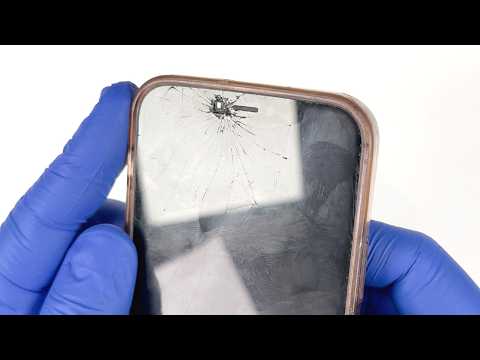
Oh man, cracking your iPhone 12’s screen? That’s the worst! It’s just that sinking feeling when you see those spiderweb-like cracks mocking you every time you pick it up. Ugh!
Now, I know what you’re thinking. “Do I really have to shell out big bucks to fix this?” Truth is, it doesn’t always have to cost an arm and a leg.
Sometimes, there’s a way around these things without breaking the bank. You could even tackle this yourself if you’re feeling brave enough!
Stick with me here, by the end of this chat you’ll know exactly what’s what and how to breathe new life into your wounded device.
Cost to Repair iPhone 12 Screen
Oh no, cracked your iPhone 12 screen? I get it, It’s quite the heart-stopper. You’re not alone in this; it happens to the best of us. Let’s look at what you might expect in terms of repair costs.
Official Apple Repair: Going to the source is always an option. If your device is under AppleCare+, you’re in luck! It covers accidental damage and will set you back about $29 for a screen fix. Without it, it’s a different story: think around $279 for the repair.
Third-Party Repair Shops: These places often offer competitive prices, sometimes between $100 and $250 depending on where you live and who you choose. Just remember though—using a non-Apple part can void any warranty left on your phone.
- Local Repair Shops: A walk down to your nearest shop could save you some time and money.
- Online Services: Some companies offer mail-in services which can be convenient if you’re busy or there’s no shop nearby.
Here’s a thought from my own experience: I once used a local shop when I was short on time, and they did a great job—not perfect like new, but close enough!
DIY Kits: If you’re feeling adventurous or just love tinkering—that’s an option too. Although it’s cheaper (kits range from $40-$80), be careful! You’ll need some patience and steady hands.
One thing more worth considering is living without that crack haunting you every day there are options out there that fit different budgets. The key is finding that balance between cost and quality of repair so that your iPhone keeps humming along smoothly!
iPhone 12 Screen Replacement Decision
Oh, cracking your iPhone 12 screen can be a real heartbreaker, right? Such a beautiful device deserves better. But hey, accidents happen. So you’ve got this decision looming over whether to replace the screen or not. Let’s chat through it to help make that choice a little easier for you.
First up, why even consider replacing that cracked screen? Well, aside from just aesthetics—because let’s face it, cracks are a bit of an eyesore—a damaged screen can mess with your phone’s functionality. Ever tried scrolling and the touch doesn’t register? That’s frustrating! Or how about those tiny shards of glass? Yeah, no fun at all.
So here’s what you gotta weigh in mind:
- Costs: Replacing an iPhone 12 screen isn’t always cheap. If you go through Apple or an authorized repair service, you’re probably looking at shelling out some decent bucks. Consider if this fits into your budget or if waiting until you have more funds might work.
- DIY Alternatives: Feeling adventurous and tech-savvy? There are DIY kits online with guides that walk you through replacing the screen yourself. This could save money but watch out—if you’re not careful, you could end up doing more harm than good.
- Protecting Your Device: Cracked screens can expose internal parts to dust and moisture—the sworn enemies of electronics! Getting it fixed sooner rather than later helps keep your device in tip-top shape longer.
A personal note: I once left my phone on the roof of my car (don’t ask) and watched in horror as it slid off on the freeway! The crack was unavoidable; afterwards I learned value in having damage protection plans set up beforehand.
A few things to keep in mind when deciding:
- If it’s under warranty still, or if you have AppleCare+, repairing might cost less—or even be free!
- If you’re attached emotionally like I am sometimes—a cracked screen is just torture and worth fixing ASAP.
Bottom line is weighing these factors with how much use (and joy) your iPhone brings into everyday life should help sway one way or another on replacement decision grounds at least somewhat clear-cut manner for now…right?
So yeah-your trusty phone companion deserves only best care awaiting final judgment call nonetheless considering facts laid before us here-of course only after thoughtful deliberation rounds lastly hopeful this shared journey proves fruitful towards brighter outlook thereafter whichever route chosen eventually brings heart’s contentment peace much kindness bestowed onto beloved mobile ally currently battling adversity courageously yet alone momentarily so similar voila!
Hope seems useful—take step back when needed review options carefully make informed move confident results follow decisively along preferred trajectory desired ultimately…okay? Catch later cheers friend!
iPhone 12 Screen Repair Cost
Oh, cracked screens—aren’t they just the worst? Especially on something as nice as an iPhone 12. One minute you’re admiring that flawless display, and the next, you’re cringing at a nasty crack! Look, it happens to the best of us. Let’s chat about what it might cost to fix that screen.
Authorized Apple Service:
First off, going directly to Apple is always an option. They have their official repair services which are super reliable. For an iPhone 12 screen repair without AppleCare+, you’re looking at around $279. AppleCare+ users, though, will only have to pay about $29. Significant difference, huh?
Third-Party Repair Shops:
Some folks prefer third-party repair shops which can be a bit more budget-friendly. Prices usually range from $150 to $250, depending on where you go and whether they use genuine parts or not.
DIY Repairs:
Then there’s going down the DIY path. You know those kits online? They often come in at under $100, but I’d honestly only recommend them if you’re feeling really brave—or maybe if you know someone who’s done it before.
Remember once when my buddy tried fixing his own phone screen? Yep, ended up worse than before! Maybe leave this kind of repairs for professionals unless you’re equipped with some serious skills and patience.
Anyway here’s a little breakdown:
- Apple (without AppleCare+): Around $279
- Apple (with AppleCare+): Approximately $29
- Third-party shops: Between $150 – $250
- DIY kits:: Typically under $100
Hey keep in mind that prices can vary based on location taxes availability and more factors like whether your phone has additional damage. Always check if the repair comes with any warranties or guarantees ’cause you wouldn’t want any surprises afterwards right?
Anyway hope this sheds some light on what you might expect when dealing with an iPhone 12 screen mishap!
Oh man, cracking your iPhone 12 screen—what a bummer. We’ve all been there, you know? Just the other week, I was at this little café, juggling my coffee and phone like I was some kind of superhuman. Spoiler alert: I wasn’t. My iPhone took a tumble right onto the floor, face down. Yikes!
Now the thing is, when that screen cracks—it’s not just about looks or aesthetics. It’s like suddenly you’re squinting through a spider web on every call or app you open. Probably more annoying is worrying you’ll make it worse everytime you swipe.
First thoughts were probably about fixing it yourself, eh? Sounds tempting to save cash and give it a go with those online tutorials and kits right? I mean I’ve met folks who’ve tried—and believed me—those tiny screws are tougher than they look!
It can be daunting but possible if you’re feeling brave and have good dexterity! But most people play it safe and choose professional repairs with those folks who do this every day for living.
Whether it’s Apple themselves or an authorized repair shop nearby usually gets done faster than you’d think sometimes even while you wait! Plus there’s that peace of mind knowing someone who knows what they’re doing has got your back.
You might feel like you’ve just upgraded after getting it fixed; no more worrying about finger cuts from glass shards or hoping drops of rain don’t destroy what’s left.Happy scrolling—you’ve earned it!