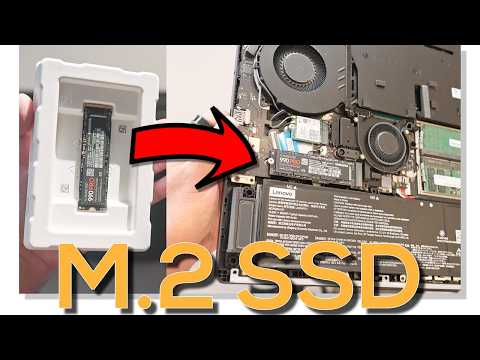
You ever been there, sitting with your laptop and wondering why it’s running slower than a snail on a lazy day? I know, it’s like watching paint dry. You probably just wanna scream into the void. That’s when you start thinking about an SSD upgrade. Sounds fancy, right?
I remember when I switched to SSD; it was like my laptop went from a worn-out old bicycle to a jet plane overnight. Honestly felt like magic or something! Speed wasn’t just through the roof—it had rocketed into outer space.
But hey, before you jump on this speeding train, there’s quite a bit to chew on. You gotta weigh both sides of this techie coin: pros and cons. It’s not all sunshine and rainbows, you know?
Anyway, let’s see if an SSD is the hero your laptop needs or if you’re cool sticking with what you’ve got—no pressure!
Benefits of Upgrading a Laptop SSD
Upgrading a laptop’s SSD can feel like giving your old machine a fresh breath of air. There’s something quite rewarding about turning on your laptop and seeing everything work smooth and fast, almost like magic. It’s one of those upgrades you really notice in day-to-day life.
Faster Boot Times
First up, booting is quicker. With an SSD, your laptop starts faster than you can make a cup of coffee. It just jumps to life in seconds!
Improved Performance
You know how sometimes opening multiple apps makes things slow down? With an SSD, it feels like you’re running on ice instead of sticky mud. Everything feels snappy! Like when you’ve got a bunch of browser tabs open while streaming music—your laptop handles it without breaking a sweat.
Enhanced Durability
SSDs don’t have moving parts—like tiny internal spinning disks—which means they’re generally more durable compared to traditional hard drives (HDDs). This makes them less prone to damage from drops or bumps.
- Lower Power Consumption: Saves battery life making it ideal for travelers.
- Lighter Weight: Perfect for keeping that bag from feeling like bricks!
- No More Overheating Woes: SSDs run cooler than HDDs.
That lower power draw is especially nifty if you’re the kind who loves working unplugged in cafes or parks because it stretches battery life!
Smoother Gaming and Content Creation
If you’re into gaming or creating digital art, video editing, stuff like that – an SSD can improve loading times significantly. Levels load super quickly; there’s no long wait staring at the progress bar creeping slowly across the screen.
There’s this sense of satisfaction watching files transfer in seconds rather than minutes as well—a real game changer when dealing with large video files or photos.
In summary—the benefits are clear: faster performance alongside durability gains—all adding regularly more pep into daily tasks while making sure your data stays safer longer-term too!
Pros and Cons of Laptop SSD Upgrades
Upgrading your laptop’s SSD can feel like you’re giving a fresh breath of air to an aging friend. You know, there’s something almost magical about making an old machine run faster. But before you jump in with that shiny new SSD, let’s look at the good and the not-so-good bits.
Pros of Upgrading to an SSD:
- Speed Boost: Imagine your laptop starting up in just seconds! An SSD makes boot times much quicker compared to traditional hard drives.
- Durability: Unlike those fragile spinning disks in HDDs, SSDs have no moving parts. This means they are less likely to break if you accidentally drop your laptop.
- Battery Efficiency: An SSD uses less power, which means your battery might last a bit longer. It’s like getting bonus minutes on every charge!
- No Noise: Have you ever been disturbed by the whirring sound of a hard drive? With an SSD, that annoying noise is gone.
Cons of Upgrading to an SSD:
- Cost Can Be High: Compared to old-school HDDs, SSDs are pricier per gigabyte. If you need lots of storage, it might pinch your wallet a bit more.
- Lifespan Concerns: Every time data is written to an SSD, it wears out little by little. Though it takes years for this wear and tear to show up for most people, it’s something worth thinking about if you’re super heavy on data writing tasks.
Now picture this: my buddy Tom—who isn’t exactly best friends with his computer—decided to upgrade his nearly decade-old laptop with an SSD recently. Before this change, opening even simple apps felt like watching paint dry. But after adding that SSD? His eyes lit up seeing everything zipping around at lightning speed!
So there you have it! While there are clear pros like speed and durability associated with upgrading your laptop’s storage using solid-state drives (SSDs), it’s essential also weighing drawbacks such as cost implications or potential longevity issues based upon usage patterns before making any decisions yourself based only upon these factors alone without considering individual needs first-hand overall contextually too where applicable if possible either way!).
Advantages and Disadvantages of Laptop SSD Upgrades
Sure thing! Let’s chat about upgrading your laptop with an SSD. It’s a move many folks consider to give their laptops a little more pep in their step. You know, it’s like giving your old friend a new pair of running shoes.
Advantages of Upgrading to an SSD
- Speed Boost: One of the biggest perks is the speed increase. Your laptop will boot up faster, and programs open in a snap. It’s like turning your snail-paced system into a cheetah on caffeine.
- Durability: Since there are no moving parts in an SSD, it’s less likely to fail if you drop your laptop or give it a little bump now and then. Much more reliable when you’re on the go!
- Energy Efficiency: SSDs use less power than traditional hard drives. So, you’ll probably notice longer battery life—perfect for those long work or Netflix sessions at the coffee shop.
Disadvantages of Upgrading to an SSD
- Cost: Here’s where things get tricky: SSDs generally cost more per gigabyte than HDDs (Hard Disk Drives). It can be tough on the wallet if you’re looking for lots of storage space.
- Lifespan Concerns: The lifespan of SSDs is usually measured by write cycles. They wear out over time as data is written and erased repeatedly. It’s like how pencils wear down when used too much—eventually needing replacement.
- Limited Storage Space:If you need extra storage without breaking the bank, sticking with an older HDD might still make sense since high-capacity options are cheaper there.
Remember that story where my neighbor decided outta nowhere they’d upgrade their laptop all by themselves? Well, what happened was… they couldn’t believe how quick everything loaded after installing an SSD! But they did end up juggling some cloud solutions because that new drive offered limited capacity compared to what they’d been used to before.
Anyway! If speed’s your thing and reliance isn’t as big deal—for sure think seriously ’bout embracing these speedy wonders called solid-state drives—but do weigh pros against cons carefully based off personal needs ‘n’ budget realities too.
Ah, the age-old question of upgrading your laptop’s SSD. You know, just the other day I was chatting with a friend who was stuck with a slow laptop. As we all do sometimes, he had a bit of a meltdown when his device took forever to boot up. I remember he said something like, “Why does it take so long just to open my emails?” That’s when it hit me: maybe it’s time for an SSD upgrade.
Upgrading to an SSD can make your laptop feel like it’s had a shot of espresso! The speed boost is often the first thing people notice. You press that power button and—bam—you’re up and running in seconds. It’s amazing how seamless everything feels: apps open faster, files transfer in the blink of an eye, and overall your system is snappier.
But wait! Before you rush off to buy one, let’s consider the downsides too. While SSDs are fantastic for speed and reliability (since they have no moving parts), they usually cost more than traditional hard drives. And if you’re someone who needs tons of storage space for videos or photos, you might find yourself shelling out quite a bit more cash.
Another point is that upgrading isn’t always as simple as plugging in new speakers or something like that. Depending on your laptop model, it might require some know-how to swap out drives or even reinstalling your operating system from scratch. Not exactly everyone’s idea of fun on a weekend afternoon!
It’s also important to think about whether this upgrade is truly necessary for what you need right now—or if you’re simply caught up in wanting the latest thing because that’s easy to do too!
So yeah, while upgrading an SSD can seriously breathe new life into your old machine—and often extends its lifespan significantly—it’s vital weigh those pros and cons carefully before making any decisions…