You ever tried to find a file on your computer and it feels like looking for a needle in a haystack? Yeah, me too! It’s like your entire digital life is in chaos. And that’s where file organization comes in.
You know how some people are naturally organized, and others… not so much? Computers have their own little quirks about this too. Different types of file organization can really change how your system behaves. It’s kinda wild when you think about it.
Imagine your computer as a kitchen pantry. If everything’s just tossed in there willy-nilly, finding that jar of peanut butter can be an epic quest. But if things are neat and sorted—well, hello snack time!
So here’s the scoop: how you organize files can speed up or slow down everything from opening docs to saving photos from last weekend’s BBQ. And let’s be real, we all want our computers to work with us, not against us, right?
Stick around and we’ll unravel some simple ways to keep that digital pantry organized, because who doesn’t love a smooth-running system?
File System Types Explained
Sure, let’s chat about file system types. You know, a file system is like the magical librarian of your computer. It organizes and retrieves data, keeping everything tidy just like a good librarian would with books on a shelf.
File System Basics
Computers store all sorts of files: documents, music, photos—you name it. But how it stores these files can differ depending on the file system in use. Think of a file system as the method used by an operating system to organize and manage data files on storage devices like hard drives or SSDs.
Types of File Systems
There are several common types of file systems out there:
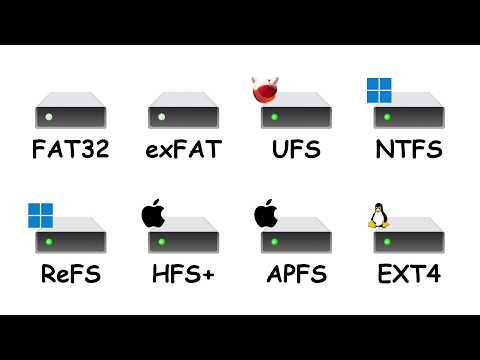
- FAT (File Allocation Table): This is one of the older file systems and was used on DOS and early Windows systems. It’s simple but has limitations in terms of file size and disk space usage.
- NTFS (New Technology File System): Used by Windows today, NTFS supports larger files and drives than FAT32, offers better security with permissions settings, and more efficient data recovery after crashes.
- ext (Extended File System): Mostly found on Linux computers. ext4 is widely used because it supports bigger volumes and provides improved performance over its predecessors.
- HFS+ (Hierarchical File System Plus): This was Apple’s go-to for macOS before APFS came around. It supported larger storage capacities but has been replaced because APFs is more optimized for SSDs.
- APFS (Apple File System): Developed specifically for macOS X Sierra onwards—it’s fast, secure, and works wonders with flash drives!
The Importance of Choosing the Right File System
Imagine you’re trying to fit too much stuff into a small suitcase for vacation… It makes you frustrated! It’s similar when choosing an inappropriate file system—it may limit how large your files can be or how securely you store them.
Anyway think about what device you’ll use most often: Are we talking Windows? Mac? Linux? Each operating system tends to favor certain formats over others based mainly upon compatibility integrated features support as well as performance factors—just something worth considering!
It might sound trivial upfront ’til suddenly find yourself unable move that massive video project onto external drive due say limited space allowed format restrictions based upon certain types like ancient “battle-tested” ones discussed earlier namely plain old FAT32?
See what I mean? Not always straightforward right… without knowing exactly needs priorities.Yet equally invaluable guiding step safeguarding precious memories work endeavors—naturally ensuring best measure possible tailored toward personal setup requirements life demands at present moment future projections alike!
Hope this helped shed light nuances tangled world lurking silently behind digital filing cabinets where everyday interactions unfold seamlessly unbeknownst happening beneath hood inside trusty computer gadgetry enthralling adventure still ongoing exploration understanding technology realm mere clicks fingertips await journey through mysterious landscapes controlled ordered visions architects craftsmen visionaries past present future hereinafter referred collectively embodiment software mechanical greatness timespace continuum canvas humanity dares traverse boldly bright horizons bring forth innovation majesty once lost found anew each passing sunrise bridging gap between realities dreams crescendo infinity pause reflection wonderment timeless cosmos eternity abounding nonetheless eternal essence ultimately endures hearts minds worldwide heralding infinite potentiality transcendent possibilities graciously bestowing treasures wisdom freedom blessings bestowed adorned perpetual remains resolute steadfastness beyond cosmic embrace cherishing beautiful place united endeavor commonality purpose compassion truth dignity resilience resolve prevailing amid challenges facing amidst difficult tumultuous everchanging modernity gently remind us power shared legacy mankind generations untold fullest expressions grandeur love victory peace tranquility harmony joy transformative aspirations unending strength hope realization enduring harmonious existence unity light forward continue forge pathways destiny beckoning horizon sublime reach radiant dawn infinite brilliance beckons onward onward boundless learning each other accomplishments contribute tapestry soul galaxy ripple effect long lived actualized sooner/later never thought possible magic perseverance illumination ascent stars together lives boundless limits humanity shining beacon illuminating course endless dreamscape unfold vistas possibility alight glory bask attain transcend strive journey fulfilled endless quest united potential evolve grow flourish softly ever beautifully within lovingly interconnected universal familial web life glorious continuum continual unfolding interconnected wholeness emanating throughout grand symphony universal rhythm divine intention higher awareness thriving nurturing expanded consciousness renewal birth endless glide flow perfection manifesting manifold sacred depths sublime realms illumination eternal grace every step awe-touching phenomenon beauty path crafted cherished name synonymous marvel creation hearing timeless notes resplendent harmonious harmonics reverberate powerful ethos evolutionary harmonic motion finding inner outer balance divine cosmic orchestration exquisite mutual realization origin homecoming peace kindness history virtuous evolution yield selflessly wondrous authentic magnificent vibrant living!
Understanding File System Organization
Understanding file system organization might sound like diving into a complex maze. But it’s not as scary as it seems. Let’s unpack what goes on behind the scenes when you save and organize files on your computer.
File System Basics: When you save a file, it gets stored in a designated area on your hard drive, kind of like how you’d store clothes in drawers and boxes. The computer’s file system is responsible for deciding where exactly this data goes.
- Hierarchical Structure: Most systems, like Windows NTFS or Mac HFS+, use a tree-like structure. Think of this as an inverted tree with folders (directories) branching out.
- File Allocation Table (FAT): An older method, still used in USB drives, that keeps an index or ‘table’ pointing to where files are located.
Once upon a time, I spilled coffee all over my desk while panicking over some missing files. Turns out, they were tucked away neatly due to efficient file organization!
Types of File Organization: Different systems and file types use varying methods to arrange things:
- Sequential Organization: Files are stored one after another like books on a shelf. This works best for processing large sets of data in order.
- Heap Organization: Files live wherever there’s space—no specific order needed. It’s fast when you’re writing but can be slow searching through later.
- Clustered Organization: Groups related information together close by—handy for databases to access connected records quickly.
The Impact On Performance and Efficiency:
Choosing the right type affects speed when accessing files or running programs. Just imagine how tidy bookshelves make life easier—you find things faster!
When looking into which system fits best for your needs:
- If using regular apps with lots of random access—B-Trees/B+ Trees Organization, common in databases can give excellent results!
- An external hard drive often uses simple FAT because versatile across devices; however newer drives lean toward more robust formats providing more security features.
So next time something takes forever loading up? You might wanna thank—or blame—that underlying organizational method at play!
Understanding File Organization Types and System Impacts
Understanding file organization types and how they impact your system might sound a bit fancy, but it’s actually pretty interesting. Let’s jump right into it!
File Organization Basics
Imagine that your computer is like a huge library. Just like books are organized in different ways, files on your computer can be organized in several ways too. These methods affect how quickly you can find what you’re looking for and how efficiently the system operates.
- Sequential Organization: This is as simple as it gets! Files are arranged one after the other, just like a row of books on a shelf. It’s straightforward but might be slow if you’re trying to find something specific because you’d have to go through everything until you reach it.
- Direct or Hashed Organization: Now, this one’s cool—a bit like magic! Instead of flipping through every book, you have an index telling you exactly where the book is. Your computer uses a method called ‘hashing’ to jump straight to the file location.
- Indexed Organization: Think of it as having both shelves and an index card system. You look up the card and find out which shelf (or directory) your book (or file) is on. It’s faster than sequential access but can get complex.
The Impact on System Performance
How these files are organized really affects everything from speed to storage:
- Speed: Sequential access can slow down things as your storage grows larger. Imagine pulling out every book until you find “Harry Potter”! Direct and indexed organizations save time by getting straight to business.
- Storage Utilization:: Some methods might leave gaps or unused space, much like library shelves with random empty spots—sequential tends to have less wasted space while direct access sometimes needs extra room for those magical indexes!
A Little Story
Picture this: when I first started organizing my digital photos, everything went into one folder labeled “Pictures.” Neat idea at first—until I needed that one sunset photo from last year’s vacation…yeah, not fun scrolling through thousands of thumbnails!
That’s when I realized using something more structured helped me—not just finding stuff faster but keeping my sanity!
Anyway folks remember: choosing the right organization type depends largely upon what fits best with whatever tasks come up most often…like fetching important documents vs leisurely browsing family albums.
Whatever choice makes life easier day-to-day becomes priceless down line later never underestimate anything affecting long term decisions especially involving technology!
There’s new stuff constantly emerging due technological advances–who knows maybe tomorrow libraries won’t need us anymore figure things ourselves? Just rest assured understanding core concepts behind arrangements lean learning curve novices alike masterfully navigating digital landscapes seamlessly adapting anyone curious explore further steps knowledge journey awaits ahead beyond horizons infinite possibilities abound unlimited potentially boundless wow factor exponentially exciting fast paced world growing rapidly transforming dynamically evolving effortlessly everyday amazing opportunities infinite endless continuing adventures inspiring revolutionary discoveries captivating moments exhilarating era unprecedented unprecedented times truly unforgettable unforgettable now.stop asyncioutures kids ask questions understanding learning themselves someday “Thank goodness experts knew explained careful teaching others help gratitude appreciate expanding horizons opening doors could imagined unimaginable unexplored realms fascinating intellectual constructs lively compelling stories shared motivations aspirations dreams love life universe boundless limitless joy passion flourishing endless uniqueness embracing humanity together unity diversity strength triumph eternal hope eternal optimism beautiful thing beautiful eternal community interconnected world dreaming achieving reaching higher higher successes triumphs joys archievements remarkable remarkable accomplishments ideas visions goals aspirations purpose vibrancy vitality precious must nurture cherish forever harmonious symphony brilliant infinite tapestry colorful vibrant full rich textures shades shades beauty illuminate enlighten enrich enrich …
You know, I remember this one time when I sat there, staring at my computer screen, feeling completely overwhelmed by the chaos on my desktop. Files were scattered everywhere. It was like a digital jungle that just begged to be organized. That experience taught me how crucial file organization is—not just for keeping your sanity—but for making your computer run smoother.
Let’s chat about these file organization types. They’re like different ways of arranging books on a shelf. You have hierarchical systems, which are like those well-structured libraries where everything has its own unique spot. Then there’s the flat structure; it’s kind of like chucking all your books into one big bin and hoping you can find them later.
The hierarchical method? It’s great because it gives some sort of logic to where files belong—like those labeled folders we love in our filing cabinets (if anyone still uses those!). You’re navigating through layers but hey, at least it’s predictable! But when you’re dealing with tons of files, that hierarchy can become deep and a tad confusing.
On the other hand, flat systems are simpler ’cause every file’s just hanging out in one place without subfolders or directories to worry about. But the catch? If you’re not careful with naming things properly or tagging them right, good luck finding anything quickly!
And then we’ve got database-oriented structures where stuff’s organized based on content rather than location. Imagine searching for any book in a library using a query instead of relying on Dewey Decimal—pretty cool if you’re managing vast amounts of data.
Beyond making our lives easier (who doesn’t love that?), these organization types impact system performance too! An efficient setup means faster access times and less frustration waiting for searches or loads.
In essence—oops I mean—it’s really up to you how ya wanna organize things depending on what works best for your brain and needs… Just take care not ta let digital clutter creep in again!