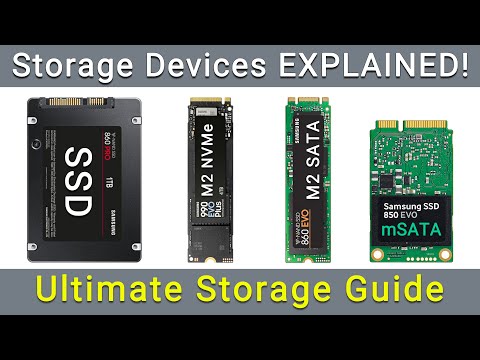
You know, upgrading storage is like finally organizing that messy closet. It feels great afterwards!
With storage, it’s all about making things faster and better, right? You’ve got these M.2 options: SATA and PCIe.
Feels a bit like choosing between two delicious cakes. Both are sweet but each has its own flavor.
Kinda confusing though, huh? Which one’s better for your needs? Let’s figure it out together!
Comparison of M.2 PCIe and SATA Performance
When you’re considering storage upgrades, the choice between M.2 PCIe and M.2 SATA can make a huge difference in performance. Both of these are forms of SSDs (Solid State Drives), but they’re not created equal.
First off, let’s dive into the nitty-gritty. The most noticeable difference is the interface they use to communicate with your computer. M.2 SATA uses the same old SATA interface that traditional 2.5-inch SSDs and hard drives use. This limits their speed a bit because SATA maxes out at about 600 MB/s.
On the other hand, M.2 PCIe connects through the PCI Express interface, often using four lanes (referred to as x4). This offers much higher data transfer rates—up to around 3500 MB/s or even more! That’s quite a leap in speed, isn’t it?
Now let’s talk about practical usage:
- **Boot Times:** If quick booting up is your priority, M.2 PCIe outperforms M.2 SATA significantly because of its faster read speeds.
- **File Transfers:** Large file transfers feel zippier on an M.2 PCIe drive.
- **Gaming:** Loading times in games can be reduced with an M.2 PCIe SSD, though overall in-game performance might not see too much change.
An example might help clarify things: imagine you’re moving into a new house and deciding between taking a bicycle or high-speed train for your trip there every day—you get there faster with the train! Similarly, your data travels quicker through that modern PC Express “train line” versus “pedaling” along a slower path.
But hey don’t toss out options without considering compatibility either! Some older motherboards may not support M.KEY slots which allow for those fancy new speedy trains — err I mean – those fast drives connected via NVMe protocols over PC Express connections: it would need special hardware support on CPU like needing compatible BIOS updates sometimes too before getting these working properly!
To sum it all up: when opting whether choosing;M6option&
In essence-if lightning-fast speed matters most—for video editing or multitasking environments perhaps—then definitely consider going down route towards massively increasing power available beneath hood by embracing benefits offered when selecting future-proof solution awaiting just beyond reach today known simply recently unveiled cutting-edge tech named after centuries-old tradition celebrated annually worldwide called…
NVMe vs SATA Speed Differences
Sure, let’s get into NVMe and SATA. These are like the fast lanes and regular lanes on a highway, you know? Both get you where you’re going, but one does it much quicker.
NVMe (Non-Volatile Memory Express) is like giving your computer a turbo boost. It uses PCIe lanes for communication and can move data at incredible speeds. Think of it as that express lane everyone wants to be in during rush hour!
- Speed: NVMe drives can hit speeds up to 3500 MB/s or even more with newer tech.
- Latency: Lower latency means faster access times for your data.
- I/O Operations: Supports multiple outstanding commands, making multitasking smoother.
On the other hand, we have SATA (Serial ATA). It’s been around longer and is reliable like an old friend from high school who’s always on time.
- Speed: Tops out at about 600 MB/s due to its older technology.
- Cables & Ports: Uses traditional cables which might feel a bit dated compared to the sleek M.2 form that NVMe often takes on.
Now talking about M.2 slots is important here because both NVMe and SATA drives can live in these spaces in your PC or laptop.
- M.2 SATA: Uses the same protocol as traditional SATA drives but skips the cables by plugging directly into the motherboard.
- M.2 PCIe (NVMe): Takes advantage of those speedy PCIe lanes we mentioned earlier!
An anecdote?, remember when I swapped out my old SATA drive for an NVMe? It was like upgrading from a bicycle to a sports car! Boot times were slashed down to seconds from minutes.
In conclusion, look at what you need: If speed is king for you – say you’re editing videos or gaming – go for NVMe. But if you’re just surfing online and doing emails?, maybe sticking with good ol’ SATA will do just fine.
Hope that gives ya better clarity between these techy terms! Feel free?.. ask more questions if needed!
M.2 SATA vs M.2 PCIe Compatibility in Windows
Oh, buddy, hardware stuff can really get our heads spinning, right? Let’s chat about M.2 SATA and M.2 PCIe compatibility in Windows because if you’re thinking of upgrading your storage, that’s quite an important thing.
M.2 Slot Diversity
So first off, when we talk about these two—the M.2 SATA and the M.2 PCIe—we’re basically discussing different types of those little sticks that go into your computer to store stuff. An interesting thing is they both fit in the same M.2 slot on a motherboard! But here’s where people sometimes trip up: just fitting doesn’t always mean it’ll work as you want it to.
Compatibility Check
Before diving headfirst into buying one of these gadgets for your computer, it’s really wise to peek at your motherboard’s manual or just browse online to find out what type it supports. Some motherboards can handle both types; others—only one kind.
M.2 SATA
Now let’s break down what an M.2 SATA is: In essence, it’s like those typical 2.5-inch SSDs but in a chocolate-bar-size stick form! They use the same protocol as traditional SSDs, so they have a limitation on speed—still faster than HDDs though!
- SATA drives are common in slightly older machines.
- If you’re upgrading an older system without replacing the motherboard, this could be your choice.
M.2 PCIe (NVMe)
The slicker cousin here is the M.2 PCIe—or even spicier when paired with NVMe technology (I know—buzzwords!). They tend to be faster compared to their SATA siblings because they hook directly onto those speedy lanes that CPUs love chatting with.
- Makes everything super zippy—boot times and loading games.
- You might need this type for handling huge data transfers or intense applications like video editing software.
The Windows Factor
You might wonder if Windows has any favorites here—and no worries—it usually plays nice with both unless there’s very old support involved from motherboards or issues like outdated BIOS versions!
It happened once; my friend tried installing a new chic NVMe drive onto his dusty PC only to find out the motherboard couldn’t really handle conversations through its high-speed lanes! If anything sounds old-fashioned here—not good news!
Updating drivers frequently solves lots of headaches too; keeping them fresh often means fewer hiccups while dealing with enhancements under-the-hood… kind of like giving your car regular oil changes!
To sum things up briefly but importantly:
– Check what slots/types are compatible on YOUR specific board.
– Understand which suits YOUR usage needs best speed-wise and budget-wise.
– Update necessary software after installation accordingly for smooth sailing afterward… happy computing!
Ah, the age-old dilemma of choosing between M.2 SATA and M.2 PCIe for storage upgrades! It’s kind of like choosing between a comfy pair of old sneakers or brand-new running shoes, you know? Both get you where you need to go, but in different ways.
So here’s the scoop: M.2 is this form factor that looks almost like a stick of chewing gum. It’s slim and sleek, perfect for saving space in your computer or laptop. But the twist? There are two main types—SATA and PCIe—and they bring their own vibe to the table.
When we talk about M.2 SATA, imagine that reliable buddy who’s always there for you. It’s not the fastest runner in the group but offers dependable performance for everyday tasks like web surfing or document editing. If you’ve got an older machine with a SATA interface, it’s probably compatible too.
Switch gears to M.2 PCIe—now you’re dealing with speed demons! These drives leverage more sophisticated technology such as NVMe (Non-Volatile Memory Express) to zip files around at lightning pace. We’re talking seriously fast boot times and data transfers—great news if you’re into gaming or crunching heavy data sets.
A friend of mine once upgraded from an old hard drive straight to an M.2 PCIe SSD on his gaming rig; he swears by it now! The transformation was insane: load times halved, multitasking got smoother…even his avatar seemed happier!
But hey, there’s more than just speed to think about right? Pricing can be a game-changer too; typically speaking, M.2 SATA will often be easier on your wallet compared with its speedy PCIe counterpart though both options have dropped significantly recently.
It really boils down to what suits your needs best—the trusty steadiness of Sata or turbocharged performance you get from Pcie? You decide! Just make sure whatever choice aligns nicely alongside budget considerations as well compatibility requirements (oh yeah those small details).
Remember though no matter which path choose upgrading storage is always step forward boosting system capabilities ultimately leading enhanced experiences—like trading cramped closet spacious wardrobe everything places feels tad bit lighter brighter suddenly doesn’t it?!