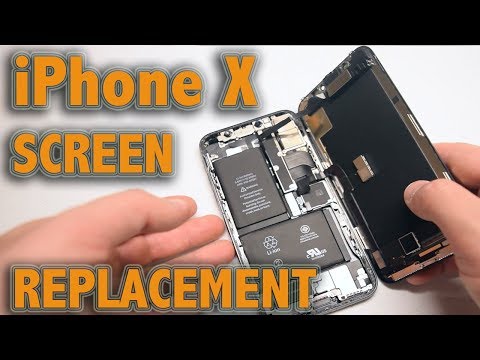
Oh, the iPhone X. Such a trusty companion, right? But then that dreaded moment happens: the screen shatters. Ugh, I’ve been there too. It’s like watching your favorite mug fall off the counter in slow motion.
Now you might wonder, “Can I really fix this on my own?” Short answer: absolutely! Is it gonna be easy as pie? Not quite, but hey, if I can do it, so can you.
I once managed to replace my screen and ended up with a few extra screws… Oops! It’s all part of the adventure though.
So if you’re ready to roll up your sleeves and get that phone looking shiny and new again, stick around! Trust me, it’s not as scary as it sounds.
iPhone X Screen Touch Sensitivity Issues
Oh, the frustration of a touchscreen that just won’t cooperate! iPhone X users sometimes face issues with touch sensitivity. It’s like your fingers aren’t talking to the screen. Super annoying, right?
Why is this happening?
There are several reasons why your iPhone X screen might not be responding as it should:
- Software glitches: Sometimes updates or bugs can mess with how sensitive your screen is.
- Hardware problems: If there’s a crack or damage, it might affect how well your touch gets through.
- Dirt and debris: Tiny particles between the screen and case can disrupt contact.
So, what can you do about it? First things first: try restarting your phone. It’s amazing how often a reboot kicks things back into gear.
If that doesn’t work:
- Check for updates: Go to Settings > General > Software Update and see if there’s anything new to install.
- Clean the screen: Use a soft, lint-free cloth—careful not to use too much liquid!
- Avoid cases or protectors: For testing, remove them; they might interfere with sensitivity.
Sometimes these suggestions don’t cut it. That’s when you consider replacing the screen. Now, replacing an iPhone X display isn’t something you take lightly.
A few things to remember if you’re thinking of replacement:
- : Getting help from Apple or an authorized service provider ensures quality parts and proper installation.
- Original Screens: These are the ones made by Apple or an authorized manufacturer. They’re generally a perfect fit because they’re specifically crafted for the iPhone X.
- Aftermarket Screens: These might come from third-party manufacturers. While they can be cheaper, sometimes they may not match up exactly in terms of quality or color accuracy.
- A new screen has got to work with your phone’s internal sensors and front camera.
- If the screen isn’t perfectly aligned, Face ID might not function properly.
- This means that any replacement should ideally also be OLED for consistency in display quality.
- If you go with LCD (which is often cheaper), you might notice differences in brightness and overall look.
- You’ll need special pentalobe screws to open up your iPhone without causing damage.
- A suction cup tool is handy for gently lifting the screen off without cracking it further!
- Tools Needed: You’ll need specialized tools like Pentalobe screwdrivers and suction cups.
- Skills Required: A steady hand helps since working with tiny screws isn’t everyone’s cup of tea.
- No Room For Errors: Components are fragile; one wrong move could lead to more problems.
iPhone X Screen Compatibility Requirements
Sure thing! When you’re thinking about replacing your iPhone X screen, there are a few compatibility details you should definitely keep in mind. It’s not as simple as just popping on any old screen, you know?
Original vs. Aftermarket Screens:
One key point to remember is the difference between original and aftermarket screens.
Compatibility Check:
When it comes to inner components, things can get a bit tricky:
The OLED Factor:
The iPhone X uses an OLED display which offers vibrant colors and deep blacks:
The Importance of Tools:
You can’t just use any screwdriver lying around:
I once tried replacing a friend’s phone screen with some generic parts online. Seemed like a good idea at first. But when we powered it up, guess what? The top half was dimmer than the bottom half! Turns out, paying attention to these small compatibility details really matters.
So there you go! Getting into all these little nuances can help ensure that your new screen fits and works like it’s supposed to on the iPhone X. Make sure you’re cautious about what’s being used so everything stays smooth sailing!
iPhone X Screen Replacement Guide
You know, I once had this mishap where my phone took a nosedive. Yeah, my beloved iPhone X slipped from my pocket right onto the pavement. Talk about heart-stopping! If you’re in a similar spot and considering a screen replacement, let’s walk through it together.
Understanding the Screen Replacement
First off, it’s important to recognize that replacing an iPhone X screen isn’t as simple as piecing together a jigsaw puzzle. It’s more like an intricate dance with delicate components. The display module integrates the touch layer and OLED panel. Just handling these can be a bit tricky!
Here’s what you should keep in mind:
Steps to Replace the Screen
If you’re undeterred, here’s a simplified version of what’s involved:
1. Turn Off Your Device: Always start by powering down your iPhone. Safety first!
2. Unscrew Security Screws: These are at the bottom near the charging port.
3. Suction Cup Delicacy: Use it to gently lift the screen while prying open slowly.
4. Main Event – Disconnect Ribbon Cables: Carefully detach these connectors; they link your screen to the main body.
5. Attach New Screen: Repeat previous steps but in reverse order.
A Little Disclaimer Here!
The thing is, if you’re not confident about handling teeny-tiny tech parts or worried about voiding warranties—heading to a professional repair service might be wiser (and less stressful!). They’ve got expertise on their side.
Oh! And don’t forget: after fixing or replacing major parts like screens—things might go all wonky without resetting settings properly afterward.
Kind of provides closure after successful surgery—you know what I mean?
Well anyway hope this gives you an idea of how intense yet rewarding transforming shattered chaos back into sleek functionality feels when done right.!
Oh, the horror of a cracked iPhone screen! Have you ever felt that mini heart attack when your phone slips from your hand and you watch it tumble, seemingly in slow motion? Yeah, it’s like your life flashes before your eyes. That’s happened to me more times than I care to admit. And let me tell you, replacing an iPhone X screen isn’t exactly a walk in the park but hey, it’s not rocket science either.
So if you’re gearing up for this little adventure of DIY repair or considering asking a professional for help, there are a couple of things to think about. First off, let’s get one thing straight: the screen on your iPhone X is like its soul—without it working properly; everything else feels kinda off too. It’s where you tap-tap-tap and swipe away all day long!
Now there’s two paths here—you could roll up your sleeves and fix it yourself or head to an Apple Store or authorized service provider. If you’re planning on cracking open (pun intended) that phone by yourself, just remember you’ll need some specialized tools and parts. Those tiny screws? They might as well belong in an art museum because they’re precision pieces! But really they are important so tread carefully.
Oh! And then there’s warranty concerns—official repairs keep warranties intact while DIY attempts can void them faster than a snap (or crack).
I’ve learned my lesson after trying both methods with mixed results over time—it was kind of like choosing between baking cookies from scratch versus grabbing them from the bakery: satisfying either way but different experiences each time around!
In short: replacing that precious iPhone X screen may be enough hassle already without unexpected surprises popping up—you follow me? Sometimes though taking matters into our own hands gives us newfound respect for those little devices we cart around everywhere… like fragile extensions of ourselves carrying messages memories media—and yes even small mishaps along increasingly interconnected journeys too down these digital highways we travel together nowadays don’t cha think?!