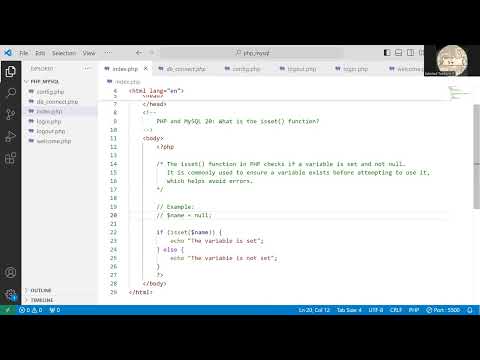
Hey, you ever found yourself wondering what’s up with this PHP stuff? Let me spill the beans on something nifty! The `isset` function. It’s like that friend who saves the day when you’re screaming “Why isn’t this working?”
So, here’s the thing. You got some code and you’re trying to figure out if a variable is even set at all before diving in and doing something with it. That’s where `isset` steps in, waving its little magic wand.
Imagine you’re cooking up a storm in your kitchen—without checking if you got the ingredients first. Wild, huh? Well, `isset` is your trusty checklist.
It makes life smoother for you by preventing those pesky undefined variable errors. No more head-scratching moments or yelling at the screen (we’ve all been there). Seriously, let’s unravel how this tiny hero function can keep your code neat and tidy.
Understanding the isset() Function in PHP
Navigating through PHP, huh? It’s like learning a new language, but once you get the hang of it, it’s really cool! One function you’ll probably bump into is isset(). Let’s dive in and see what it does.
The isset() function has a straightforward task: It tells you if a variable is set or not. Think of it like asking if your sandwich has cheese. If there’s cheese, isset() says “Yes!” by returning true; otherwise, it returns false.
Why Use isset()?
- Avoid Errors: Before accessing a variable, use isset() to check if it exists. This prevents those pesky undefined variable errors.
- Conditional Logic: Use isset() in your conditions to make decisions based on whether or not data is present.
- Easier Debugging: Quickly identify missing data points that cause bugs in your code.
Here’s a small story for you. I remember helping my friend Tom with his first PHP project. He was losing sleep over why his form wouldn’t load correctly sometimes. We checked and realized he was trying to work with user input that occasionally wasn’t sent—like trying to cut air! With isset(), we placed guards around the input fields; solved all his problems.
Now let’s see how you’d use this practically:
“`php
if (isset($myVar)) {
echo “Variable is set!”;
} else {
echo “Whoops! Variable isn’t there.”;
}
“`
In this simple example, we’re just checking if $myVar exists before doing anything with it.
Just keep in mind one thing: The function checks for variables being set and not null. If a variable is unset or its value is null, guess what? It rings false.
The feeling when everything works seamlessly because you’ve used such tiny superheroes like isset()? Oh man, priceless!
Also an interesting note—when checking multiple variables at once:
“`php
if (isset($var1, $var2)) {
echo “Both are present!”;
}
“`
Isn’t that neat? In situations where either variable goes AWOL (absent without leave), you’ll catch the issue right away!
So now when you’re debugging or setting up user forms on websites handling their inputs—feel confident throwing some isset() checks in there; protect yourself from headaches later.
Anyway that’s kinda how the dance goes between developers; chasing hidden mistakes—and tools such as these make life much easier am i right?
Hope this helps shed light on why everyone’s so fond calling upon our friend “I am here!” known more commonly as “$variable_name?
Difference Between isset() and empty() in PHP
Hey there! Let’s chat about two common PHP functions: isset() and empty(). They might look pretty similar, but they do different things! These are like tools in your toolbox—each one serves its own specific purpose.
The isset() function: This guy is all about checking if a variable has been set or not. Think of it as asking, “Hey, is this variable there?” It returns true only if the variable exists and is not null.
- If the variable isn’t even set, you’ll get a false.
- If it’s set to null, that’s also gonna be false.
- If there’s actually some value (even an empty string or zero), then you get a true!
$var = "";
if (isset($var)) {
  echo 'This variable is set!';
}
The empty() function: Now, this one’s different. It’s more like asking, “Is there anything inside this box?” It checks whether a given variable is considered empty.
- An empty string (“”), zero (0), “0”, null are all considered empty by this function.
- If any of these values are present in the variable you check with empty(), it returns true!
You follow me? In short: use isset() when you wanna make sure the thing exists at all. Use empty() when you need to know if that thing’s holding onto anything worth looking at! Understanding these lil guys can save ya from those pesky errors creeping into your code unexpectedly…
PHP Alternative to isset()
Exploring alternatives to PHP’s isset() function can sometimes feel like hunting for a single sock in a drawer full of clothes. You might miss it if you blink. But don’t worry, I’m here to guide you through this wonderful maze of PHP! Let’s break things down a bit.
Now, isset() is a handy function when you wanna check if a variable is both set and not null. It’s like having a trusty flashlight to see in the dark—pretty essential most of the time. However, there are situations where an alternative approach might make more sense.
So here’s the deal: one alternative approach involves using array_key_exists(). While isset() checks if something exists and isn’t null, array_key_exists(), as its name suggests, only cares about existence in an array—without worrying about null values. For instance:
“`php
$array = [‘key’ => null];
echo isset($array[‘key’]); // Outputs nothing (‘false’)
echo array_key_exists(‘key’, $array); // Outputs 1 (‘true’)
“`
Another sneaky option hiding up your sleeve is using the combination of null-coalescing operators (??). These nifty operators let you provide default values when something isn’t set or is null—like having an umbrella handy just in case it rains:
“`php
$value = $_GET[‘name’] ?? ‘default_name’;
“`
Here’s how it works: instead of showing errors or undefined values, this helps you provide meaningful defaults right away.
Sometimes folks prefer something even simpler and more flexible like using expressions directly with some conditions. Maybe you’ll want to use ternary operations or simple checks with conditions just flowing along nicely with logic without function overheads.
Ternary Operator:
“`php
$isSet = $value ?: ‘It’s not set!’;
“`
Finally—and hear me out on this one—for those special cases where quick checks with lots of control matter tremendously tailored functions built specifically fit best for specific needs so developers retain complete control over inputs outputs behaviors everything around codebase!
Anyway hope these little insights help broaden understanding tools techniques available tackle big small problems alike happy coding adventures ahead!
You know, when I first dipped my toes into the world of PHP, one of the functions that stood out to me was `isset()`. It’s kind of like discovering a Swiss army knife when you’re trying to cut a slice of bread with just your hands. Honestly, it blew my newbie mind.
So, here’s the deal with `isset()`: basically, it’s like asking your code a simple yes or no question – is this variable set or not? Imagine you’re baking cookies and you need to check if you have chocolate chips before starting. You’d look in your pantry and confirm they’re there, right? Similarly, `isset()` helps you check if a variable is defined and isn’t null.
I remember spending ages debugging lines because I was calling variables that didn’t exist yet. A friend once shared this trick with me – you wrap your variable in an `isset()` and voilá! No more angry red error messages shouting at you about undefined stuff. Life-changing.
Here’s something I realized: it’s more than just about avoiding errors; it’s this neat little guardrail ensuring everything runs smoothly under the hood. Like having someone double-checking each door on an airplane before takeoff.
Let me tell you this funny thing: there was a time when I wrote tons of lines only to find out half my variables weren’t even set properly! That’s when `isset()` became my best buddy for quickly throwing checks here and there.
And don’t even get me started on default values! Sometimes you’ve got optional settings in forms or queries—places where users might skip inputs—hey that’s okay because as long as there’s an isset() around handling defaults becomes less hair-pulling too!
Overall—it’s not perfect—but definitely stacks up well for making scripts behave predictably across sprawling codebases without hiccups from missing pieces… Which reminds us all how beautiful programming really feels—like solving puzzles one block at-a-time until everything clicks together effortlessly (and let’s face it — few things beat moments like that).
So yeah… what do ya think? Ever had those Eureka instances thanks again PHP’s very own “Is This Here?” magic trick—a.k.a., good ol’ friend named—`Isset`()?