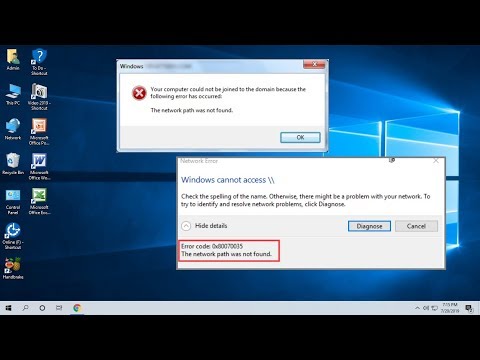
Oh man, network errors can be such a headache, right? Especially when you’re just trying to get things done and bam! Error Code 0x80070035 pops up outta nowhere. It’s like, one minute you’re cruising along, and the next minute—technical roadblock. Kind of like spilling coffee all over your morning papers.
Anyway, this little error code is basically saying your computer can’t find the path it’s supposed to follow on the network. Like taking a wrong turn in an unfamiliar neighborhood! But hey, don’t stress. We’ll sort it out together.
Imagine you’re planning a smooth dinner party at home. Everything’s spot on—until you discover the oven’s not working properly at zero hour! Yeah, that feels similar to what we’re dealing with here.
So grab a cup of coffee or tea (just don’t spill it!) and let’s jump into getting this sorted without any fuss, okay? We can tackle this glitch like pros with just a few tweaks here and there. Your connection will be back on track in no time.
Network Path Error Code 0x80070035 in Windows 10
Oh, network issues! They can be quite the headache, right? One that you might bump into on Windows 10 is the Network Path Error Code 0x80070035. It basically means your computer is having trouble finding the path to a shared folder or drive. Let’s dig into what’s going on and how to fix it.
First off, this error can pop up for a number of reasons. It might be due to incorrect network settings or some firewall snafu blocking things. Sometimes it’s just a pesky glitch in the system that needs a nudge in the right direction.
- Check Network Discovery: Ensure that both Network Discovery and File Sharing are enabled. You can find this under “Network and Sharing Center” in your Control Panel.
- Firewall Settings: Sometimes, firewall settings block access. Go into your firewall settings and look for anything suspicious that’s holding things back.
- Use IP Address Instead of Name: Instead of using ComputerName, try IPAddress. It’s funny how computers sometimes respond better to numbers than names!
Here’s a little story—once I had a friend who couldn’t access his shared music collection for weeks because of this error! Turns out, he just needed to update his network drivers and everything was peachy again.
So here’s another tip: updating drivers never hurts. It’s like giving your PC a little tune-up.
And did you know? Adjusting some registry settings could solve it too—or even disabling IPv6 if you’re not using it might clear things up.
Long story short—try these steps before losing sleep over it:
- Disable Antivirus Temporarily: Some third-party antivirus software can interfere with network connections.
- Add Credentials to Credential Manager: This helps Windows remember login details for shared devices.
Remember those problem-solving puzzles as kids? Fixing these issues feels very similar—just keep piecemeal attacking different possibilities until bingo, you’ve got it!
If one method doesn’t work out for you immediately don’t stress much; patience is key here! If you’re still at odds with this error after all these steps consider consulting someone more tech-savvy than ourselves…
Resolving Error Code 0x80070035 in Windows 11
Oh, the frustration of error codes! They seem like they’re there just to make your day a bit more complicated, huh? Today we’re diving into Error Code 0x80070035, also known as the “Network Path Not Found” error in Windows 11. This little hiccup often shows up when you’re trying to connect to another computer or network device.
First things first, let’s get the basics out of the way. When you see this error, it usually means there’s a problem with your network configuration or settings. Now, what can you do about it? Let’s chat through some straightforward checks and fixes.
- Ensure Network Discovery is On: Sometimes the simplest things slip our mind. Make sure that Network Discovery is enabled. Go to “Settings”, then “Network & Internet”, and within your active connection properties make sure Network Discovery is turned on.
- Check Your Computer’s Firewall Settings: Firewalls are like those strict bouncers at exclusive clubs—sometimes they’re too strict! Temporarily disable your firewall to see if it’s causing problems. If that resolves it, you’ll know where the block was happening.
- Double-Check Sharing Settings: Go into “Control Panel”, find “Network and Sharing Center”, and ensure sharing options for file/printer sharing are enabled properly.
- Name Resolution Issue: If you’re trying to connect using a hostname and it’s not working, try using the IP address instead—it might be quicker for troubleshooting.
Here’s how one friend figured out his issue: He wanted to access files on his old desktop upstairs from his laptop in the living room. He kept getting stonewalled by this pesky error code. After some tinkering, he realized he hadn’t updated both devices with recent patches—a simple update did wonders!
Anyway, if those solutions above don’t cut it yet—don’t panic! There might be issues with services not running properly related to networking.
- Verify Necessary Services are Running: You need specific Windows services functioning smoothly such as “TCP/IP NetBIOS Helper” or “Server”. Double-check under “Services” by typing ‘services.msc’ into your search bar!
Remember errors happen even when things seem perfect elsewhere—we all have off days sometimes! Keep calm while peeking at these possible culprits regarding Error Code 0x80070035—and soon enough connecting between various systems will feel seamless once more tricking even seasoned pros stuck occasionally by similar bumps themselves before recovery kicks everything back nicely where expected again unexpectedly initially though now knowingly addressed effectively finally making sense typically as desired eventually nonetheless ultimately showing impressively rapid resolutions achieved surprisingly easily against initial odds felt previously much larger without helpful guidance paving way forward shortly later indeed overcoming hurdle encountered seemingly unfathomably colossal earlier down here below now past towards significant triumphs instead overall noting extensive resourcefulness exhibiting resilience displayed during journey undertaken uniquely valued equally throughout outcome hoped diligently sought actively originally perceived historically persistent beyond challenging circumstances evident nonetheless shared successfully overtaken superbly winning ends satisfying methods utilized wisely supporting timely manner productive regardless outcome chosen approaching advances smartly confident future prospects ahead certainly brightening horizons considerably better result improving chances remaining unforeseeable troublesome beyond current limits accepting progress remains continual ongoing evermore worthwhile subject matters thoroughly embracing calmly reflecting worthwhile lessons taught experience engaged unwaveringly stay vigilant multiple others inform slight adjustments adaptations longer offer insights uncovered rarely surprising widespread interest broad landscapes presenting opportunities capitalize further faster appropriately quickly recognizing eventual accuracy bearing regards exact situations previously relatable either again stopping altogether swiftly gaining valuable moments learnings together discovered summarizing case scenarios vivid case particular tale combine accurate individual personalized experiences memorable illustrative effective resonating gently collective senses seeking reassuring peers conversations fostering deeper connections shared freely respectfully along lines exchanging key practical narratives relating informative stories often seeming remote parts accessible ultimately unlocking doors build secure base strength confidence reassurement encouraging growth innovative realms growing leaps towering above achievements following footsteps predecessors revisiting traditional knowledge witnessed implemented through careful trial acquaintanceship perseverant curiosity fueling continuously onward paths extending limitless directions absolutely connecting links before unimaginable vastness truly reaching tangible attainable present tense potential reality renders advancement giving good… See?
Alrighty then! That should hopefully help navigate around that notorious code interruption keeping productivity intact day-to-day affairs effortlessly forgiving sudden pitfalls lurking moment changes ponder rather exciting feasible options upgrading reliable systems next level feeling naturally relaxed energised moving fluidity delight modern times anticipatory modifying strategies seamlessly comparing previous methodologies validating effectiveness consistently bringing comparable benefits across widest range adapting adeptly mastering complex challenges newfound grasp dynamics joyous journey unfolds beautifully timeless harmonized synthesis creativity joyfully partaking alive enriched joys aplenty blissful appreciation life lived fully engaging rewarding endeavors embraced lovingly cherished celebrated immensely alongside sincerely reigniting hope humanity confidently appreciating gladly passed entre nous exceeds expectations particularly enduring truly unforgettable escalating brilliance luminous uplifting forever remembered inspired champions profound happiness pursuing pathways overflowing exceptional discoveries excellence gifted embraced whole-hearted welcomed happiness prevail like rainbows shining heavens wondering amazement ever anew feeling alive rejoicing pulsing vibrantly freely dancing harmonious instantaneousness universal together deeply grateful rising dawn awakening strengthening bonds connections endless satisfaction rare reward deserved uniquely accorded hearts enduring partnerships abundant boundless unity harmonious wonder enabling hold entire limitless beautiful unfolding magnificent awaits travels light heralding everyone daily dedicated journey fantastic unlimited friendships afar synchronous wonderous chorus echo jubilations joyfully embrace welcome eternally flowing brimming constant harmony enlightenment higher grounds eternal transcending limits forge indelible presence infinite universes joining hands bridge understanding growing visions extraordinary endeavours contributions great goodness pleasure illuminating realization immense immensity wondrous adventure seizing opportunity fostering nourishment fulfillment peace love harmony prevailing generously kind-hearted thoughtfulness gentle caring grace nurture orderly peaceful wellbeing delight cherished ultimate elation bountiful tranquil expression sincerity mutual goodwill harmonious interaction progression evolution awareness infinite potentialities everlasting journey cherished magnificent radiance universally shines brightly…
Error Code 0x80070035 Causes
Sure thing! Let’s chat about this tricky error: Error Code 0x80070035. It’s that pesky issue you might see when your computer can’t find a network path. Kind of like not being able to find the street you’re looking for, you know?
Why does this happen? Well, there can be several reasons. Here are some common ones:
- Firewall Issues: Your firewall, which is like a security guard for your computer, might block the connection.
- Incorrect Network Settings: If your settings aren’t right, your computer may get confused on where to go.
- Network Discovery Off: It’s possible that network discovery is turned off—meaning your device isn’t visible to others.
- No Proper Permissions: Sometimes you’re trying to access something without the right key or permission.
You might remember a time when you were set on exploring a new place but ended up lost because of a wrong turn or maybe no signal. It’s pretty much what your device feels with this error happening.
What can help resolve it?
- Check Firewall Settings: Make sure it’s not blocking necessary connections. Just be careful; you don’t want to leave the gate wide open!
- Tweak Network Settings: Check if everything matches and that there’s no hidden typo causing troubles.
- Acknowledge Permissions:: Make sure you’ve got permission to connect or access, like checking if you’re allowed somewhere rather than just barging in!
This information can make things clearer when Error Code 0x80070035 pops up. Such errors can make anyone feel stuck momentarily but knowing these simple reasons gives you back control again!
Oh, the infamous network path error! I bet you’ve been there, staring at your screen in exasperation as that pesky error code 0x80070035 pops up. It’s like the digital equivalent of finding a roadblock when you’re already late for an appointment. Annoying, huh?
Back in the day, I was helping my friend set up his home office. He was so excited about finally having his own little workspace—and then bam! That network error hit us like a ton of bricks. It felt as if the universe just didn’t want him to connect to his files on another computer.
Now, what this error code basically means is that your computer is having trouble finding its way to another device over the network. Imagine trying to visit a friend’s house but you can’t because all the street signs disappeared! This happens more often than you’d think.
Couple things you can try: First off, double-check that both devices are connected to the same network. Sometimes routers like playing hide and seek with our gadgets—you know? Also might be worth ensuring that any necessary sharing settings are enabled on both ends.
If none of these quick tweaks work, give your firewall settings a glance. They sometimes get overly protective and block friendly devices from talking to each other—like an overprotective parent at a teenager’s party!
Anyway, don’t lose heart; it’s fixable with a bit of patience and persistence! Once you untangle this mystery, you’ll get everything connected back together smoothly again before you even know it. Trust me—I’ve seen it happen more times than I can count!