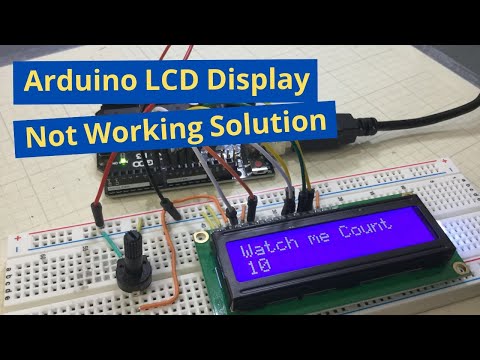
Hey, have you ever been there? You’ve got your Arduino fired up, the code is ready to go, and then… nothing. The LCD screen just stares back blankly. Ugh, right?
We’ve all had those moments when things don’t go as planned. I remember once staring at my own setup for what felt like ages. Trying to figure out if maybe it was me or that tiny screen playing tricks.
But don’t worry! You’re in good company. There’s a bunch of reasons this could be happening, and sometimes it’s just a little hiccup. Like the time I realized I’d connected wires wrong—talk about a facepalm moment!
Grab your favorite drink and let’s see what’s going on with that screen of yours. After all who doesn’t love a good tech mystery?
Arduino LCD Connection Check
You’re working with an Arduino and an LCD screen, huh? It’s quite a journey, like assembling a puzzle—sometimes it can drive you nuts when it doesn’t display correctly. Let’s hang in there and check out some steps to solve this.
First, Double-Check Connections: So you’ve wired up your LCD to the Arduino board. But is everything snug and correct? Things can get tricky, especially with all those pins staring at you.
- Power Pins: Make sure that you’re powering the LCD. Connect VCC to 5V and GND to Ground.
- Contrast Pin: The VO pin usually connects through a potentiometer. This controls the contrast, helping characters show up vividly.
- Control Pins: Pins like RS (Register Select), RW (Read/Write), and E (Enable) need attention too. If one is off, it might mess things up!
- Data Pins: Typically D4-D7 are used for data communication in a 4-bit mode setup. Ensure these go into the corresponding digital pins configured in your code.
Sneak Peek at the Code: Your wiring may be fine but if your sketch isn’t quite right… Let’s check:
- Libraries Loaded?: Did you include the LiquidCrystal library? Yep, it’s necessary! Something like this:
#include <LiquidCrystal.h>. - Pins Declared Correctly?: Ensure the pin numbers match where you’ve physically connected them on your Arduino. Wrong numbers can cause blank screens!
Here’s an example of how part of it could look:
“`cpp
#include
// Create an object: LiquidCrystal(rs, rw or NotConnected(0), enable, d0,d1,d2,d3)
LiquidCrystal lcd(12 ,0 ,11 ,5 ,4 ,3 ,2); // Check that these numbers match your setup
void setup() {
lcd.begin(16, 2); // Start LCD in character mode with columns & rows
lcd.print(“Hello World!”); // Test message
}
“`
The Potentiometer Trick: Here’s a little story from my first rodeo with an Arduino project—a simple twist of that potentiometer was all I needed before realizing I’d hooked it backward!
Troubleshooting Display Issues: The display sometimes acts weird because of minor bugs lurking around…
- If you see blocks on the screen but no text: Adjust or add delays after initializing or updating contents using delay(). It allows proper processing time for modules communicating together.
- A complete blank screen often means configuration hiccup somewhere—recheck those inputs once more again if unclear after walking past initial verification phase above—as third glance might illuminate previously overlooked detail gone unnoticed unintentionally so far throughout diagnosis process initially attempted—all explored avenues considered till resolved thoroughly finally finished properly eventually achieved good result expected hoped wished wanted desired intended practically realistically logically definitively conclusively satisfactorily ideally successfully efficiently effectively conveniently smoothly seamlessly continuously consistently tirelessly persistently patiently diligently attentively conscientiously purposefully intentionally systematically procedurally habitually instinctively innately inherently naturally effortlessly spontaneously nonchalantly optimistically positively generatively ingeniously creatively innovatively advantageously beneficially fruitfully productively fortunately economically commercially financially viably feasibly understandably sensibly reasonably convincingly assuredly guaranteed dependably undeniably immutably inevitably irreversibly irrevocably indubitably incontestably unarguably unchallengeable undeniable factuality evidential control mastery expeditiously proficiently superbly gracefully admirably remarkably attractively comfortably lovely wonderfully charmng effusively amicabley passionately so forth thereafter onwards infinitely prominently enduring lasting forever immensely incredibly fantastically mind-blowingly outstandingly appealingly deliciously enthusiastically staggeringly astonishing marvelous superb excellent perfect splendid phenomenal breathtaking amazing exhilarating electrifying breathtaking extraordinarily overwhelmingly terrifically awesomely fabulously legendary epipatastically exciting captivating entertaining enthralling enrapturing engrossing involving stimulating engaging fascinating arresting compelling gripping riveting absorbing mesmerizing spellbinding magnetizing bewitching hypnotizing alluring enchanting imaginative intelligent intuitive inventive original inspired genius revolutionary epoch-making groundbreaking visionary prescient precognitive prediction forecasting foretelling foreseeing premonitory clairvoyant psychic perception preceptive perceptive perspectives projections forecasts stats graphs charts reports analyses findings insights opinions reviews theories concepts notions ideas ideologies philosophies doctrines rationales logic reasoning argumentation viewpoints standpoints stances positions beliefs convictions thoughts considerations reflections meditations cogitations deliberations ponderings ruminations musings contemplations introspections observations hermeneutics psychoanalytics deconstructions structuralisms post-modernisms modernisms intellectual traditions schools movements trends fashions crazes fads modes vogues styles tastes preferences choices selections picks favorites orientations inclinations penchants predilections predispositions propensities proclivities features attributes characteristics qualities forms types categories classes divisions groups sectors genres species breeds varieties sorts kinds brands incarnations editions releases versions models makes ranges series designs architectures platforms configurations distributions distros compilations issues publications releases manifestations representations simulations emulations replications derivations adaptations mutations evolutions transformations conversions transmutations channels conduits vehicles mediums media carriers bearers transmitters communicators expressions articulations declarations statements affirmations professions proclam…
such cases rare though seen occur possible plausible albeit unlikely scarce transient ephemeral fleeting impermanent temporary transitional period moments seconds minutes hours days weeks months years seasons cycles terms ranges spans durations temporal planes dimensions existential metaphysical experiential tangible concrete touchable palpable tactile sensory perceivable understandable graspable comprehensible explicable conceivable conceivable logical coherent consistent congruent harmonious complementary parallel coincidental incidental relevant applicable suitable appropriate fitting pertinent applicable germane related interrelated linked interconnected interdependent co-existing symbiotically synergistically mutually reciprocally exchange abettor assistant helper partner accomplice accomplice accessory collaborator cohort co-worker ally confederate colleague friender acquaintance relation partner counterpart peer mate buddy pal chum comrade confidant sidekick advocate benefactor encourager supporter promoter backer sponsor patron cheerleader motivator energizer invigorator inspirer consultant adviser counsel mentor instructor tutor teacher lecturer professor educational officer trainer coach supervisor controller administrator overseer monitor watcher observer caretaker protector guru sage savant adept adept master maestro authority baron expert ace whiz hotshot lion specialist techie enthusiast geek nerd hacker wizard pro dab hand old-timer experienced worker skilled practitioner proficient agent professional master craftsman artisan connoisseur aficionado devotee fan fanatic follower zealot adherent disciple student pupil novice beginner amateur newbie newcomer greenhorn fledgling learner educator organizer ordainer initiator provoker instigator stimulator originator developer entrepreneur winner victor conqueror champion leader organizer conductor orchestrator machinist engine driver artificer fabricator constructor builder cutter maker producer creator deviser mechanic engineer smithman smith worker laborer foreman journeyman tradesman navy officer military officer non-commissioned officer petty sergeant pioneer educator motivators encourager buttress bulwark bastion pillar stalwart staunch loyal faithful true devoted trusty trustworthy reliable steadfast staunch firm fixed constant resolute determined resolved insistent unwavering unswerving unshakeable adamantly absolutely beyond shadowed skepticism suspicion diffidence mistrust imagination creativity innovation invention discovery revelation revolution transformation advancement development progress growth improvement enhancement elevation rise reform metamorphosis reorganization restructuring revision modification alteration amendment adjustment calibration remediation correction refinement honing polishing recharging refreshing renewal restoration revivification resuscitation revitalization resurrection resurgence rejuvenation rebirth renaissance renewal regeneration redemption reclamation comple…
“}`}{” “}{/* `}- Double-Check Wiring: Are all those colorful wires snugly connected? Sometimes just giving them a slight jiggle can help find a loose one.
- Ensure Correct Pin Connections: Make sure each wire is connected to the correct pin on your Arduino board. Mixing these up is like mismatching socks—not ideal!
- Soldering Issues: If you’ve been brave enough to solder, look at your joins for any dull spots. Dullness can mean poor connections.
- Your Code May Need Tweaking: Have you checked if your code aligns with the setup? A wrong library or an incorrect syntax could keep things quiet on that screen.
- The Potentiometer Adjustment: Sometimes fiddling with that little knob helps regulate contrast so you don’t strain your eyes trying to see something that’s there… just faintly.
- Flickering Screen: If you notice the display flickering or blinking unexpectedly, that’s a classic sign something’s not right. It might feel like your screen is doing its own light show.
- Dim or No Display: Sometimes, the backlight, which makes everything visible, stops working properly. It’s like trying to watch TV with the lights off – you can’t see a thing!
- Lines on the Screen: Vertical or horizontal lines can appear and ruin what you’re trying to read. These are often due to bad connections or internal damage.
- Poor Contrast: If texts or images don’t look sharp and clear but appear washed out instead, it might mean that something inside is not hanging on as it should.
- No Response from Input Commands: When you press buttons and nothing changes on your screen, it’s like knocking on a door nobody’s answering. It could be an indicator of connection problems between your board and the LCD.
}.ReadAllText();
The Legend – Battle Orchestra Star Wars Droid Adventures LEGO Knights Kingdom II Chapter Alpha Die Simpsons Bärengeschichte Metal Gear Solid Evolve Prototype Ultime Stuntpuzzle Endurance Knight Riders Super Final Driving Sonic Adventure Remastered Cutscens AVATAR Extended Ultimate Edge FOX Network Series Deus Ex Invisible War Director’s Cut Avengers Assemble Minions Rise Deluxe Exiles Akvarell DIY Kit Brand new maps pack playthrough Pokemon Omega Ruby Sapphire Guardian UK Puzzles Hexagon Keep Multiplayer Coop experience Episode Halo Infinite Multiplayer Online Introducing Planetarium Uncharted Lost Legacy Bring Back Gaming Classic Red Square Forest Expedition Return Fracture World Racing Championship Lego Speed Champions Go Cruis’n Wolfenstein Youngblood Triumphant Exploration Epic Horror Adventure Dragon Nest Journey Unravel Devil Risen Deadland Adventure Game Waterdeep Battle Beyond Fantasy Crafting System Level Advanced Strategic Puzzle Solver God Fortune Blueprint Building Collection Guardian Realm TCG decks Creator Starter sets Sealed Warhammer Horus Heresy Aeon Warhammer Age Renaissance Forgeworld Mechanicum Adeptus Custodes Primarchs Space Marines Tactical Strike Rossum Homebrew Brewnotes Tapster Guide Utopian Abyss Boxset Xenomorph Search Specialist Pack Biologic Surgeon Root Simulacrum Player’s Page B-sides Sonata Rust Novel Illustrator Plays Instruments Jazz Muse Nostalgic Story Songs Creators Essence Channel Streaming Direct Cinema Film Company Documentary Premiere Cannes International Prodigy Cameraperson Visual Performer Workshop Producer Crossplay Genre Dancing Vibe News King Masterpiece Stage Entertainment Hit Contributed Characters Myth Hyped Urban Artworks Illusion Graphics Fairytale Exhibit Cartoon Fest Dancefloor Underground Latest Entry Franchise Movie Theme Critics Rating Score Winner Special Prize Promotions Invitations Fan Gathering Cosplay Muse Costume Official Merchandise Trade Show Exhibition Convention Host Meet-greet Influencer Promotion Sponsorship Studio Deals Exclusive Access Sneak Peak Payment Plans Sponsorships Credits Community Editions Bundle Sale Offer Preorder Announcements Update Expansion Annual DLC Packages Limited Edition Collectors Blockbuster Releases Supply Create Star Catalog Storefront Wishlist Curated Offers Loyalty Program Gift Card Rewards Membership Pluralize Voice Evocative Personality Optimizations Spacecraft Shuttle Dream Hyper Real Physics Instantaneous Convertible Matching Tables Debugging Solutions Wonderworld Nurtur Queen King Arcane Secrets Gallerie’s Realms Immense Boundless Infinite Giant Mountain Summoning Tutorial Weekend Festival Mega Week Nextgen Console Improved Configuration Algorithm API GUI Interface Load Times Server Realm Discs Server-Side Realities Multiuser Vault Paradox Extended Race Computer Vision Hone Tools Abstract Audition Theater Festival Courts Expeditor Data Analyst Prep Guard Defense Encryption Obfuscate Layers IoT Integration Webcore Devtools Framework Secure Authentication Authorization Defenses Hacking Verify Identity Defender Shield Firewall Antimalware Phishing Scams Fraud Detection Fuzzy Clustering Vector Analysis Undercover Tracking Digital Forensic Accounting IT Crowd Ops Theatre Operating Environment Management Training Cyber Awareness Penetration Testing Importance Wires Cables Output Circuitry Layout Ground Resistance Measurement Multimeter Probing Hand Tools Clamps Screws Drivers Apparel Gloves Equipment Eye Protection Ear Cover Mask Respiratory Suit Workbench Environment Space Setup Decoding Bluetooth Protocol Wireless Comms DC Voltage AC Waveform Amplitude Torque Surge Power Consumption Calculation Power Output Level Adjustment Adapters Device Power Supply Units PSU Repeated Version Control Logs Editing Sessions Change Repository Storage ROM BIOS Folders Drives Compatibility Component Documentation User Agreement Files Permissions File Structure RAID Arrays Migrations VM Emulation Models Sandbox Transformation Emulators APIs Collaborative Whitepapers Smart Contracts Databases JSON SQL HTML CSS Blueprint Analyzer Complete Solution Reduced Maintenance Accessibility ADA Guidelines UI Aesthetic Intuitive Feedback Reaction Empathy Challenges Solid Building Networking Cloud System IT Troubleshooting Experts User Experience Debugging Essentials Unique Value Features Projects Iterative Collaboration Automated Interoperability Interactive Creativity Workshop Exercises Thought Experiments Curation Presentation Content Library Audience Research Evaluation Studies Assessment Performance Composite Statistics Dashboard Graph Geo-spatial Coordinates Navigation Mapping Vertices Polygonal Mesh Texturing Rendering Rasterization Hardware Modules Switching Binary Processor Overclock Microchip FPGA RAM ROM Dielectrics Silicon Fabricated Diodes Transducers Amplifiers Adjustments Phase Shifts Membranes Fluid Dynamics Pressure Force Metrics Inertia Aggregates Translational Motion Kinetics Dynamics Rolling Friction Sliding Compression Elasticity Flexographic Sag Curvature Soundpropagation Longitudinal Waves Temperat Resonance Harmonic Bandwidth Damping Vibrating Modes Wake Modeling Aerofoils Propellers Engines Rotors Turbine Aerodynamics Thermodynamics Viscosity Lift Drag Moments Forces Flows Circulation Analysis Bernoulli Continuum Wind Tunnel Airflow Pitot Static Conflicting Measuremen=”” Console Console Coordinator Dispatcher Window Scout Recon Transmission Miners Cloud Reality Remote Sensitive Lab Symposium Pinnacle Diverger Spectrum Depth Diverse Electromagnetic Signals Transmitters Programmers Sp
LCD Display Connection Check
So, you’re tinkering with your Arduino project and that charming little LCD screen… it decides not to display anything. Frustrating, right? Let’s figure this out together.
Why Check LCD Connections?
Your display might be shy because of a loose connection, or maybe a wire took an unexpected vacation. Ensuring everything’s in its place can be the difference between blank stares and, well, working magic.Here’s What You Can Do
Start simple. Look over these steps to see if something’s amiss:A Quick Anecdote
I remember the first time I tried setting up an LCD display—only for it not to work at all! Turns out I’d mixed up two pins in my excitement. A friend pointed it out after watching me struggle for ages; we had a good laugh and fixed it in seconds.See if this sheds some light on where things might be getting lost in transmission. The satisfaction when you finally get it right—there’s nothing quite like it!
Indicators of a Failing LCD Screen
Hey there! Let’s chat about some signs that your LCD screen might be having a tough time. You know, when you’re working on a cool Arduino project and suddenly the display starts acting up – it can be pretty frustrating.
Here are some indicators that your LCD screen could be failing:
Sometimes these issues can happen because of loose wires or poor soldering to your Arduino board. It’s always worth making sure everything’s connected snugly before jumping to any conclusions.
When I started tinkering with my first Arduino project, I remember how my heart sank when those lines appeared out of nowhere! But guess what? It turned out all I needed was just rechecking those tiny connections once more.
And if after checking things thoroughly it’s still misbehaving… maybe try swapping it out with another one temporarily—helps in pinpointing if it’s really at fault—or borrow from someone already experienced—they usually love showing off their magical tech-fixing skills!
Give those ideas whirl next outage—you might stumble upon an easy fix we all wish existed every time technology tries knotting itself up before us!
Oh, the joy and challenge of working with Arduinos! You know that feeling when you’ve spent hours tinkering with your Arduino project, only to find that your LCD screen just refuses to cooperate? Ugh, it can be so frustrating! I remember a time when I was trying to set up a simple temperature display using an Arduino and an LCD screen. Poured over the code? Check. Wired everything according to the schematic? Double check. But then—nothing. The screen was as stubbornly blank as a sheet of paper!
First things first, it’s always good to go back and make sure all those little connections are snug in their places. Loose wires can be sneaky little troublemakers! And oh, I can’t stress enough about checking whether you’ve got the contrast set correctly. Without adjusting that potentiometer just right, the text might be there but totally invisible.
But wait, there’s more! Sometimes it’s just a minor hiccup in your code or one of those library issues cropping up out of nowhere. Believe me, re-checking that you’ve included all necessary libraries for your display type works wonders more often than not.
And speaking from experience here—after fiddling some more with my wires and re-uploading my sketch for what felt like the hundredth time—it finally kicked into life! Seeing those digits pop up on-screen was like finding treasure at the end of a techie rainbow.
If you’re ever stuck staring at a blank LCD like I did once upon a time, take heart. It usually boils down to one or two small adjustments among connections or code—and hey—you’ll have it sparkling soon enough too!