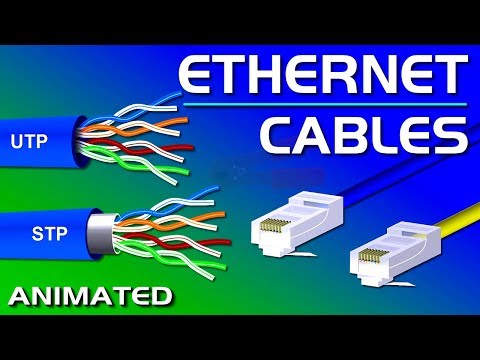
Alright, so you’re setting up a network and someone mentions UTP cable length limits. And you’re like, “Uh… what?” It’s one of those nerdy things people throw around, right? But stick with me here; it’s not that scary!
Imagine this: You’re trying to connect a printer that’s all the way in the other room, and suddenly there’s talk of cable lengths. Seriously! You may not have given it much thought before, but it matters. Too long or too short can mess things up big time.
Think of UTP cables as those lifelines for your network devices. They keep everything talking smoothly—a bit like having a good cellphone signal for your favorite calls. Messing with cable lengths? Well, that could mean dropped connections or sluggish speeds.
Don’t fret! We’ll break down what you really need to know so everything runs smoothly at home—or wherever you are setting things up. Hang tight; we’re gonna make sense of this together!
Factors Limiting UTP Cable Length
You know, when setting up a network, there’s one tiny thing that can trip people up: cable length. Yep, it can make or break how well your whole setup works! Specifically, UTP cables—those unshielded twisted pair cables you see connecting all the devices—have limits you gotta keep in mind.
Here’s the scoop:
- Signal Attenuation: Every meter you add to a UTP cable kind of wears down the signal. It’s like yelling at someone across a room—the further they are, the harder it is for them to hear you. As signals travel through these cables, they just weaken naturally.
- Electromagnetic Interference (EMI): You know all those electronic gadgets buzzing around? They can seriously mess with your cable signals if they get too cozy with high EMI sources like microwaves.
- Crosstalk: Imagine two conversations happening through thin walls—you might hear bits of both. Crosstalk is kinda like that but with data signals from different cables interfering with each other.
- Cable Quality: Not all UTP cables are created equal! Better quality means better insulation and construction that holds the signal together longer. Check for specifications like CAT5e or CAT6—these labels tell you a bit about what to expect from them.
Now here’s an example scenario: If you’re using a standard CAT5e UTP cable, you’re good up to about 100 meters (328 feet). That’s kind of the sweet spot for keeping data flowing nicely without glitches or drop-offs.
So seriously, next time you’re linking up devices across your space check how far that cable has to run ’cause it really counts if reliability’s something you’re aiming for.
And look if things go haywire—or feel sluggish—it might just be worth double-checking how long those lengths have stretched out over time!
UTP Cable Length Limits in Network Setup
Sure thing! Let’s get into the basics of UTP cable length limits for network setups. This might sound like tech jargon, but we’ll break it down. It’s like discussing noodles—some are longer, some shorter!
Imagine you’re setting up a network at home or in the office. You’re using those familiar cables known as Unshielded Twisted Pair (UTP) cables. Now, these are popular because they’re cost-effective and do the job pretty well. Yet, there’s this sneaky devil called distance that you need to keep in check.
Why Length Matters:
If a UTP cable goes beyond a certain length, it could affect performance. Your data could slow down, or worse, you might lose connection entirely. Picture it as trying to shout across a football field – your voice loses strength over distance.
Standard Limit:
- The maximum recommended length for a single UTP cable run is 100 meters, which includes patch cables at both ends.
- This stretches about 328 feet in total.
But hey—why is there a limit? Well, signals degrade over long distances due to resistance and interference along the way. Ever notice how voices get quieter on long phone lines? Same idea.
A Quick Example:
Think of laying cable from your living room router to an upstairs bedroom computer. If your path is winding or has lots of detours through walls and ceilings, keep it under 100 meters from start to finish to maintain speed and stability.
Another thing comes into play too: network standards like Ethernet dictate these lengths to help ensure everything runs smoothly together—even if different brands are involved.
Going Beyond Understanding Limits:
You might think “What if I need more than that?” Good question! If extending beyond this range is unavoidable:
- Add devices like switches or repeaters every so often along the line.
- This boosts signals back up before they weaken totally.
Remember it’s vital not just because someone says “follow strict rules.” It’s based on real-world experience where improvisation causes headaches!
To close off my ramblings here without leaving confusion hanging around – watch those distances closely as life happens upon us all suddenly with unknown wiring paths waiting silently yet gleefully out there… lurking under unattained floorboards needing careful placement mindfulness…
Hope sharing tales helps clarify why keeping within bounds ensures strong connections without disruptions!
Cat6 Ethernet Cable Distance Limit
Ah, the joys of setting up a home network! You’ve probably come across Ethernet cables with all sorts of numbers and letters, right? Well, the Cat6 Ethernet cable is one of those things that sounds technical but really isn’t that hard to get your head around once you break it down.
First things first: Cat6 cables are part of the family known as UTP or Unshielded Twisted Pair cables. These are essential for connecting devices within a network. Now, when it comes to setting up your home or office network using Cat6 cables—especially if you’re aiming for those super-fast speeds—keeping an eye on distance is key.
So just how far can you run these nifty little wires? The maximum recommended length for a Cat6 cable is typically 100 meters or about 328 feet. This distance includes patch cables at both ends, so you can think of it as the whole kit and caboodle from start to finish.
- Standard Operation: If you’re within this limit (the typical 100 meters), you should get excellent performance without noticeable signal loss.
- Beyond That Distance: Venture past this limit and things might start getting quirky. Signal degradation could occur, affecting data transmission speed and reliability.
For example, let’s imagine you’re wiring an office that’s about the length of a football field—that’s roughly 100 meters in case you’re wondering. In most scenarios inside this range, your Cat6 cable will perform just fine without hiccups.
But if you’re planning something more ambitious like connecting buildings across campus grounds—or if walls and materials tend to mess with signals—consider alternatives like adding switches in between. Or better yet opt for fiber optic connections which handle longer distances with ease!
Remember too not all environments play fair; interference from other electronic devices might demand shorter runs or shielded variants known as STP (Shielded Twisted Pair). But hey unless there’re some serious space shuttle-level electronics nearby chances remain low interference will be significant enough.
So there ya have it! Keepin’ limits under wraps ensures smooth sailing when connecting those speedy networks together via trusty ol’ Cat6 cabling methods ensuring sound connectivity throughout workspace adventures ahead!
Hope everything’s crystal clear now—I’m sure once plugged correctly everything works wonders… just like sipping hot cocoa by fireside after snowball fight kinda feeling—satisfaction guaranteed ’cause nobody enjoys spotty connections resembling stuck-up coffee straws mid-sip chaos moments—they’re dreadful stuff indeed!
Have you ever noticed how some things just have a limit? Like, no matter how much you’d love to stretch it further, there’s a point where it just kinda says “nope.” Well, network cables are a bit like that too. You know those UTP cables we often use in our home or office setups? They’re sneaky little things with their own set of rules.
UTP stands for Unshielded Twisted Pair. Doesn’t sound too fancy, does it? But oh boy, these cables are like the backbone of many networks around us! Imagine this: you’re setting up your work-from-home station. You’ve got all the gadgets and gizmos ready to roll—laptop here, printer there, maybe even a cute little lamp to give your space that cozy feel.
But then comes the challenge: making everything talk to each other through the network. And that’s where our friend UTP cable steps in. Thing is, they can’t go on forever. Nope! There’s this length limit of about 100 meters (or roughly 328 feet). Anything beyond that and things start getting funky—signal loss happens or you get slower internet speeds.
I remember helping my cousin set up his gaming den once. We thought we were smart stretching one long cable across multiple rooms. But then his character would freeze mid-game because of lag! We were scratching our heads until someone pointed out we overshot the cable length.
Why does this happen? Well picture trying to shout across a field—it’s all clear when close by, but farther out your voice kinda fades away right? That’s similar with these cables; after a certain point they can’t maintain signal strength effectively anymore.
So what’s the workaround if you really need more distance covered? More cables in between as extenders or using devices like switches or repeaters which help boost signals along their way can do wonders!
These quirks remind us: technology might be powerful but there’s always something new it’ll teach ya—even if it’s learning where lines (or lengths) should not be crossed!