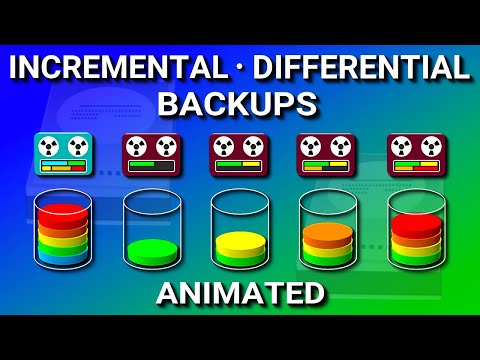
You ever wonder how backups actually work? I mean, like, we hear about them all the time. But when it comes to “incremental” and “differential,” things can get a bit fuzzy! Anyway, the other day I was chatting with my neighbor—he’s always fiddling with his computer—and he mentioned he lost some files. Ouch! So that’s when it hit me.
These two backup types can really make a difference. And trust me, they’re not as complicated as they sound! Think of it like keeping track of your favorite TV series (or podcasts if you’re into that). It’s about saving progress and knowing where you last left off. You follow me?
Stick around, we’ll break it down together, nice and easy. Who knows? Maybe next time you’ll be the backup guru among your friends!
Difference Between Full, Incremental, and Differential Backups
Let’s break down the world of backups, you know? This is one of those things you might not think about until something goes wrong, and then, bam! You’re left without your precious data. So here’s what you’ve got to understand: there are three types of backups—Full, Incremental, and Differential.
Full Backup: Imagine taking a snapshot of everything on your computer. That’s what a full backup does. It copies all the data on your system at that moment in time. Sounds exhaustive, right? It is! But there’s a downside: it can take forever and use loads of storage space.
- Advantages: Simple and complete recovery.
- Disadvantages: Time-consuming and requires lots more storage.
Here’s where we get into the intriguing stuff—Incremental backups. Let’s say you took a full backup two days ago. You don’t need to copy everything again; just what’s changed since then.
Incremental Backup: These only store changes since the previous backup—whether that’s full or incremental. It’s like building steps up a staircase each day after starting with ground level.
- Advantages: Saves time and space compared to full backups.
- Disadvantages: Recovery can take longer because you’ll need all increments plus the initial full backup.
Then we’ve got differential backups—not too different from incremental ones but with their unique twist!
Differential Backup: this type also tracks changes after that last full backup but doesn’t reset daily like incrementals do; essentially accumulative changes are added over time until another complete full occurs.
- Main PRO:– Faster recovery than incrementals because fewer pieces need gathering
- Con : B > Needs More space/time gradually until next rounders are redone fully again LI >
UL >To sum up—full offers straightforward restorations yet demands plenty resources (time/storage); while incremental/differential rule helps economize ongoing efforts still call varying methods during actual data regroupment stages…capisce?
Three Levels of Data Backup
Hey, you ever thought about how important your data is? It’s like, super essential to keep it safe. And that’s where backups come in handy! Let’s chat about the three levels of data backup: full, incremental, and differential. Knowing these will make you feel like a backup wizard!
Full Backup:
This is the big one—the motherload of backups. A full backup captures every single piece of data you’ve got at once. It’s comforting ‘cause you know everything’s saved in that snapshot. But yeah, it takes time and space since it copies all your data each time.Incremental Backup:
Now, this one’s like the speedy little guy! An incremental backup only saves the changes since the last backup—be it full or another incremental one.- First step: do a full backup.
- After that: capture only new or changed files.
Imagine you’ve finished writing a novel (nice!) and start working on chapter 2; an incremental backup will just save chapter 2 as long as chapter 1 hasn’t changed between backups.
Differential Backup:
Differential is kinda halfway between full and incremental—it’s quite smart! It saves changes made since the last full backup.- You still start with a full backup.
- Only new or altered files are copied after that initial one.
Let’s say we go back to our novel example… You wrote chapters 1 through 3 before doing another differential; this method would save those three chapters every time until your next big save.
Each level has its quirks:
– Full gives peace (and eats space).
– Incremental needs less room but requires patience during recovery.
– Differential falls somewhere sweetly balanced between them.Keep in mind finding what fits best depends on stuff like storage capacity & recovery speed needs—you grab whichever makes sense for ya situation based on preferences/priorities/preferences over performance vs size spacsiness delicacies!
Types of Backups and Their Differences
You know, backups are like those insurance policies you get ’cause you want to be prepared for the unexpected. It’s all about keeping your data safe and sound. So let’s chat a bit about them.
Types of Backups
There’s quite a few ways to back up data, each with their own quirks and benefits.
First, there’s the Full Backup. This is kind of what it sounds like: it copies all your data every time you run it. It takes up lots of space and time but boy, is it thorough! Imagine having a photo album of every single moment in perfect detail—full backups are that for your digital life.
Then we have the Incremental Backup. What this one does is pretty clever… After an initial full backup, it’ll only grab changes made since the last backup of any type. It’s efficient and speedy but restoring data can take longer since information might be scattered across multiple incremental backups over time.
Lastly, there’s the Differential Backup. Think of this as Incremental’s sibling. After that first full backup too, a differential one stores changes made after the most recent full backup rather than any type like its brother does with incrementals! It sits nicely between Full and Incremental in terms of speed efficiency—easier than Incrementals when restoring files…but still faster than doing another Full!
Comparing Incremental vs Differential Backups:
- Storage Space: Incrementals use less space because they only store what’s changed since last time?
- Restore Speed: Differentials are quicker to restore due fewer layers needing retrieval during recovery?
- Efficency: While those incrementally update quicker; differentials strike good balance by catching snapshots right at regular intervals.
When deciding which one’s right for ya’, think background needs & resources available too everyone’s situation ain’t same one-size-fits-all solution! So yeah—that quick overview should help clear things up!
Let’s talk about backups—it’s one of those things in the tech world that might make you roll your eyes but hear me out. I remember once losing a trove of photos because, well, I thought I’d backed them up. Turns out I was wrong, and oh boy, did I learn my lesson! You know that feeling when you’re trying to piece together memories without pictures? Yeah, not something you’d want to experience.
Now, when it comes to saving your data’s bacon, incremental and differential backups are like two different approaches to the same goal. It’s like choosing between tacos and burritos for dinner; each has its charm depending on what you need at the time.
Incremental backups are quite nifty because they save only what’s changed since the last backup. Imagine scribbling notes on a notepad—incremental is just adding new points instead of copying everything over again. This makes them quick to run and perfect for keeping storage use low. But there’s always a catch: restoring data can be a bit slower because you might have to string several incremental pieces together like finding all your socks from different laundry baskets.
On the flip side, you’ve got differential backups which sort of sit in between full backups (where everything’s copied) and incremental ones. Differential saves all changes since the last full backup—it’s as if you’re copying just new entries ever since you had a clean slate at the start of the month or week. Restoring from differential can be quicker than with incrementals since it’s more like grabbing all related socks in one go rather than hunting through multiple piles.
Choosing between these depends on your patience with backing up versus restoring time and how much storage space you’ve got lying around. So yeah! That’s how these two play out in real-world scenarios where data safety meets practicality—it might not stop heartbreaks entirely but sure helps when computers decide they’re having a “moment.