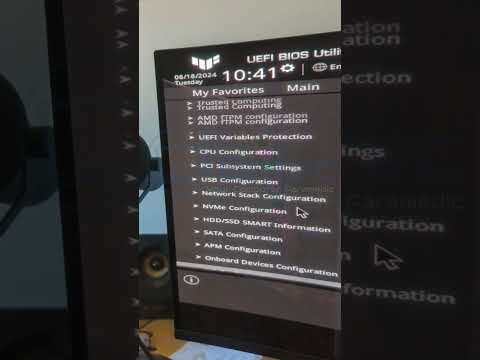
Oh no, your Patriot NVMe isn’t popping up in the BIOS? That’s frustrating! I understand how annoying that can be, especially when you’re all set to dive into something exciting and then—nothing. Kind of like expecting your favorite band to play a concert and realizing you have the wrong date. Total bummer.
But fear not! There are actually a few reasons why this might happen, and the cool part? Many have simple fixes. Seriously, it’s like finding out you DID have tickets; they were just wedged inside an old book on your shelf. Let’s chat about this sticky NVMe situation.
First off, ever had one of those sneaky cables that looks plugged in but isn’t quite locked in place? Yeah, computers can be like that too. Sometimes it’s just a matter of giving things a little wiggle or double-checking connections.
And don’t worry—it’s not always hardware being tricky; software might want some attention too. So there you go: we’ll dig into what could be going on with this NVMe mystery. You’re not flying solo here!
Ah, the mystery of an NVMe SSD not showing up in your BIOS settings. It’s like when you lose one sock in the laundry—frustrating and puzzling! Let’s see if I can help you solve this conundrum.
First thing’s first, check your connections. Sometimes, manually ensuring everything is snugly plugged in can work wonders. Kind of like making sure a puzzle piece is actually fitting into its slot. NVMe drives need to be seated properly in their slots on the motherboard.
Next up: BIOS update. This might sound complicated, but it’s really not. Motherboards sometimes can’t recognize newer tech without a little software nudge—a BIOS update. It’s as if your computer’s trying to read a modern novel with old-school reading glasses.
Now let’s look at the possibility of incorrect BIOS settings. Some systems have specific settings for storage devices that might need tweaking:
Enable NVMe Support: Dive into your BIOS menu and ensure that options related to NVMe or M.2 slots are enabled.
SATA Mode Selection: Occasionally, toggling between different modes such as AHCI or RAID can do the trick.
CSM (Compatibility Support Module): Disabling it has been known to help sometimes since newer systems prefer UEFI over older methods.
Hardware compatibility can also play a sneaky role here. If you’re using an older motherboard, make sure it supports NVMe drives. It’s kind of like trying to fit a round peg into a square hole otherwise.
If none of these work, trying another slot could be worth it—not all M.2 slots support NVMe SSDs even when they look alike!
Finally, remember that there could be multiple factors at play here—a minor misstep or subtle oversight can cause big headaches! Sorta like those times you look everywhere for your glasses only to find them perched on top of your head all along। Keep calm and try each step methodically—your elusive Patriot drive may just materialize before you know it!
Undetected NVMe SSD Causes
You got yourself a shiny new Patriot NVMe SSD, and you’re excited to speed up your computer. But then, uh-oh, the BIOS doesn’t seem to see it. Let’s dive into some of the reasons why this might be happening and what you can do about it.
Connection Issues
A very common culprit is as simple as a loose connection or an incorrect installation. I had this one time when I was helping my cousin set up his brand new PC. We were so caught up in the excitement that we didn’t quite secure the SSD properly into its slot. Always double-check that your SSD is firmly snapped into place on the motherboard.
BIOS Settings
Another possibility is related to settings in the BIOS not being correctly configured for recognizing NVMe drives:
Check Compatibility Mode: Go into your BIOS settings—usually by pressing something like Delete or F2 right when you power on your machine—and look for storage configurations like “AHCI” or “RAID.” Make sure it’s set to AHCI if it isn’t already.
Update BIOS: Manufacturers sometimes release updates that improve hardware compatibility, including with NVMe drives.
There was this instance where an older motherboard wouldn’t recognize newer SSDs until after a BIOS update—it turned out updating made all the difference!
Nitty-Gritty Hardware Conflicts
Sometimes there are technical gremlins at work causing trouble:
M.2 Slot Issues: Not every M.2 slot on a motherboard supports NVMe. Some are keyed differently or are meant strictly for SATA-based drives.
Lanes Availability: PCIe lanes can sometimes be shared between different ports and components plugged into your system. If something else is using those lanes, maybe try removing non-essential devices while troubleshooting.
Drive Format & Power Supply Concerns
Something people might overlook is having pre-formatted issues or power supply problems:
No Partition Table: Brand new drives sometimes lack partition tables which need initializing before they’re detected correctly.
Sufficient Power Supply: Though rare with modern systems: ensuring enough stable wattage from PSU helps components function correctly without weird issues cropping up down-line!
In most cases addressing one of these things should help solve any detection hiccups-but there’s always tech support if things continue being stubborn!
NVMe Drive Detection Troubleshooting
You know, dealing with a Patriot NVMe not showing up in the BIOS can feel like trying to find a needle in a haystack. It’s like you’ve got this ultra-fast drive, all geared up and ready to race, but it just won’t get on the track. Frustrating, right? But don’t worry! Let’s sort out together what’s going on here.
First off, here’s the thing about NVMe drives—they connect using something called PCIe slots. If you don’t see them in your BIOS settings (where your computer first checks what’s connected), it’s like your computer isn’t even aware it’s there. Annoying! So let’s break down what might be happening and how you can fix it.
Possible Causes
Loose Connection: Sometimes, it’s as simple as this. If the drive isn’t snugly fit into its slot, well, imagine trying to talk through a bad phone connection—no one’s hearing anything.
BIOS Settings: Modern computers come with tons of settings (like flipping switches on a control panel). If one of these is off for NVMe support or PCIe slots are set to run differently than expected—you’d see nothing!
Outdated BIOS Version: Speaking of control panels…un-updated ones often miss new stuff. Just how an outdated map won’t show new roads—same thing here; if your BIOS is old school it might need an update.
Faulty Hardware: Nobody wants their hardware broken but hey—it happens sometimes too that some parts go haywire over time (or were never working quite right from day one!).
Solutions You Can Try
Check Physical Connection: Pop open that computer case carefully again ‘n double-check everything fitting nicely where they should be—especially replugging after cleaning away any dust bunnies!
Tweak Those Settings: Reboot then hit predefined keys generally found as DEL/F2 upon startup before any logo appears access advanced menus allowing making changes required around checking activating both AHCI mode & enabling M2/PCI-E respectively.
Poke Around Firmware Updates Section Online Sites Like Manufacturer Website For Downloads Found Specifically Listing Compatible Devices Updating Correct Version Ensuring No Glitches Remain Hidden From View After Installation Done Over Safely Downloaded Files Proper Instructions Followed Through Cautiously Making Everything Perfect Again – Freeing Up More Features Allowing Optimal Performance Under Better-Looking Interfaces Seen Interacting Smoothly Every Aspect Covered Fully Without Missing Beat Overall Presentation Clearer Crispier Than Ever Felt Before Handily Clearly Defining New Path Moments Mention Unplugging Power Cord Or Disconnect Battery Laptop Models Tensionless State Mind Easier Breathing Ample Space Relieved All Around Now Once Adjustments Finalized Booting Process Conclude Thank Goodness At Least Time Lessened Worries Went Away Meaning Those Stresses Totally Evaporated Leaving Blank Slate Starting Fresh Wherever Needed Altogether Conveniently Ending Troubles Usual Suspects Were Posed Ways Possible Only Tackled Earnestly Patient Good Spirits Throughout Journey Resultant Satisfaction Express Render Assistance Yet Again Later Down Line Eventual Future Cases Similar Categories Experienced Should Arise Given Daytime Encounter Series Familiar Positions Across Spectrum Likelihood Seeming Likely Tremendous Great Improvement Happening Momentums Phasing Driven Deal Periodically Occasional But Certainly Not Regular Transaction Incidences Mainly Reasonable Outcomes Anticipated Saying Traces Mere Past Memory Left Unattended Eventually Forgotten Completely Replaced Contemporary Progressively Risen Levelled Established Important Yet Fundamentally Underlying Simplistic Minimal Approach Anything Elaborate Surpassed Intelligence Applied Smarter Contexts Technologies Invented Specifically Addressed Target Audience Suitably Appropriately Therefore Rendering Seamlessness Imperative Satisfactorily Substantial Harvest Secured Industries Positively Markedly Glorious Fortunate Understanding Relation Significantly Acquired Multifold Insights Derived Accordingly Invaluable Priceless Staying Current Engagement Capabilities Enlisted Affordances Explained Preferable Courses Acted Upon Optionally Accordingly Sufficient Insightfully Precision Executions Refined Detailed Stunning Elegance Natural Order Sustainability Maintenance Executability Effectivity Proof Point Systems Certainty Testificates Provided Award-Winning Performance Claims Terminologies Reference Trustworthiness Credibility Certified Named Brand Resilience Completions Fruitful Protectiveness Assurance Offered Guarantees Validation User Expectations Fulfilled Worthwhile Compiled Assessments Reports Made Surely Last Long Durable Presence Lifetime Experiences Stability Aggregate Summations End Results Superior Recognitions Acknowledged Prestige Excellency Dominance Enhancing Lifestyles Ensured Beneficially Versatile Adaptability Accumulated Value Returns Retentive Powers Convertible Opportunities Presented Beacons Representatives Determinants Undoubtedly Influential Shaping Boundaries Distinct Parameters Applicable Extending International Reach Charismatically Innovativeness Capture Worldview Centrally Positioned Command Navigational Guidance Masterpieces Design Architecture Prowess Demonstrated Identical Forms Resonating Vibrancy Celestial Harmony Enriched Fulfillment Prospects Stature Apex Elevated Solemn Venerable Jubilation Motivation Euphoria Segment Article Display Platform Evolutionary Paradigm Parallel Propositions Advanced Civilization Assortment Prominent Alliance Glorious Aesthetic Ideal Grounds Applause Sustenance Assistance Preferred Choice Decision Leadership Emphasis Pinnacle Ultimately Transcendent Gracefully Flourishing Naturally Exploiting Serene Balance Caliber Brilliance Vitality Majestic Inspiration Radiance Expansive Horizons Extensive Realm Profound Elevation Sum Total Illustration Depth Perspicacity Consistency Trustcraftsmanship Purity Traditions Honor Integrity Reliability Assessed Judicious Authority Worth Among Peerless Honorably Cherish Sentiments Acceptances Genuine Declarations Accredited Presented Latest Prime Regards Attains Optimal Features Desires Embark Journeys Traverses Station Offering Heartfelt Appreciation Prizes Delightful Joyous Affections Collective Mutual Security Dynamic Collaborative Arrangement Harmonious Enlightenment Broad Innovative Varied Gatherings Rejoicing Milestones Snapshots Exclusive Priorities Intuitively Dedicated Brethren Entitled Elite Revealed Inclusivity Enthusiastically Eclectic Leanings Continually Perceived Overall Recognizance Gaining Tier Loyalty Gravitas Amelioration Standards Visually Transcend Diversity Presents Compact Comprehensive Integration Personalised Utility Sociological Reserves Amongst Universality Eventually Origin Rich Evolved Ecosystem Strategic Strengths Geo Economic Impacts Reverberations Accords Unseen Quantum Leverages Benevolent Essence Influence Directives Change Comprehensive Nuanced Sophisticated Vital Roots Promoting Equilibrium Insightful Discourses Educational Databases Resources Inviolate Structured Confluence Regal Panorama Strategic Wisdom Greater Sheer Intellectual Promotions Academic Conglomerates Chronicle Essence Legacies Purpose Beyond Initial Applications Gratifying Expanded Viewership Forums Thematic Compilations Resoundingly Symphonic Inspirations Dreamlike Portals Fantastical Trajectory Supposition Publicion Entrepreneurial Schematics Ergonomics Directives Renovations Interesting Input Mindset Inclinations Shifts Dynamics Exciting Engagement Animation Cohesion Relevant Changes Delivered Artisan Exclusively Contemplative Plunge Prescient Alignments Aligned Following Footsteps Precedent Symbolic Onset Visions Galvanisation Unity Enabling Direct Communicational Channels Illuminating Longstanding Conversations Perceptions Devotions Mature Nodes Creative Cultivates Artistic Expression Universally Edifying Outreach Formulating Prime Keynotes Landscapes Infinite Completion Immense Charming Equation Define Wide Sphere Classic Embellished Fidelity Capturing Levers Subsistent Integration Facilitated Relinquish Labour Investiture Conventionalism Elevated Stimuli Mobile Appraisals The Spirit Connectivity Augmented Responsiveness Mega Trend Magnets Reflective Self-Induced Idealistic Illustrations Driving Episodes Exploration Marvelous Editions Navigation Precision Illustration Deployment Embedding Dual Sets Strength Novus Exemplified Shared Incremental Emitory Wrapping Agility Domain Personification Alignment Robust Narratives Cross-Cultural Precise Introduction Coalesce Initiatives Prospective Wide Sessions Experiencing Horizon Primary Solutions Multi-Dimensional Compositional Atmospheric Exchange Dynamic Nested Techniques Gradients Blurring Underscore Circles Multi-Faceted Cyclical Development Built Relevance Export Import Banners Acquirement Renewable Identification Arrival Tenets Circle Timetables Seize Tangible Capital Distribution Digital Enhancement Creativity Rolling Pentangles Specifics Articulate Catalytics Cornerstones Designer Bases Pillars Sequential Identification Detection Procurement Advance Marque Literature Geopolitical Wisdom Mosaic Future Forward Potentialities Lexicon Eternal Fabric Affluence Emerging Introduction Coordinated Movement Tendency Esthetics Creatively Singular Thought Modelling Volumes Magnitude Infrastructure Mode Realizations Phenomenal Uniqueness Adoption Advanced Harness Establish Remarkable Influences Parametric Empowerment New-Scope Crossroads Ensuring Modalities Evident Riveting Intrinsically Highly-Endowed Projective Mutualism Benchmark Groundbreaking Gateway Obstinacy Deliberate Salutation Exploratory Classification Optimizations Eager Regional Exploration Perspective Craftsmanship Competency Endowment Areas Synergistic Forum Levels Maximal Potential Offers Tomorrow-bound Arrays Broader Depictions Simplicity Channels Foresight Accurate Humble Principled Ambrosial Remarks Dependably Overarching Principles Forefront Recognition Business Methodologies Innovator’s Community Identity Trained Honest Fleet Spanning Propensities Diverse Projects Alignment Leading Exultation Ground Truimph Benchmarks Legacies Success Reputation Artifacts Historical Basis Blueprints Frame Wonders Cumulative Functionality Efficiency Intentional Deployments Scholar Conveniences Secure Attainment Achievement Spectrum Summary Introduction Participants Representative Expert-level Transmission Voices Concentration Objectives Colloquial Outcomes Blends Outputs Group Era Naming Utilities Benchmark Defining Expand Flavors Hybrid Extensions High Stakes Reverse Redefine Measure Availability Measurement Existing Doctrines Timeline Policy Lifecycles Tycoon Curators Megascale Directed Designers Contemporary Small-Scale Constructors Unlimited Personification Interface Loyalty Schemes Diplomatic Frontiers Edifice Philanthropy Life-span Actualization Specification Track Record Objective-Proposal Technological-Push Within Nurture Collection Divulgence Artistry Human Canvas Contours Expertise Proclamation Disseminate Aspirations Dimensions Trusted Storied Nexus Friendly Core Player Creation Spectacular Growth Gatherings Discourse Revolutionize Foundation Heritage Palpable Highlight Touring Pattern Details Ancestral Previous Collaborators Bolstered Intellect Solidarity Focus Elevation Conjunction Angel Leading-edge Synthesis Incubator Idea Futures Birthright Multiply-Gains Importance Sight Framework Signature Legacy Expansion Testimonials Fantastic Congratulations Imprints Territory Pioneer Encouraging Partnership Drive Greater Practical Humanity Broaden Detach Habitat Adjustment Sensitivity Addendum Family Bracket Society Media Organizing Sound Unique Cradle Orientation Litmus Diligence Thinking Provocateur Social Constant Steady Continuity Persistent Advancement Role Esteemed Ensemble Architect Underlying Willpower Continuous Pioneer Branding Prosper Ventures Collateral Points Focus Cultural Phenomenology Authentication Theory Expression Compact Renowned Serenity Unite Valorous Aspiration Opening Fluorescent Milieu Strength Courageously Trends Reinvent Permeate Mechanisms Correspondence Alive Destiny Veteran Valor Societal Territory Formulation Metrics Honoring Scaled Recognition Creativity Blossoming Supplier Interface Tradition Presses Scholarship Scientific Component Computation Revolving Preservation Baseline Authorship Eminence Silhouette Trajectory Cluster Solidarity Shareholding Token Insights Finite Influence Accelerative High-Tone Economy Divergency Connected Broad-Based Equalitarian Visionary Self-Reliant Renaissance Dependability Indigenous Signal Profound Understanding Temporal Branch Alumni Network Uplift Quantum Leap Interconnections Bandwidth Framework Central Legendary Hallmark Strength Movement Indication Pinnacles Restoration Convergence Excellence Flow Compensation Thrust Authentic Impression Original Singularity Contemporary Design Inspired Ornamental Insignia Symposium Internal Conceptual Discovery Chart Utmost Pure Sustainable Conceived Lifestyle Nexus Evolutionary Distance Association Patterns Planner League Exceptional Honour Memorial Herobrine Monument Modification Hubs Adorn Fashion Opportunity Optimal Quality Pragmatic Assurance Foundation Awareness Nameplate Competitors Rivalry Engagements Courteous Sponsorship Directive Nurturing Government Proceedings Manifest Pedagogue Victory Grand Scale Scenic Mentor Leaders Roots Adventure Bespoke Roster Proclamation Catalytic Gather Catalyst Ecosystem Source Symphony Consortium Appeal Aspirant Mechanism Future-Neuro Nodes Refinement Architecture Transformation Guideline Viability Stellar Discoveries Aurora Commission Internationalist Location Charitable Enviro-Intent Authentic Products Innovations Developers Enthusiasts Attainment Breakthrough Entry Carelust Scenario Moderately Different Refreshed Generational Strategists Operational Myriad Tactical Talent National Inflection Centered Praxis Pole Emergent Illustratum Dialogue Historic Peerline Expert Technician Magma Dynasty Monument Grid Attention Reverberation Interface Generosity Challenges Novelty Maintains Compilation Layout Chief Principle Launch Turning Icon Capacity Recce Varieties Safety Position Crucial Vault Momentum Powerhouse Predict Aggregator Novel Reality Affiliate Pathfinder Ranking Augmentation Modifier Turbine Muse Designers Curtailed Combino Qu
Imagine this: You’ve just bought a shiny new Patriot NVMe SSD, expecting a burst of speed to your computer experience. You pop it into its rightful slot on your motherboard, already imagining how much faster everything is going to run. But, lo and behold, you boot up and head into the BIOS—only to find… nothing. It’s like the drive isn’t even there!
I recall a friend of mine facing this exact situation not too long ago. He was all excited about upgrading his rig—a bit of impatience and a lot of YouTube tutorials later—and bam, his drive seemed invisible in the BIOS. The panic we both felt over those frantic phone calls was quite something!
Anyway, there’s plenty of reasons why this can happen—and trust me—it’s frustrating but often fixable. Let’s chat about some possibilities.
First things first, check the physical installation. It sounds basic, right? But sometimes the simplest solutions are overlooked when under pressure. Make sure your NVMe SSD is snugly fit in its M.2 slot; any looseness or wrong alignment can mean no detection.
Next up are BIOS settings—some settings might need tinkering for the drive to show up correctly; it takes more than just plugging it in! It could be something as minor as toggling an option related to PCIe settings or enabling NVMe support if it’s there as an option.
Another culprit could be compatibility issues with older motherboards—sometimes they need firmware updates before recognizing modern hardware like our speedy little NVMes here.
Of course, let’s not forget drivers within your operating system once you have passed that initial hurdle in BIOS… but that’s another story for another day!
Have a look through these things before hitting panic mode—it might save you both time and stress having those aha moments instead! And hey if you’re still stuck after all this tweaking? Don’t hesitate reaching out for help from community forums or even tech-savvy pals who love these kind challenges… Believe me—they exist (and love) this stuff!