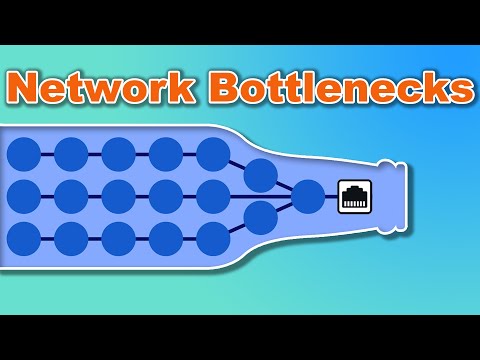
Oh man, network bottlenecks. They’ve gotta be one of the most annoying things, right? You’re just sitting there, trying to watch that new series everyone’s been talking about or maybe getting into an epic gaming session. But instead of smooth sailing, you keep getting stuck in frustrating buffering loops!
So you think your internet’s the problem. But get this—it could actually be that sneaky little mini switch Ethernet you’ve got going in your setup. Yup, something as tiny as that can mess up your entire flow! It might seem harmless and all… like it’s just doing its job quietly in the corner. But sometimes it trips up and drags everything down with it.
Want to know why such a small thing can cause such big headaches? Let’s dig into how these little devices work and what you can do to keep things running smoothly!
Network Switch Bottleneck Causes
Let me tell you about a time when I was trying to stream my favorite show. The video kept buffering, and it was driving me bonkers! It turned out the culprit was a small network switch that couldn’t keep up with everything else going on in the network. Yep, small devices can sometimes create big headaches.
So, what’s the deal with these mini Ethernet switches causing bottlenecks?
- Lack of Bandwidth Capacity: Imagine trying to squeeze a watermelon through a garden hose. Some mini switches don’t have enough bandwidth capacity to handle multiple devices and heavy traffic simultaneously.
- Insufficient Ports: Sometimes, there aren’t enough ports in these switches. When too many devices compete for limited slots, they can slow each other down like cars at rush hour.
- Poor Quality of Service (QoS): QoS is like airtime scheduling for data packets. If your switch lacks good QoS settings, important data (like your video call) might not get prioritized over less critical stuff.
- Old Firmware: Outdated software is another common snag. If the firmware running on your switch is ancient history, it may not optimize routing efficiently—kind of like using an old map on a road trip.
- Mismatched Speed Settings: Ever try walking at different paces with friends? If one link in the chain operates at lower speeds than others—say gigabit connections mixed with megabit ones—it creates inconsistencies that could hamper overall speed flow.
Once I sat down and tweaked some settings or upgraded equipment here and there; surprise—everything streamed smoothly! Just keep in mind any combination (or even just one) of these factors could choke up what you thought was supposed be simple connectivity between systems—even if it seems insignificant initially!
If this sounds familiar from past experiences maybe consider checking those little guys first—they might be packed full handling more quests than anticipated without proper adjustments made beforehand leading them into bottleneck issue territory instead!
Diagnosing Ethernet Switch Failures
Ethernet switches can have their days, you know? One minute, everything’s running smoothly, and the next, chaos. Let me walk you through diagnosing Ethernet switch failures with a wink at those mini switches that sometimes like to cause network bottlenecks.
First things first: spotting the symptoms. When your network starts acting up—connections dropping, speeds slowing down—it might be your switch’s fault. It’s a bit like having a hiccup in your daily routine. Nothing major but definitely annoying.
Some usual suspects when it comes to Ethernet switch failures are:
- Physical damage: Check if there are any visible damages—scratches or bent ports—on the device. You wouldn’t believe how often something so simple gets overlooked!
- Overheating: Touch it briefly; if it feels too hot, that’s not normal. Imagine working under the sun with no shade—that little guy needs some cooling too.
- Poor connections: Loose or damaged cables can trip up even the best networks. Go around and gently press on each connection to ensure they’re snug.
Now onto those pesky mini switches. They’re convenient for small setups but sometimes act as bottlenecks because of limited capacity or features. Maybe they’re overworked with too many devices trying to chat at once.
To tackle this particular issue:
- Look at device count: These minis aren’t built for heavy traffic—they’re like tiny cars on a big highway! Limit the number of connected devices.
- Check capacity: Make sure your mini switch supports enough bandwidth for what you’re tossing its way.
- Reboot regularly: Like turning your old computer off and on again (we’ve all been there). Doing this occasionally keeps it from getting overwhelmed by data build-up.
Think back to when I tried troubleshooting in college—the solution was sometimes just restarting after all else had failed!
- Upgrade if persistent issues occur: Sometimes these minis just can’t handle being loved so much by multiple devices fighting for attention—and upgrading becomes necessary.
My cousin’s home office experienced slowdowns until they swapped their mini-switch out… Problem solved after much head-scratching!
In short: Diagnose by checking physical stuff first; heat levels (hint hint); cabling connectivity issues alongside knowing limits specific hardware like those mini-switches might have!
Network Performance with Multiple Ethernet Switches
Hey there! Let’s chat about something lots of folks bump into—network performance when you’re using multiple Ethernet switches. This happens often, especially if you have a mix of old and new hardware buzzing around.
What causes network slowdowns? Well, picture this: you’ve got a bunch of devices all trying to have their say at once. It can get quite noisy! If you’re dealing with mini switch Ethernet, sometimes they become the bottleneck in the data flow. You know how it is, like when you’re on the highway and hit a traffic jam because a lane is closed.
Anyways, here are some things to consider:
- Device Compatibility: Make sure all your devices speak the same language—Gigabit speed or whatever comes next. Mixing old switches with new high-speed ones? That could slow things down.
- Cabling: Got tangled cables everywhere? Sometimes it’s not just messy wires—it’s subpar performance too! Use CAT6 cables for better speed if Gigabit is your aim.
- Switch Configuration: It’s like tuning an instrument; settings matter. Check for anything obvious—you know like misconfigured ports or unnecessary protocols running amok.
Imagine this: my friend Gina, she had all these fancy devices but her network was crawling. We realized she had this ancient switch in her setup that just choked everything up!
So what do you do?
- Create Separate Networks: Segment your network so the heavy lifters (think gaming consoles or high-res streaming boxes) don’t hog all bandwidth meant for lighter tasks like checking emails.
- Add More Bandwidth: Sounds simple but upgrading to more robust switches can really help free up those data lanes!
- Check Traffic Management Features: Some switches offer Quality of Service (QoS) controls—like traffic cops ensuring everyone’s getting through smoothly without interruptions. If yours does too, dive in!
Here’s hoping these tips springboard you back into faster speeds and smoother connections faster than surfers catching waves!
If anything sounds off-topic here—or if details seem missing from jest above—I’m just reminiscing from personal run-ins with similar tech tangles myself over coffee breaks past noon… good luck sorting yours out too soon enough anyhow!
Oh boy, network bottlenecks can really trip you up, can’t they? I remember this one time when a friend of mine was in the middle of an important video call for work. Everything seemed fine until suddenly his screen froze, and his voice turned into an unintelligible robot-like mess. Turned out, the culprit was a tiny piece of hardware—the mini switch Ethernet he’d set up.
You see, these mini switch Ethernet devices are pretty handy little gadgets. They let you connect multiple devices to your network without having to run cables all over your place. But here’s where things get tricky—if you’re not careful about how many devices you’re connecting or how much data each device is gobbling up, you could end up with more data trying to get through than the poor little switch can handle. Kind of like too many cars trying to merge onto a one-lane road at once!
Imagine you’ve got a few smartphones streaming music or kids playing online games while at the same time someone else is doing some heavy lifting on a laptop—maybe uploading big files or streaming high-definition videos. That’s when this bottleneck situation kicks in. It’s like everyone wanting pizza from a food truck but there’s only one stressed-out chef inside!
This doesn’t mean mini switches are always bad news though! They’re super useful if you know what you’re doing and don’t overload them with too much traffic all at once.
In my friend’s case, he fixed it by managing traffic better—making sure not every device was hogging bandwidth at peak times—and eventually upgrading from that small switch to something with more juice.
So yeah, keep an eye on those little gadgets—they’re pretty powerful yet need some tender loving care! Just because they’re small doesn’t mean they can’t cause big headaches sometimes!