Hey, you ever juggled with your data? Like, wondering if it’s truly safe and sound? Yeah, me too. I’ve been there—playing that game of “do I have a backup?” or “is this really fail-proof?”
And then you hear about RAID 100. Sounds like something out of a sci-fi film, right? But it’s real! It’s the tech world’s way of saying, “we got layers of protection for ya.”
Now you’re probably thinking, is it really all that it’s cracked up to be? Does your data get guarded like some treasure in a fortress?
Let’s explore what RAID 100 is all about. And see if it really lives up to the hype—or if it’s just another fancy term tech folks throw around. Curious yet?
RAID’s Limitations in Data Protection
Exploring
Well, when you’re diving into the world of data storage, RAID (or Redundant Array of Independent Disks) comes up a lot as a solution for data protection. It’s basically like a trusty old toolbox where each tool has its own special job. But, like every toolbox, RAID isn’t perfect. Let’s chat about why this is the case.
First off, it’s important to know that RAID isn’t a one-size-fits-all solution. Although it significantly boosts performance and reliability compared to single drives, it’s not foolproof against data loss. Here are some key points:
- Hardware Failures: If you thought using multiple drives protects you completely from hardware issues—guess what? A controller failure can still be catastrophic. Imagine your controller as the wizard behind the curtain: if it goes down, even if your disks are healthy, accessing your lovely data could be a problem.
- No Substitute for Backups: People often believe that with RAID, backups aren’t necessary. Oh man, that’s just asking for trouble! Backups serve a different purpose and shouldn’t be skipped just because you have RAID running.
- User Errors or Malware Attacks: Picture this—you accidentally delete an important file or malware slips through your defenses. Even with extensive RAID setups like RAID 100 (fancy and all), such troubles can leave you high and dry since it doesn’t protect against human mistakes or malicious activities.
- Data Recovery Can Be Complicated: Recovering data from a failed array involves technical expertise and often specialized software—sometimes costing more time than expected.
- Initial Costs and Maintenance: Setting up sophisticated systems like those in enterprise environments isn’t cheap! Plus maintaining them requires regular attention.
Now then let’s say we consider something massive like RAID 100—impressive name huh?. It combines techniques from different RAID levels offering boosted redundancy and speed but unfortunately doesn’t shield completely against all types of disasters either.
A friend of mine once had their mind-set on setting up an intricate RAID system thinking they’d dodged downtime forever… only after ignoring proper backup protocols did they realize their oversight led to precious project files being lost during an unexpected blackout!
In conclusion (oops there I go), remember this: while RAIDs do offer greater reliability over single drives thanks largely due to distributing information across multiple disks cleverly; always integrate them within broader security strategies including regular backups alongside robust cybersecurity practices—which together provide truly comprehensive safeguards for treasured bits & bytes!
RAID Level with Best Performance
You know, when it comes to storing data on your computer, RAID can be a real lifesaver. It’s like having a safety net for all those files you can’t afford to lose. And if you’ve been scratching your head about which RAID level offers the best performance, you’re definitely not alone.
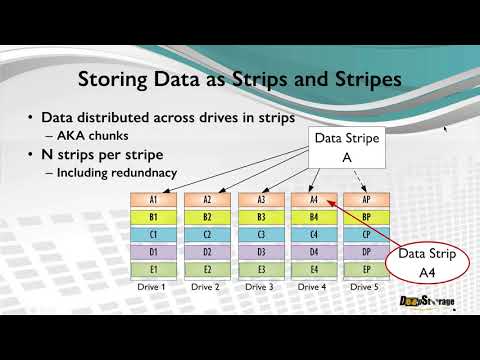
RAID 0 is often regarded as the best for pure performance. This setup splits data across multiple drives, allowing them to work together like a team of super-fast sprinters passing the baton. The more drives you have in RAID 0, the faster it goes! But—here’s the kicker—it doesn’t provide any data protection.
Now, if you’re looking for both speed and some backup support, RAID 5 might just be your buddy. It’s kinda like RAID 0’s slightly more responsible cousin. It stripes data across drives but adds parity—think of it as an insurance policy that can rebuild lost information if one drive fails.
- Performance: Not as fast as RAID 0 but still pretty snappy.
- Data Protection: Can handle a single drive failure without losing your precious files.
Then there is RAID 10, which combines mirroring and stripping—two’s company right? It mirrors all data and then stripes it across multiple pairs of disks—giving you both performance and redundancy.
- The Speed: Almost up there with RAID 0!
- The Safety Net: Can survive one drive failure within each mirrored pair.
And when talking about ultimate safety nets and thinking of something like “Does RAID 100 offer superior data protection?” Well… let’s just say it’s more complex than most people need. Stick with levels that make sense for your particular usage!
In conclusion (oops!), choosing between levels depends on what *you* need: pure speed or peace of mind knowing things are backed up should disaster strike. Hard choice sometimes!
Limitations of RAID Configurations
Man, RAID configurations can be a bit of a mystery sometimes. So you’re curious about whether this RAID 100 thing really hits the mark for data protection? I’ve got you covered!
First off, RAID (Redundant Array of Independent Disks) is like your digital insurance policy. It uses multiple hard drives to create backups of your files. This way, even if one drive fails, your stuff’s still safe—well, mostly.
But let me tell ya’, not all RAID setups are created equal. Each has its own perks and quirks.
- 1. Cost: These setups ain’t free! The higher the level, the more drives you need. It’s not just buying more storage; it’s also maintaining them.
- 2. Complexity: Advanced levels like RAID 100 can be complex to manage and configure—you gotta know your way around tech stuff.
- 3. No Total Fail-Safe: Even with redundancy, there’s no guarantee against total system failure or data corruption.
And speaking of RAID 100—it’s basically using multiple RAID arrays nested together across numerous disks for extra redundancy and performance boosts. Sounds fancy! But think about it: you’ll need oodles of room for all those disks—not to mention the headache setting it up might give ya’.
So next time when considering building or upgrading these setups over just regular backups or cloud solutions? Keep in mind their quirks ’cause well everything comes at some price right!?
You know, when it comes to data protection, the conversation about RAID configurations never fails to pop up. There’s a certain nostalgic charm in remembering those days when just mentioning “RAID” would get the tech folks all excited and chatty around the office. Now, RAID 100 isn’t exactly something you hear every day. It’s like a rare species in the wild world of data protection.
RAID 100 is essentially a combination of multiple RAID 10 arrays that are then striped together. Picture this: You’ve got several groups of mirrored drives (that’s RAID 1) and then you stripe those groups across (that’s the RAID 0 part). Seems fascinating, right? It’s designed for those who need serious redundancy and high performance—think big data centers where downtime is simply not an option.
But here’s where things get interesting: Is it really offering superior protection? Well, on one hand, you’ve got redundancy coming out of your ears. If one drive fails, there’s another waiting in line to take over smoothly—like having a safety net during acrobatics! But it also means you’re using lots more drives to get that level of security and speed.
The cost? That’s definitely something to consider if you’re thinking about setting up a RAID 100 at home—it’s steep. And though it’s robust against hardware failure, let’s not forget human errors or software bugs—it won’t fend them off any better than simpler setups.
In essence (whoops, there I go with fancy words), RAID 100 is like having an armored car for your data travels. Bulky but super secure against certain threats—in this case drive failure—but requiring quite an investment as well as thoughtful planning on implementation.
At its core—pun intended—it’s not just about having stacks of hard drives singing in harmony; it’s making sure everything hums along perfectly without breaking your budget or sanity!