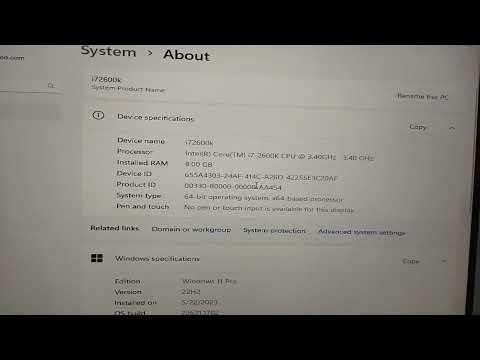
Oh man, you wouldn’t believe the stuff I’ve been hearing about folks trying to run Windows 11 on their good old Core i7 2600. It’s like trying to fit a square peg in a round hole, you know? People love their vintage tech, and who can blame them? This processor has been a workhorse for years.
But now, with Windows 11 around the corner and all its shiny new features, folks are getting curious—and maybe just a little bit frustrated. You might be feeling that itch too! Why should your reliable i7 be left out of the party? I mean, it’s been there through countless late-night gaming sessions and endless streams!
So here’s the scoop: it’s not as simple as we’d hope. There are some bumps in that road to upgrade city. But hey, that’s what makes this journey exciting—or nerve-wracking—depends on how you see it!
i7 2600 Windows 11 Compatibility
Ah, the Core i7-2600. It’s a solid processor that was pretty cutting-edge when it first hit the shelves, but time has marched on. So here’s the deal: you’re thinking about updating to Windows 11 and wondering if your trusty old i7-2600 is up for the job.
- Official Requirements: Microsoft has set some firm minimum requirements for Windows 11. And unfortunately, the i7-2600 doesn’t quite make the cut. Officially speaking, only Intel’s 8th generation processors or newer are supported. Kind of a bummer, right?
- Why Doesn’t It Work? Mainly because of security features like TPM 2.0 and Secure Boot. These are security measures meant to keep your system safer from modern threats and keep your data well out of hackers’ reach.
If you’re like many others who are attached to their trusty machines (hey we’ve all been there), you might wonder if there’s any way around this limitation.
- Workarounds: There are ways folks have found online to install Windows 11 on unsupported hardware, including processors like the i7-2600. But let me warn you: it’s not officially sanctioned by Microsoft and can lead to less stable performance or maybe even unexpected hiccups.
Now let me share a little story here—once upon a time, my buddy tried upgrading his setup using similar methods on his old machine. Initially all seemed great! But soon enough he ran into driver issues that were a real pain to fix.
Your Alternative Options:
- Stay with Windows 10: Honestly not a bad choice at all since Microsoft will support it till October 2025.
- Consider Upgrading Your Hardware: If you’re keen on moving up with technology trends without compromising system stability an upgrade might be worth exploring!
Staying older doesn’t mean being left behind completely; there’s always more than one path forward!
Intel Core i7 Compatibility Requirements for Windows 11
So, you’ve got your trusty Intel Core i7 processor and are wondering if you can jump on the Windows 11 bandwagon, huh? Well, let’s get down to brass tacks about this compatibility jazz.
Windows 11 Requirements are a bit strict when it comes to processors. One of the biggies is that Microsoft has outlined specific processor models that are officially compatible. The issue with older models like the Intel Core i7-2600 often lies in Microsoft’s requirement for TPM 2.0 support. TPM stands for Trusted Platform Module — it’s like a little security add-on that’s baked into newer processors.
- TPM 2.0: Essential for Windows 11; checks for system security.
- UEFI Firmware: Needs Secure Boot capability, enhancing operating system integrity.
- Official Support List: Only certain processors make the cut; older models might not be on it.
Here’s the scoop: Intel’s i7-2600 does not officially meet these new requirements set by Microsoft for Windows 11 because of its age and tech limitations, you know?
Now, while some tech enthusiasts tinker around to bypass such restrictions—and hey, who doesn’t love a good hack—it’s worth mentioning that doing so might cause compatibility gremlins or even security issues later on.
And remember my cousin Joe? He tried installing Windows 11 on a similar setup without checking compatibility first. Well, let’s just say his computer turned into more of a brick than anything else!
So just keep in mind if you’re thinking about upgrading an older processor like the i7-2600 model. It might be better to look into getting hardware that’s designed with these latest operating system requirements in mind! Or maybe stick with what you have until you’re ready for an upgrade adventure.
That’s basically where we stand here—stay vigilant about those specs before making any major OS leaps!
i7 Compatibility with Windows 11
You know, the whole fuss about upgrading to Windows 11 has had folks scratching their heads, especially those with older machines like the good ol’ Intel Core i7-2600. Let’s break it down a little bit.
Processor Compatibility:
The i7-2600 was quite a beast back in its day. But when it comes to running Windows 11, it runs into a bit of a hiccup. Microsoft set some new standards for processors, requiring certain hardware capabilities that older chips sometimes don’t meet.
- TPM 2.0 Requirement: This might sound fancy, but TPM stands for Trusted Platform Module. It’s like an extra layer of security—something like wearing a seatbelt while driving. Many older processors and motherboards don’t have this built-in or enabled.
- Secure Boot: Another security feature that helps to prevent unauthorized programs from loading during booting. It’s more common on newer systems.
- Performance Optimization: While Windows 10 could run on older processors reasonably well, Windows 11 is optimized for newer hardware to provide better performance and user experience.
Anecdote Time!: Imagine an old friend visiting your newly renovated house after several years away—not all furniture will fit just right! That’s what happens with an i7-2600 trying to settle into Windows 11’s modern living space.
Now if you’re wondering whether you can run Windows 11 on your trusty i7-2600 machine by other means—well some adventurous folks have managed it by bypassing requirements using workarounds… but here’s the kicker: it’s not officially supported and may leave you without updates or facing potential issues down the line.
For those thinking of sticking with this processor for now remember: You’re not alone! The majority are hanging tight or upgrading only when they feel absolutely necessary.
And there we go! Those are pretty much the bare essentials regarding compatibility troubles between Intel’s Core i7-2600 series and Microsoft’s latest OS venture—Windows 11!
You know, when we talk about older hardware and new operating systems, it often brings back personal memories. Picture this: you’ve been using your trusty computer with an Intel Core i7 2600 processor for years. It’s kind of like that comfy old sweater you just can’t bear to part with. Solid, reliable, does what you need without fuss.
And now Windows 11 pops up on the scene. Brand new, shiny, and full of promises of new features and better performance! But here’s where things get a bit tricky: Windows 11 has specific hardware requirements that your beloved Core i7 2600 simply doesn’t meet. It’s like being told your favorite jeans are out of fashion—heartbreaking!
Why the fuss? Well, Microsoft has set certain standards for processors to have features like TPM (Trusted Platform Module) 2.0 support for enhanced security measures. This is not just buttoned-down tech talk; it’s about preventing some sneaky vulnerabilities from wrecking havoc on your system.
Now, if you’re clinging to your old setup because it’s familiar or fits in your budget—or you’ve got software that runs perfectly fine on it—you’re not alone! There’s plenty of people in the same boat who’ve had to take a deep breath and decide whether they can live without these new-fangled bells and whistles or if it’s time for an upgrade.
But hey—it’s all about weighing costs versus benefits while keeping an eye on what’s right for you personally rather than jumping into every tech trend! At least you’ll always have those memories with good ol’ Core i7 2600 by your side through countless late-night gaming sessions or finishing off deadlines at last minute—I mean we’ve all been there right?