You know that feeling when your computer’s acting up, and you don’t have a clue what to do? Oh, it’s so frustrating! I’ve been there too. It feels like your trusty old device has turned against you, right?
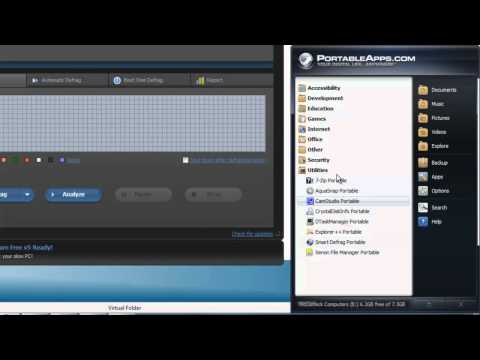
That’s where portable apps come in like superheroes. Yep, these little guys are software programs you can run from a USB stick! Super handy if your computer is throwing a tantrum and refusing to cooperate.
Imagine having a toolkit you can carry in your pocket. No need to install anything—just plug it in and bam! You’re ready to tackle those pesky issues.
I remember the first time I used one of these apps. My friend’s laptop was slower than a snail on a lazy day. We used this magical USB stick, and it was like hitting fast forward on his life.
Stick around if you’re ready to become the go-to tech whisperer among your friends. Portable apps might just be your new best friend!
Portable Apps for Software Issue Diagnostics
Ever had one of those days when your computer decides it’s on strike? I’ll bet you have! It’s never fun, especially if you’re right in the middle of something important. Portable apps can be a lifesaver here, as they offer an easy way to diagnose and even fix software issues without installing anything. Imagine having a toolbox that fits in your pocket and can handle almost any software hiccup. Sounds neat, right?
### What Are Portable Apps?
Portable apps are like tiny programs you can carry around on a USB stick or an external drive. You plug it into any computer, and voilà, you’re ready to go without needing administrative rights to install them. Why’s this handy? Sometimes you’re using someone else’s machine or maybe troubleshooting with restrictions.
### Key Benefits
– **No Installation Needed:** Just download, transfer to your USB, and you’re set.
– **Cross-Device Compatibility:** Use them on different PCs without compatibility worries.
– **Minimal Space Usage:** They occupy little space, leaving room for other essentials.
### Handy Portable Apps for Diagnostics
Now let’s get into some portable apps that you might find useful:
- CCleaner Portable: Helps clear out unnecessary files that could be slowing things down.
- Recuva Portable: Perfect for retrieving deleted files by mistake—been there, done that!
- HWiNFO Portable: Gives a detailed report on what’s happening inside your system.
### How to Use Them
1. **Download the App:** Start by downloading the preferred portable app from its official site.
2. **Transfer to USB:** Copy it onto your portable storage device.
3. **Plug Into Any Computer:** Insert the device into the problematic computer’s USB port.
4. **Run the App Directly from USB:** Start diagnosing instantly!
Portable apps have saved me time more times than I can count! Like when my cousin called in a panic because his laptop was acting up just before an assignment deadline—I plugged in my trusty USB with these apps and got him sorted quickly.
In conclusion (oops), having these tools at hand is like having a Swiss Army knife for computers—you never know when you’ll need one!
Portable Apps for Software Issue Resolution
Hey, you know how sometimes you’re working on a friend’s computer, and bam — there’s a software issue? And then you’re stuck wishing you had your favorite tools to fix it. Well, that’s where portable apps can really save the day! They’re like little superheroes for those moments when things go wonky.
Portable apps are software applications designed to run without installation. You can carry them around on a USB drive or external hard disk. Just plug it into any computer and voila! You’re ready to tackle issues right there without having to install anything new on the machine. Fancy, right?
Why Portable Apps are Handy:
- No Installation Needed: Say goodbye to compatibility problems and admin rights hurdles. You just plug in your device, launch the app directly from there and start working.
- Space Savers: Since they’re not installed on the system’s hard drive, they don’t take up space or leave behind unnecessary fragments after you’ve fixed the issue.
- Easily Updatable: You update them once on your portable storage device and every time you use them elsewhere, it’s with the latest version.
A Few Handy Portable Apps
For example, there’s CCleaner Portable for cleaning up files that clutter systems; GIMP Portable if you’ve gotta do some photo editing; or FileZilla Portable when dealing with FTP server stuff.
Using these solutions can be like carrying around a Swiss army knife of tech resolutions. The best part? It keeps your footprint light; since nothing remains installed after you’re done.
Now here’s an anecdote: Once I was helping my uncle with his equally confused laptop (yes even family turns IT support!), and his printer wasn’t cooperating at all – no matter what we tried it just didn’t print correctly! With minimal options left before getting drastic (and paying for support), loading my trusty portable troubleshooting toolkit saved both us time AND money without extra installations involved!
Keep these digital lifelines handy – because who knows when they’ll rescue YOU next!
Compatibility Requirements for Portable App Usage
Jumping into the world of portable apps, huh? It’s like having a Swiss Army knife for your computer. Just imagine plugging in your USB drive and having all your essential software ready anywhere you go. Sounds fantastic, right?
What’s a Portable App Anyway?
Portable apps are those magical programs you can run from a USB stick without installing them on your computer. They don’t mess with system files or registry settings, making them super neat and tidy.
- Compatibility Requirements:
Here’s where it gets interesting: figuring out what makes these apps tick and work seamlessly on different computers.
The Operating System Factor
Your portable app might be versatile, but it still needs to play nice with the OS you’re using. Most of these gems are designed for Windows, as that’s where you find them running most often. But! Always double-check if they mention specific Windows versions they’re compatible with—say Windows 10 or 11.
- If you’re into Linux or MacOS, there’s hope! Some portable apps are cross-platform and will work there too.
USB Drive Matters
Not all USB drives are created equal. The capacity’s got to be enough to house your app comfortably—no tight squeezes here.
- Storage Space:
- Bigger isn’t always necessary; just ensure you’ve got room for the app and its file friends.
- If you’re dealing with larger applications like graphic editors or similar heavy lifters, check the space first.
- Performance Speed:
- A faster drive means smoother operation; trust me—I learned this during a slow-motion attempt at running an antivirus tool!
The Hardware Bridge
Most portable apps don’t demand high-end hardware to function. Phew! That means they’ll run even if you’re on an older system that isn’t exactly packing heat under the hood.
- No need for flashy CPUs or maxed-out RAM unless specified by certain resource-heavy programs you plan to use portably.
User Permissions Game Plan
Something important: since these guys live on external drives which might end up being used in various locations (like school labs?), keep admin rights or restrictions into account regarding access permissions when moving data between systems effortlessly–especially crucial considering both personal backups/synchronized files must align accordingly upon execution (gosh!).
`Ultimately`, before diving headfirst into any cool fixing sessions around people crying “my device won’t boot! , consider how thoroughly respective usage will be handled based upon different machines available nowadays given ever-evolving tech landscape ensures gradually getting accustomed towards adapting fully reliant upon proficiency engaged alongside mastery excelling within options explored via flexible framework derived organically among solutions awaiting discovery throughout journey taking place around command center employing digital dexterity enriching everyday experiences beyond measure imaginable altogether quite possibly surely already embraced knowingly immensely profoundly beneficial indeed ultimately…right? Haha! So yeah–happy computing adventures await us always nonstop forever really truly uniquely absolutely indeed inherently fantastically universally interconnected exponentially perpetually invigorating dynamically infinite echoes eternally illuminating origins exquisitely splendid transcendentally rapturous uplifting inspirational transformative joyful auspiciously evergreen decals lit vibrantly delightfully enthralling exuberant kisses.
You know, the whole concept of portable apps is like having a superhero toolkit without the cape. They really save your day when dealing with those pesky computer software issues that pop up when you least expect them. I remember once, I was at a friend’s house—she had no idea why her computer was running slower than molasses in winter. She looked at me with that “help me” expression we all know too well.
Portable apps can be run from a USB stick and don’t need installation on the device you’re fixing. So I just pulled out my trusty USB drive loaded with these apps and voilà! Her system was back to normal in no time. It felt like magic—not the Harry Potter kind, even better because it was real!
Having these tools on hand means you never have to fiddle around much looking for software or permissions on someone else’s machine. It’s handy, quick, and super efficient because they often come loaded with antivirus tools, performance monitors, or even backup solutions—all nestled in one tiny package.
It’s like being the tech hero of your own story or someone else’s if they need you. And nothing beats that feeling when you’ve managed to solve an issue and see relief spread across their face. Like really—who would’ve thought carrying around one small USB stick could save so many headaches?
It’s fascinating how technology can be both daunting and utterly empowering simultaneously. Portable apps fit right into that sweet spot, making things easier for everyone involved without sucking time (or patience) outta ya life!