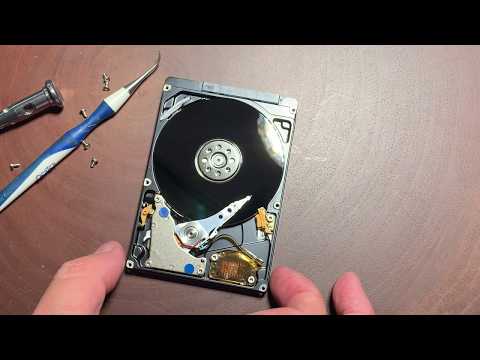
You know, there’s this one time I thought my world was ending. Well, sort of. My hard drive just up and died on me. All those photos from trips, important work files… poof! Gone. Panic mode set in real quick.
We’ve all been there, right? It’s not exactly fun when our tech betrays us like that. But don’t worry, it doesn’t always mean the end of the world.
Recovering data from a busted hard drive is a thing—really! But yeah, there are some twists and turns along the way. Risks too. Kind of like walking a tightrope.
So here we are. Talking about this little journey into getting back what might seem lost forever and what could possibly go wrong during that adventure! Shall we?
Repairing a Damaged Hard Drive with Data Recovery
Hey there! Let’s talk about something that’s happened to all of us at least once. Imagine this: you’re working away, when suddenly your hard drive decides to play hide and seek with your data. Frustrating, right? But don’t worry, we’re going to unravel this together.
First up, you should know that a hard drive can be damaged for various reasons—physical impact or, you know just wear and tear over time. When disaster strikes, the first instinct is panic. But hold on! There are ways to rescue your precious data.
- Stop using the drive: Whatever you do, avoid saving any new files on it. This could overwrite the old data you’re trying to recover.
- DIY software solutions: There are programs out there that can scan for lost files and retrieve them—tools like Recuva or EaseUS Data Recovery Wizard are popular choices among users.
- The freezer trick: Some folks swear by placing a dying hard drive in a ziplock bag sprinkled with silica gel packets (those little moisture absorbers) and putting it in the freezer for a few hours before trying again—an extreme method with mixed results!
Now here’s an anecdote: A friend of mine once accidentally deleted their entire music library off their external drive while tidying up folders (classic mistake!). After some initial panic—and maybe a few tears—they used one of those software tools I mentioned earlier and managed to get almost everything back! Phew!
But hey, sometimes these home remedies won’t cut it. If professionals need to step in…
- Professional data recovery services: If the damage is more severe (like clicking noises from physical malfunctions), experts use clean rooms (think sterile environments like those sci-fi labs) to try recover what they can.
Something important though—these services don’t come cheap because of their skilled labor-intensive processes.
Here’s one risked worth noting: DIY attempts could worsen things if not careful; mishandling may lead even experts unable salvage anything further down line from broken platters fragile state inside casing per se!
So yeah.. While tempting handle everything ourselves let’s remember there times calling pros brings peace mind guaranteed chance success dealing critical failures hands trained technicians fieldwork
.
Lastly…regular backups should become good habit prevent future heartbreaks similar scenarios arising again down road best preventative measure mustn’t forget today.
Hope this helps!
Risks in Damaged Hard Drive Data Recovery
A damaged hard drive can feel like a technological nightmare, right? Those moments when you hear odd noises coming from your computer or notice files mysteriously disappearing—your stomach just drops. So many memories and crucial files are at stake! Let’s take a closer look at what happens when you’re trying to recover data from a damaged hard drive.
Understanding the Risks
First of all, there’s always a chance of further damage. Imagine you have an old photograph that’s started to tear; every time you touch it, it risks more tears. Similarly, attempting recovery without proper tools might worsen the existing damage. This is why being gentle and careful with your approach is crucial.
- Data Loss: Some files might be corrupt beyond recovery. A professional can sometimes retrieve these using special software or techniques, but it’s not guaranteed.
- Overwriting Files: When part of the hard drive is still functioning, new data could unknowingly overwrite old sectors containing those valuable files you’re trying to save!
- Physical Damage: If the hard drive has physical issues—like scratches or bad sectors—it may lead to even more inaccessible data if mishandled.
The Role of Professionals
Turning to professionals can be like having a seasoned guide while hiking through unknown terrains. They use specialized equipment in clean environments to handle those delicate components without causing further harm.
But let me tell ya’, this process isn’t cheap! Professional recovery services can cost quite a bit, depending on how severe the damage is and how much information needs saving.
A Real-life Scenario
I remember helping out my friend Sam once. He was frantic because his thesis—a work in progress for months—vanished after his laptop took an accidental tumble off the table (ouch!). Thankfully some parts were recoverable thanks largely due partially undamaged sections which enabled successful retrieval through expert help!
Your Home Approach
There are software solutions available if you’d rather try fixing things up yourself before seeking professional aid . These programs scan for accessible regions within disk space identifying salvageable content restoring missing segments wherever possible: think digital detectives unearthing clues amid chaos!
However remember using these programs isn’t foolproof; improper handling exacerbating initial problems arising previously unforeseen setbacks should they arise during usage!
In short navigating complex maze known world-tech issues challenging yet exciting task requiring critical balance patience expertise plus little luck course!
Data Recovery Risks on Windows 10
Recovering data from a damaged hard drive on Windows 10 can feel like trying to rescue a photo album from a soggy basement. It’s nerve-wracking! There’s always that fear of losing precious photos or important documents for good, right?
Understanding the Risks
- Data Corruption: When drives are physically damaged, the files might be scrambled beyond repair. It’s like trying to read a book with missing pages.
- Further Damage: Attempting recovery without knowing what you’re doing is like poking an irritable bear! You risk worsening the existing problem.
- Partial Recovery: Even with professional tools, sometimes you only get bits and pieces back. Imagine finding just half of your grandma’s recipe.
Avoid DIY Pitfalls
- Software Limitations: Many programs work well for small issues but struggle if physical damage is severe. They don’t have magic wands!
- User Error: Missteps during the process—like selecting the wrong drive—can lead to more loss. Like pouring salt in your coffee by accident… ugh!
The Professional Route
If it’s something crucial, calling in experts might save some tears. They come with special gear and know-how much like seasoned detectives looking for clues at a crime scene.
- Certainty Over Cost: Hiring pros isn’t cheap but gives peace of mind they’re using best practices for recovery.
In summary remember: while enticing solutions abound online for dealing with hard drive hiccups, weigh risks carefully before any action! Think twice and back-up while you still can—it’s just sensible advice from one friend to another!
Ah, damaged hard drives! They can be a real headache. Picture this: It was a rainy day. I’d just returned from a trip, eager to see the photos I’d taken. Plugged in my external hard drive, and bam! Nothing happened—just silence and dread. It’s like when your car won’t start on the morning of an important meeting.
So here’s the deal with damaged hard drives. They’re mysterious little creatures. Sometimes they’re physically okay but have logical errors that mess things up; other times, there’s actual physical damage going on inside them.
Now, if you’re thinking about getting that precious data back, there are two main roads you might wander down: doing it yourself or calling in the pros. Let’s chat about both options for a moment.
If you’re tech-savvy and want to try your hand at recovering data yourself, there are software tools out there designed to help with logical issues—they basically search for files you can no longer see and try to restore them for you. It’s kinda like fishing in dark waters (no pun intended).
But—I have to say—it’s risky business if you’re not careful because using such tools on a failing drive might worsen things or even make recovery impossible later by overwriting valuable information.
On the other side of town are professional data recovery services—a gang of awesome folks with cleanrooms where they handle physically messed-up drives with great care—and expertise—to get what’s lost back into your hands safely without causing more harm than good.
Though these experts’ magic does come at quite some expense sometimes depending upon severity but hey when pictures from life’s best moments are held hostage? Worth every penny right?
In any case: Always keep backups handy. Been there done that!
Life is unpredictable just like technology gear we use everyday… So tread wisely friends!