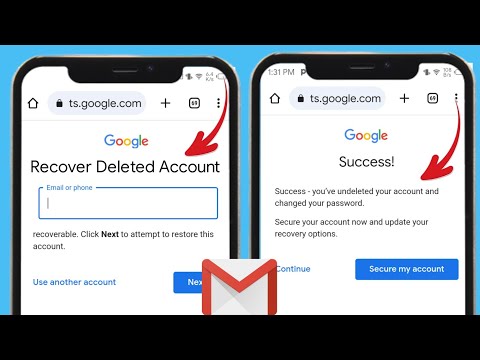
So, you accidentally deleted your Google Account, huh? No worries! It happens to the best of us. I remember once I deleted an important email and thought it was gone forever. Total panic moment! But hey, turns out there’s hope for those who act fast.
Imagine losing all your emails, contacts, and photos just because of a tiny mistake. Yikes! But breathe easy. You might still get everything back if you jump on it quickly enough.
We’ll chat about some steps to take right away—and trust me—it’s gonna be easier than you think. Ready to tackle this together? Let’s dive in!
Permanent Deletion Timeline for Google Accounts
Oh, Google accounts! We’ve all got one and they’ve become such a big part of our lives, right? From emails to photos, and even that secret recipe cookbook you’ve saved in Google Drive. Now, imagine losing access to it or having it deleted permanently! Scary thought? Don’t sweat it—I’m here to help you demystify what happens when a Google account is permanently deleted, and the timeline involved.
Understanding Permanent Deletion:
When you hit that delete button on your Google account, it’s not like flicking a magic wand where everything just vanishes instantly. It’s more like saying goodbye after a long party—it takes some time. Let’s go into how this process really works.
- First Step – Initiation: Once you decide to delete your account, it enters into a sort of limbo or holding phase. Think of it like putting your phone in airplane mode—not gone but kinda inactive.
- Temporary Phase: For about 20 days, Google’s got this safety net where you can recover your account easily if you change your mind. Life happens—maybe the cat walked over your keyboard and accidentally clicked delete?
- Countdown Begins: Post those initial 20 days, there’s another window of up to 60 more days. Your data is still lingering around but recovering becomes tricky since stuff starts getting wiped from servers over time.
Permanently Gone:
If no action’s taken throughout these phases (and we’ve all been there—putting things off), by around 80 days after pressing ‘delete,’ the account along with the data inside gets kicked off permanently from their systems.
Yet another reminder that tech can mimic human emotion sometimes: once something’s gone forever… well—it really doesn’t come back!
Here’s an anecdote for context… Imagine forgetting about deleting an old blog email connected through that already-deleted Google Account until trying retrieving archives for laughs years later! Oops—not much hope then!
Anyway—not sure if I explained myself there perfectly but anyway—I trust now knowing what happens behind scenes gives some peace-of-mind knowing exactly when things happen during such processes regardless if accidental or intentional deletions occur – plus ways possible getting them back early-on without reeling headaches attached usually at times like these.
So there! Hopefully these insights are helpful keeping precious digital possessions safe because nobody wants losing irreplaceable memories stored online ever again feeling helpless without timelines insight beforehand warning warnings ahead doing drastic actions prematurely leastwise… You follow me?
Recovering Permanently Deleted Files
Alright, imagine this—you accidentally deleted some important files from your computer and then, without really intending to, permanently trashed them. Uh-oh! Don’t worry, it happens to the best of us. Let’s explore ways to get those files back.
First of all, here’s the real deal: when you delete a file permanently, it’s not actually gone for good right away. What happens is that the space it occupied is marked as available for new data. The faster you act before new data overwrites those files, the better your chances of retrieval.
Steps to Recover Permanently Deleted Files:
- Check Your Backup: If you have a backup system in place—like an external hard drive or a cloud storage service—this should be your first port of call. Retrieving from here is usually very straightforward.
- Use File Recovery Software: There are several tools out there that can scan your hard drive for bits and pieces of deleted files and stitch them back together. Some popular choices include Recuva (for Windows) and PhotoRec (cross-platform). Make sure not to install these on the same disk where your lost files were located.
- Consult a Professional Service: If you’re dealing with super critical data and you’re not comfortable doing this yourself—or if you’ve tried software options without luck—you might consider reaching out to a professional data recovery service.
And now about recovering a permanently deleted Google Account—it’s kind of related because once online accounts are deleted, there’s often a short window in which they can be recovered.
If You Need To Recover A Google Account:
- Head over to Google’s account recovery page as soon as possible. Time’s ticking!
- Enter your login credentials if prompted. Google may ask you certain questions to verify your identity.
- The sooner you do this after deletion, the higher chance you’ll have at getting everything back just like before.
A quick story—a friend once called me in tears because she thought she’d lost her beloved collection of vacation photos forever. She’d emptied her Recycle Bin without realizing what she was tossing away! Thankfully we used a recovery tool together that evening—and because her laptop hadn’t been used much since then—we got every last beautiful image back safe ‘n sound!
The takeaway here? Always double-check before deleting something or changing settings on accounts—and whenever possible try backing things up regularly somewhere safe online too!
Limitations of Recovering Permanently Deleted Google Accounts
Oh, losing access to a Google Account can be heart-wrenching, can’t it? You know, there’s always that moment of panic when you realize something’s gone wrong. Anyway, let’s dig into the limitations of recovering a permanently deleted Google account. It’s a tad tricky, but understanding the process might just shed some light on what you’re dealing with.
Understanding the Process
Google accounts are central to so many things like emails, photos and even calendar events. When your account is deleted—permanently—it feels like losing a part of your digital life! The thing is, once an account is marked for permanent deletion there’s no straightforward way to restore it. But hang tight, ’cause there are bits you should know before you throw in the towel.
- Time factor: Once you’ve requested account deletion, Google sets a brief period in which recovery might be possible. It’s usually about 20 days. However after this window closes it’s practically irreversible.
- No guarantee: Attempting recovery within that short window doesn’t come with any guarantees.
- Data loss: Imagine all your emails photos contacts documents *poof* gone! Even if recovering the account were technically doable most if not all data linked with it will be wiped out permanently.
- Lack of support: Because these operations involve privacy concerns—Google doesn’t offer personalized recovery help for deleted accounts.
Steps to Consider Before Deletion
Preventive measures are always better than trying to fix things afterward don’t ya think? If ever you’re pondering about deleting (or just safeguarding) an account doing these things could save future headaches:
- Create backups regularly: Trust me when I say you won’t regret having duplicates of crucial data somewhere handy!
- Two-factor authentication: Helps keep unauthorized users from accessing and possibly deleting your precious info.
- Avoid impulse deletions: Double-check before hitting delete because reversing decisions has very few options.
And there ya have it—a glimpse into navigating through such frustrating situations revolving around Google Accounts’ deletions limits! Hope this guides you toward making informed choices or urgency plans before anything gets wiped off forevermore!
Oh man, losing access to your Google account can really feel like you’re missing a part of your digital self, huh? I’m guessing most of us have relied on our Google accounts for everything—from emails and photos to important documents and even the contacts we never took the time to memorize. It’s like waking up one day and realizing your virtual filing cabinet has vanished into thin air.
Okay, let me share a little story. A friend of mine once accidentally deleted her Google account thinking she was cleaning up space. Yep, that happened! She panicked—those “it’s not the end of the world” moments don’t usually feel that way when you’re in them. All those cherished vacation photos and contacts were seemingly gone forever. The thing is, tech mishaps happen more often than we’d like to admit.
Now, here’s the deal: recovering a permanently deleted Google account isn’t exactly straightforward. It’s kind of like trying to unspill milk—tricky but not always impossible. Within a certain time frame (think a couple weeks), you might be able to recover it by visiting Google’s Account Recovery page. Cross your fingers! If that doesn’t work, sadly, it may be lost for good.
Through all this chaos my friend learned precious lessons about backing up important stuff elsewhere and double-checking before hitting delete. And well hey, maybe it’s worth taking note if you’re prone to similar mishaps!
Ah, technology—a blessing and sometimes a curse wrapped into one digital package!