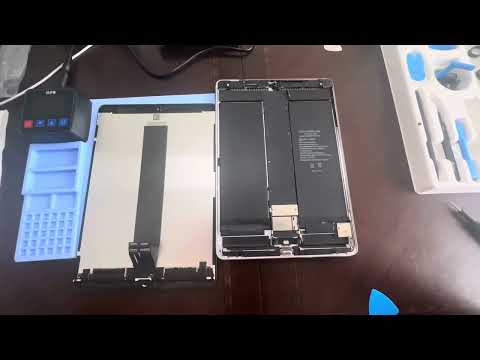
You know that feeling when your iPad Pro 10.5 just won’t hold a charge anymore? It’s frustrating, right? You’re scrolling through your favorite apps, and bam! Battery hits the red zone way too soon. Ugh.
But hey, don’t toss it out just yet. Replacing the battery might be just what you need to give that trusty device of yours a new lease on life. Imagine being able to binge-watch or game with peace of mind again.
Replacing the battery sounds like it could be complex, but it’s not rocket science—promise! It might even be kinda satisfying, like putting together a puzzle (minus the missing pieces). Curious? Stick around; we’ll walk through this together, step by step.
And remember, I’ve got your back here. No fancy tech talk or confusing jargon—we’ll keep things simple and straightforward. Ready to breathe some new energy into your tablet? Let’s dive in and get started!
iPad Pro 10.5 Rapid Battery Drain Causes
Oh, the frustration of watching your iPad Pro 10.5’s battery level plummet at lightning speed, huh? It’s like the universe decided to test your patience! Don’t worry, you’re not alone. Let’s chat about some possible culprits behind this pesky issue.
Background Apps: One of the sneaky offenders might be those background apps. You know how some apps just keep running in the shadows? Well, they’re using power even when you’re not actively using them.
- Solution: Head over to your settings and disable Background App Refresh for apps you don’t need constant updates from.
Email Fetching: So maybe you’ve got it set up to check emails every minute? Enthusiasm is great, but that kind of frequent email fetching can really kick your battery in the metaphorical shins.
- Solution: Change your email settings to fetch less frequently or manually.
Brightness Levels: It sounds almost too simple, right? But keeping that screen at max brightness can be a real battery guzzler!
- Solution: Enable Auto-Brightness or just lower it yourself when indoors.
Poor Network Connections: If your iPad keeps straining to catch a signal in weak Wi-Fi areas or searching for a cellular connection all day long… Yep, that’s going to eat up power.
- Solution: Turn off Wi-Fi or cellular data when not needed. Airplane mode is also a handy quick fix!
Now what if you’ve tried all this and still no joy? Well then maybe it’s time to consider battery replacement. Batteries do wear out over time—you’ve given it quite the workout!
You might remember having one of those days: When everything seemed perfect and yet tech seemingly staged its own rebellion. Ah, what a feeling! Anyway if replacing seems daunting there’s always trusty Apple support—or local tech whiz—to help bring life back into that device.
There ya go! Keeping tabs on these little things could make all difference between rapid drain chaos setting in—or smooth sailing ahead while enjoying longer unplugged sessions with minimal headaches attached… Sounds good?
iPad Pro Battery Replacement Cost
Sure! Let’s explore the topic of replacing your iPad Pro 10.5 battery, shall we?
If you’re noticing your iPad Pro 10.5 losing its charge quicker than usual, it might be time to think about a battery replacement. Batteries wear out over time, you see? One day it works like a charm, and the next it seems to drain faster than a tub with no plug.
Cost Considerations:
- Official Apple Service: Going the Apple route can often be the most straightforward choice. For an out-of-warranty device like an iPad Pro 10.5, expect to pay around $99, excluding any additional taxes or shipping fees.
- Third-Party Repair Shops: These can offer a cheaper option compared to Apple’s pricing. Your local repair shop might charge anywhere between $60 and $90. But, remember that using non-certified parts could end up causing more harm than good down the line.
- DIY Kits: Some brave souls out there opt for doing it themselves! Battery replacement kits are available online from around $50. They usually include tools and instructions—though I’d recommend this only if you’re pretty handy with electronics.
You know how sometimes people get attached to their devices? Well, I once had an old laptop with a failing battery I didn’t want to part with because of all our ‘memories’ together! If your iPad’s become that kind of buddy for you, then ensuring its longevity with a new battery might just be worth every penny.
Warranty Check:
- If you’re still covered by warranty or purchased AppleCare+, lucky you! Battery replacements could come at no extra cost under certain conditions. It’s worth checking into before shelling out cash unnecessarily!
No matter which path you choose though – whether it’s sticking with Apple or venturing elsewhere – weigh both costs and risks carefully when making decisions regarding these digital companions we hold dear in our daily lives!
Feel free to jump back into questions if anything else bugs ya’—about batteries or otherwise!
I remember the first time my iPad Pro 10.5 acted up. Its battery seemed to have run a marathon without my knowing. Oh, those unexpected shutdowns! Seriously inconvenient, right? You probably know that feeling—the one where you’re about to win at your favorite game or on a video call with a dear friend, and poof—black screen. Total frustration.
So, here’s what I learned from replacing the battery. It’s not as intimidating as it sounds. Patience and care are key here! First things first: gather everything you need before opening your device. The thought of hunting for a tiny screwdriver halfway through the process can give anyone a mini heart attack.
Anyway, removing that old battery might feel like unpeeling a well-loved sticker—slowly and carefully does it. Believe me when I say patience truly pays off here.
Replacing with the new one feels oddly satisfying though, like giving your iPad a second chance at life or something! Just make sure everything snaps back into place snuggly—don’t force it if it feels wrong.
Finally, seeing that charging sign pop up after putting everything together was pure joy for me—a small victory worth celebrating with some happy dance moves in front of my dog (who remains thoroughly unimpressed).
So yeah folks if you’re considering doing this yourself remember happiness lies in successfully finishing what sometimes starts as daunting task—it’s all part of adulting joy… Isn’t technology wonderful?